I'm at GitHub Universe this week and, similar to last year, the conference badge is a full-blown color screen computer.
I've been hacking around with it again, and then I ran into with Steve Francia... who worked with Gemini to get a full NES emulator working on it, and then went a step further and deployed an emulator for both the Game Boy and the Game Boy Color.
Up, and my uncle Thomas and his scrivener bringing me a bond and affidavit to my mind, I paid him his 20l. for his daughter’s legacy, and 5l. more for a Quarter’s annuity, in the manner expressed in each acquittance, to which I must be referred on any future occasion, and to the bond and affidavit.
Thence to the office and there sat till noon, and then home to dinner, and after dinner (it being a foul house to-day among my maids, making up their clothes) abroad with my Will with me by coach to Dr. Williams, and with him to the Six Clerks’s office, and there, by advice of his acquaintance, I find that my case, through my neglect and the neglect of my lawyers, is come to be very bad, so as that it will be very hard to get my bill retayned again. However, I got him to sign and swear an affidavit that there was treaties between T. Trice and me with as much advantage as I could for me, but I will say that for him he was most exact as ever I saw man in my life, word by word what it was that he swore to, and though, God forgive me, I could have been almost naturally willing to have let him ignorantly have sworn to something that was not of itself very certain, either or no, yet out of his own conscience and care he altered the words himself so as to make them very safe for him to swear. This I carrying to my clerk Wilkinson, and telling him how I heard matters to stand, he, like a conceited fellow, made nothing of it but advised me to offer Trice’s clerks the cost of the dismission, viz., 46s. 8d., which I did, but they would not take it without his client. Immediately thereupon we parted, and met T. Trice coming into the room, and he came to me and served me with a subpoena for these very costs, so I paid it him, but Lord! to see his resolution, and indeed discretion, in the wording of his receipt, he would have it most express to my greatest disadvantage that could be, yet so as I could not deny to give it him. That being paid, my clerke, and then his began to ask why we could not think, being friends, of referring it, or stating it, first ourselves, and then put it to some good lawyer to judge in it. From one word to more we were resolved to try, and to that end to step to the Pope’s Head Taverne, and there he and his Clerke and Attorney and I and my Clerke, and sent for Mr. Smallwood, and by and by comes Mr. Clerke, my Solicitor, and after I had privately discoursed with my men and seen how doubtfully they talked, and what future certain charge and trouble it would be, with a doubtful victory, I resolved to condescend very low, and after some talke all together Trice and I retired, and he came to 150l. the lowest, and I bid him 80l.. So broke off and then went to our company, and they putting us to a second private discourse, at last I was contented to give him 100l., he to spend 40s. of it among this good company that was with us. So we went to our company, both seeming well pleased that we were come to an end, and indeed I am in the respects above said, though it be a great sum for us to part with.
I am to pay him by giving him leave to buy about 40l. worth of Piggott’s land and to strike off so much of Piggott’s debt, and the other to give him bond to pay him in 12 months after without interest, only giving him a power to buy more land of Piggott and paying him that way as he did for the other, which I am well enough contented with, or at least to take the land at that price and give him the money. This last I did not tell him, but I shall order it so.
Having agreed upon to-morrow come se’nnight for the spending of the 40s. at Mr. Rawlinson’s, we parted, and I set T. Trice down in Paul’s Churchyard and I by coach home and to my office, and there set down this day’s passages, and so home to supper and to bed.
Mr. Coventry tells me to-day that the Queen had a very good night last night; but yet it is strange that still she raves and talks of little more than of her having of children, and fancys now that she hath three children, and that the girle is very like the King. And this morning about five o’clock waked (the physician feeling her pulse, thinking to be better able to judge, she being still and asleep, waked her) and the first word she said was, “How do the children?”
Recently, the colonial government of the District of Columbia released a report on school truancy in D.C. While many of the issue raised in the report will be familiar to people anywhere in the U.S. who have thought about this problem, there was this section (pp. 22-23; boldface mine):
Hispanic and Latino students are a group that have continued to present with different barriers than other students in the Pilot. Some of these students are Newcomers, which are students who have recently immigrated to the United States, and their family’s immigration status played a role in their student’s attendance. During SY 25-26, changes to the political climate brought additional law enforcement to the District via Immigration and Customs Enforcement (ICE) and the National Guard, and Hispanic and Latino students and families have reported the presence of these groups having a negative impact on their families, including on their students’ attendance. The Pilot’s three Bilingual Case Managers supported these students and families in Spanish and removed the language barrier many families experience when trying to access supportive services.
Client story 7: Luis is a 15-year old Hispanic-American high school student who was referred to the Truancy Reduction program for 17 unexcused absences. Earlier in the year, he watched his father being taken away by immigration authorities. Following this incident, his guardian shared increasing concerns about his emotional well-being and possible depression. His attendance began to drop, not because of lack of interest, but because he became genuinely afraid to step outside. In addition to this trauma, he lives with ADHD and has an IEP, which already requires consistent structure and support. The emotional impact of the event made it even more difficult for him to stay focused, engaged, and motivated in school.
Although our work together has only recently started, he has shown courage, honesty, and a willingness to engage in services. Our first goal is to connect him to mental health supports that can provide trauma-informed care and a safe, consistent space to process what he has experienced. With the right supports, mental health services, school ‑based accommodations, and compassionate guidance, he has the potential to regain confidence, rebuild his sense of safety, and move forward with greater emotional and academic stability.
The presence of the National Guard isn’t just “standing around.” Their presence actively harms some of our most vulnerable kids. Free D.C. now.
I have a fun announcement today, which is that I have a new side gig. I’ll be joining the Japanese VC firm Coral Capital as a Venture Partner! That’s less prestigious than it sounds — basically I’ll just be doing a few blog posts and helping to introduce them to folks in the U.S. But it’s still cool, and the Coral team is really great. The reason I’m doing this, of course, is to encourage more American investment into Japan, in order to revitalize that country’s economy. That was the subject of my book, The Weeb Economy (alternate title: Weebs Will Save Japan), which Coral helped to promote. I also want to contribute to Japan’s ability to defend themselves from an increasingly threatening regional environment; Coral is involved with defense tech as well.
Today we’re thrilled to announce that Noah Smith is joining Coral Capital as a Venture Partner…Noah is one of Japan’s greatest champions on the world stage…He lived in Japan for years, speaks the language, and has spent two decades studying its economy. Last year he published Weebs Will Save Japan (Nikkei BP), a book on how Japan’s cultural gravity and industrial strengths can power its next era of growth. His next book, now in progress, covers Japan’s defense tech sector and national security. He has argued forcefully that Japan should attract more foreign capital and talent, that Japan can be America’s arsenal, and that Japan’s manufacturing prowess is one of the most underpriced assets in the global economy.
Long before we started working together, Noah was already making the case we’ve built our firm around…
The world’s focus is shifting from bits back to atoms. Reindustrialization, defense, energy, robotics, and physical AI are the defining investment themes of the next decade, and they play directly to Japan’s strengths. In these industries, language and culture barriers matter far less than monozukuri, the process power and manufacturing know-how Japan has compounded over decades. And as the world de-risks from Chinese supply chains, Japan has a once-in-a-generation opportunity to deepen its ties with the United States and fill the manufacturing voids being left behind…
Japan is America’s most important ally. It is the largest foreign direct investor in the United States, and Japanese companies support more American manufacturing jobs than any other foreign investor. Japan hosts more US service members than any other country in the world. The US-Japan corridor is the most consequential economic relationship in the world right now, and we intend to be the firm that bridges it.
This is the thesis we laid out in JAPAN IS BACK, and it’s why we’ve partnered with companies leveraging Japan’s strengths to compete globally. Anduril is not just selling to Japan but building in Japan, with plans to invest billions in manufacturing capacity here. Kyoto Fusioneering, TeraWatt Technology, Ookuma Diamond Device, GITAI, and many more are taking Japanese hard tech to the world…
The lost decades are over. It’s time the whole world knew.
So anyway, you’ll be hearing a little more about that in the coming weeks and months!
OK, on to the roundup. First we have a very fun podcast appearance, in which I discuss a wide variety of topics with former streamers Lukas and Saila on their podcast, Plausibly Deniable:
Back in 2022 I wrote a post arguing that the boom in humanities and social science education had created “elite overproduction” — too many educated people expecting high-status jobs, and not enough academic, journalistic, legal, political, and nonprofit jobs to satisfy their dreams. I argued that this was one reason for the social unrest of the 2010s, as legions of frustrated smart people spent their energy and extra time attacking the American system they felt had jilted them — and applying ideas they had learned in academia to modern American politics via social media.
But whether or not that argument was right, I don’t think overproduction of humanities scholars is going to be a big problem going forward. From a new study called “The Humanities in Crisis” by Ober et al., here’s a chart of the number of humanities dissertations in the U.S.:
Interestingly, the humanities decline has been going on for over a decade, while the decline in the social sciences is post-pandemic.
Why this is happening is not clear yet. Most people talk about the humanities being colonized by wokeness and driving reasonable people away from the field (Ober et al. discuss this theory at length). I personally suspect that the difficulty of getting a job as a humanities PhD is probably a bigger factor. Fewer undergrads are majoring in the humanities because they think it isn’t a good route to getting a job; this means less demand for humanities profs, and thus for humanities grad students.
But whatever it is, the humanities are clearly dying in American academia.
2. Krugman’s data center crowd-out story is fishy
I love Paul Krugman, and he’s usually right about things, but I do think he’s had a bit of a blind spot when it comes to AI. In a recent post, he argued that the data center boom is crowding out other types of investment:
Massive spending on data centers is crowding out investment in everything else in the economy…Surges in private spending, like the current immense AI boom…drive up interest rates. And that is where we are now: the surge in AI spending is driving up interest rates and crowding out all other investment. Indeed, in my October 4 primer I argued that the AI boom is the main cause of soaring long-term interest rates…
In other words, all that money going into construction of datacenters and purchasing foreign produced semiconductors comes at the expense of investment in everything else…[C]onstruction of datacenters appears to be diverting funds and resources from the construction of housing, office buildings, and factories — more or less everything that isn’t AI-related.
But as Alex Tabarrok notes, the first chart Krugman uses to tell his story — courtesy of Steve Rattner — actually tells the opposite tale:
First of all, how is $51 billion of data center spending supposed to crowd out $120 billion of other spending? If supply curves slope up and demand curves slope down like they’re supposed to, a positive shock to the demand for data centers should only partially crowd out other spending.
Of course it’s possible that non-data-center investment is being crowded out not just by current data center spending, but by forward-looking expectations of even more data center spending in the future. That’s perfectly reasonable — interest rates might have risen in response to those forward-looking expectations, choking off non-data-center investment immediately.
But as Tabarrok also points out, the timing for that story is very odd. Rattner’s chart shows non-data-center construction falling off a cliff sometime in mid-2025. But the big rise in real interest rates happened three years earlier in 2022-23:
Why would it take three years for rising rates to start crowding out non-data-center construction? It’s not clear.
So for Krugman to be right, the sequence of events has to have gone like this:
Real rates rise in anticipation of AI boom (1/2022 - 10/2023)
GPT-3.5 and GPT-4 make everyone realize AI is a big deal (12/2022-3/2023)
Non-data-center construction falls years later (8/2025)
That could be true, I suppose — any macroeconomic story will generally hold up if you throw in enough assumptions about long and variable lags — but it seems pretty fishy! In any case, just posting charts of “data center go up, other stuff go down” is not sufficient to prove that significant crowd-out is occurring.
3. China’s local governments are in big trouble
Because of the history of how Europe developed strong governments, we tend to associate state capacity with high taxes. But that’s not always the case. Despite its fearsome state capacity, the People’s Republic of China has always been a low-tax country. A lot of the responsibility for paying for public goods — and, until recently, for industrial policy — was farmed out to local governments. But instead of collecting taxes — much of which they would have to remit to the central government — those local governments often chose to sell real estate to pay for their operations.
That strategy is now hitting a wall. The country’s property sales are crashing:
So China’s local governments are no longer taking in nearly as much money as they used to. As a result, they’re going deeply into debt. Shih and Elkobi have a new paper showing the extent of the problem. They write:
[W]e show that fiscal autonomy has been heavily eroded in the vast majority of localities in China since 2018. The bond data show that by the end of 2025, average monthly debt servicing had surpassed 50 per cent of monthly budgetary and extrabudgetary income for all but seven Chinese provincial units.
The problem is the collapse in property sales (“EBF”):
The central government will pick up the bill, but it’s heavily indebted as well, so it will pay the local governments’ bills only reluctantly.
The upshot here is twofold. First, the relative provincial autonomy that drove China’s dynamism during the 1990s, 2000s, and early 2010s may now be over; everything looks likely to be increasingly centralized. And second, China’s local governments are going to be too burdened by debt to do much of anything for a few years. China’s local governments were one of its strongest engines of growth during the long boom, but that era looks like it’s over now.
4. Is AI the vindication of financial capitalism?
The speed of AI progress has been truly dizzying. A lot of this has come in the form of cost declines — each AI task keeps getting much much cheaper every year. Epoch AI has a good chart showing this:
But Karthik Tadepalli estimates that if we look at AI’s cost decrease as a function of how much we’ve spent on AI research, it doesn’t stand out as much:
In other words, a big reason AI is getting so cheap, so fast, is that we’ve been pouring unprecedented amounts of cash into making it better. In fact, we’ve been basically spending all the cash that we saved over the previous decade and a half of hoarding cash.
James Gilliland wonders if this was the plan all along:
It pains me to say this, but if we actually “get AGI,” the resulting boom in industrial capacity from robotics and massive society-wide wealth creation will look like a total vindication of neoliberalism…The discourse about financialization and offshoring being a generational mistake may be replaced by a very different historical interpretation: that the late 20th and early 21st centuries were an enormous capital-accumulation phase, freeing up civilization-scale pools of liquid capital that could ultimately be deployed to accelerate and bring about the most consequential technological phase-change in human history…In that telling, what looked like deindustrialization and betrayal from inside the period (I grew up in the Rust Belt, I know) becomes the prelude to reindustrialization on an almost unimaginable scale.
For decades, it looked like financial capitalism was broken — no one was thinking for the long term, everyone just cared about quarterly numbers and shareholder buybacks, equity couldn’t fund massive investments, everyone just wanted to maximize short-term profits and outsource anything capital-intensive to China, and so on.
Then AI came along, and suddenly it looks like we were actually saving up for something useful. We weren’t, of course — no one knew AI was as big of an opportunity as it’s proving to be. But maybe financial capitalism worked. Maybe companies like Google just looked at the available investment opportunities before AI and said “Nah” — just like Corporate Finance 101 says they were supposed to do.
And then finally a good investment opportunity came along, and they poured in every dollar they had — and it worked.
5. A cool Japanese trick for building more housing and infrastructure
Going to Japan can be a radicalizing experience for Westerners. The cleanliness, the lack of crime, the artistry, the attention to detail, and plenty of other things make Japan feel almost magical. But one of the most magical things is the housing. Japanese cities build enormous amounts of housing — far more than their counterparts in the U.S. Housing in Tokyo or Osaka isn’t exactly affordable — Japanese salaries are far lower than American salaries — but regular people can afford to live fairly near the city center, and Japanese rents haven’t risen for a long time.
How do they do it? A lot of analyses focus on Japan’s streamlined, efficient zoning laws. The fact that they use bureaucrats instead of courts to do environmental review speeds things up a lot as well. But an often-overlooked factor is how Japan gets local political buy-in for new housing development projects. Instead of either trying to steamroll NIMBYs or kowtowing to them — the two approaches used in the United States — Japan manages them as stakeholders in the process of local development.
Cremieux had a good blog post about this about a year ago:
One of his sources is this World Bank case study by Matsui Minoru, which explains Japan’s approach of “land readjustment”.
In the U.S., when we think of “redevelopment”, we think of a developer basically kicking existing tenants out of their homes and building something else where their homes used to be. But in Japan, it often involves building the existing tenants a new home on the same spot, which they are then entitled to rent for the same price they were paying before. Here’s an illustration:
Japan actually has incredibly strong tenant protections. You’d think this would make it harder to tear down old buildings to build new housing, but thanks to land readjustment, it’s easier than in America.
Cremieux then goes on to explain how Japan uses land readjustment in lieu of America’s more forceful eminent domain laws to build high-quality infrastructure:
With land readjustment, no one is expropriated. Everyone maintains a plot and infrastructure gets built. People only compromise on size, proximity, to other plots, and so on. As a means of provisioning urban infrastructure, this is obviously going to be more acceptable to large numbers of people than is the use of eminent domain. But is it better than simply not building at all?
People who already own land might wish to keep it a certain way. Land readjustment might not be for them, and it’s likely to make them very upset because the people around them might vote to change their claims around.But enough people will agree to land readjustments in enough places that it can have radical impacts on economic geography, rewarding those who accept it with access to new infrastructure and higher densities. There will even be some people who elect to have the government or firms build infrastructure on their jointly-held parcels, letting them bid to build on their land. When the building is through, it’ll be returned to its owners in their newly-arranged plots.
People who stubbornly insist on thinking of Japan as a hierarchical, conformist, collectivist society will surely find ways to convince themselves that this is the kind of thing American individualism would never allow. But in fact, Japan’s system has far stronger protections for individual renters, while America’s system often only gets things done using the heavy hand of government.
What Japan’s land-use system really shows is the value of negotiation, compromise, and respect for individual dignity. Those are all lessons we could stand to learn.
6. Phones bad
As someone who has been shouting about the ills of smartphone-enabled social media for years now, it gratifies me to see that more people around the world — and especially in developed countries — are coming to see social media as something that’s bad for democracy:
What can we do about the problem? One thing we can do is to make sure people grow up without overdosing on phone-enabled social media, so that they can learn to use it when they’re older without it shaping their personalities and minds as much. Greece is leading the charge — its legislature recently passed a ban on social media for children under the age of 15.
7. China is losing market share in low-end manufacturing
Most countries’ industrial development follows a familiar pattern. They start out making simple stuff like clothes, furniture, and toys, and doing simple electronics assembly. They then shed those labor-intensive starter industries as they move up into more capital-intensive, high-tech, higher-value sectors like machine tools, autos, electronics components, and so on.
A lot of people are saying that China is going to buck this trend. The leadership has declared that even as the country moves up the value chain in traditional fashion, it wants to keep the cheap labor-intensive stuff from migrating overseas as it usually does. This is being called the “China Squeeze”, and people are writing that it threatens other countries’ path to development. If China keeps outcompeting Bangladesh, Vietnam, Mexico, etc. in the low-end industries, how are those countries supposed to industrialize?
Except the China Squeeze doesn’t seem to be succeeding. Despite the leadership’s wishes, China is losing market share in lots of labor-intensive industries:
Modern pundits often just assume that the Chinese state is industrially omnipotent — that if Xi Jinping declares “This industry shall remain in China”, then indeed it shall. But the outmigration of low-value labor-intensive manufacturing industries looks like a law of nature that even the mighty CCP can slow, but not halt.
Good.
8. Rent control bad
John Burn-Murdoch did the Lord’s work when he synthesized the results of 112 studies on rent control into a single chart:
Basically, rent control helps one narrow group of people (existing tenants in the area covered by the policy) in one very specific way (restraining their rents). But it removes the incentive for developers to build new housing, which raises rents in other nearby areas and drives some people to homelessness. It also removes the incentive for landlords to upkeep their properties, resulting in decay. (And that’s not even getting into the ways that rent control policies can be gamed.)
I know lots of people love rent control, but it’s really a loser of a policy. Just build a lot more housing and hand out housing vouchers to the poor.
If Republicans do implode as badly next Tuesday as the current polls suggest, there will be two main reasons. One is Trump’s epic corruption, which finally seems to be getting traction as a campaign issue, second only to the cost of living. The other is soaring energy prices, which are both a major cause of overall inflation and especially visible since they’re posted on big signs in front of every gas station across the country.
It’s a highly ironic situation because Trump’s promises to slash those prices were a key theme of his 2024 campaign. These promises were explicit: he cited numbers, asserting that he would cut energy prices in half within 12 months.
Disastrously for Trump and the Republicans, the opposite has happened, with gasoline and especially diesel prices way up, mainly because of Trump’s catastrophic war with Iran.
One measure of energy prices I find useful is the average price of the products refined from a barrel of oil — typically 2/3 of a barrel of gasoline and 1/3 of a barrel of diesel. I focus on refined products because those, not crude oil, are what people actually burn. And refined products are up in price both because crude prices are up and because the “crack spread” between crude and refined products has soared.
Here’s what has happened to the price of refined products:
Those prices are roughly back to their Biden-era peak, and far above the prices Trump inherited when he took office. Furthermore, Biden wasn’t responsible for that temporary surge in prices, which was mainly caused by post-Covid supply-chain disruptions. Trump, on the other hand, bears almost all the responsibility for current high prices: his war of choice has disrupted the flow of oil, both crude and especially refined products, out of the Persian Gulf. (Ukraine’s strikes on Russian refineries are also contributing, but the Ukrainians are only doing what they must — and Trump, who is effectively backing Russia, has no standing to complain.)
The cost to American consumers of the Trump spike in energy costs is remarkably high. The U.S. consumes about 7.5 billion barrels of petroleum products annually. As you can see from the chart above, Trump’s war has raised the price of these products by about $75 a barrel. So this war is costing U.S. consumers around $560 billion a year at an annual rate, which is a lot even in a $30 trillion economy.
The United States oil and gas business is making hundreds of billions of dollars. I don’t give a damn, I’m going to say it — we’re making a freaking fortune.
The obvious response is, what do you mean “we,” white man?
It’s true that oil and gas companies are making a lot of money thanks to the fallout from the Iran debacle, and oil-company stock prices have soared. But this does nothing for ordinary Americans who aren’t big investors in oil-company stocks, such as workers paying more for their daily commute and farmers who need diesel for their tractors.
So when Trump says “We’re making a freaking fortune,” what he really means is that his policies are taking more than half a trillion dollars at an annual rate out of the pockets of ordinary Americans, and giving that money to the oil industry (which gave 88 percent of its 2024 campaign contributions to Republicans.) Some people might consider this a bad thing, but by his own account he “doesn’t give a damn.”
Remind me again why people call Trump a “populist”?
I think a pattern is starting to emerge in enterprise AI-modernization, and I’ve been collecting the design ideas into an assembly I call the Counting House. This pattern adds AI to systems handling large volumes of human work, notably customer service departments, though the same pattern fits claims processing and other casework, with millions to tens of millions of contacts per year. This writeup is a postcard introduction to the Counting House, compared side by side with SDLC-side development, which it does not much resemble.
You can build one of these even if you don’t have your SDLC-side AI adoption sorted out yet. Once you have a Counting House, you can control and improve your cost, quality, and human ramp-up time, all using comparatively cheap (even open-weight) AI models.
In fact, chances are, you don’t have your SDLC-side AI adoption sorted out. The big companies I’m talking to (e.g. banks) tell me they are still struggling with AI in software development. They see promising but inconsistent results, non-replicability across teams, ballooning costs, internal cultural pushback, etc.
From where I stand, SDLC-side AI adoption has been an industry-wide struggle in 2026, and that will probably continue into 2027.
A Counting House uses classic data science and a little good old-fashioned engineering knowhow to put lower-tier models on hardened rails, supporting human workflows. And it lets you measure and report how well those models do against their human counterparts.
I will briefly review my own software factory, the Wheelhouse, which I run more or less like a shop of human employees. And then we’ll dive into the Counting House, which stands in stark contrast, putting models on the tightest track possible.
Wheelhouse Recap
I’ve blogged about my Wheelhouse system, which is a successor to Gas Town, which was the very first software factory. Wheelhouse is far more sophisticated, and is now doubtless one of the top solo software factories on the planet, comfortably producing 2000–4000 commits a week on a light multi-machine setup. Its agents work around the clock: building, reviewing, deploying game features, negotiating on Slack with my game admins, interacting on Discord with players, exchanging emails with my accountant and my lawyers. It’s a whole startup in a box. I plan to open-source at least the skeleton of it.
Wheelhouse is aimed squarely at SDLC in the real world, where building meaningful new systems requires a fair amount of scope and freedom. It’s an exploratory process, and so Wheelhouse is by design an open system with no sandboxing. There is structure: doctrine and policy, human gates, and just fourteen mechanical “fences” (programmatic denials). But my agents are first-class colleagues. They work under my own identity, signing their own names to the work, and they can see the whole system and act independently. It is YOLO mode scaled up to the size of a small company.
I’ve met with at least a dozen people running teams of agents in systems resembling factories, and every single one of them is completely different. I’m starting to see software factories as being like private armies, and soon, everyone will have one. How much you lock yours down is your call; I have the luxury of keeping mine fairly open. But this is yet another reason SDLC-side AI has been slow to take off. Software factories are hideously expensive, hard to learn, hard to maintain, and straight-up risky to hand that much scope inside a real enterprise. And the more you try to lock one down, the more you strike at the heart of what makes it productive in the first place: collaboration and exploration.
With Counting House, you do pretty much the exact opposite of everything in Wheelhouse, treating models as stateless one-shot sessions: mechanical, as deterministic as possible, with only the scopes they need, no credentials of their own, no memories, never able to write to a system of record. A complete lockdown. You can use it to service millions of work items a year, orders of magnitude more work than SDLC software factories handle.
I’ll tell you why you want a Counting House, a bit about how they’re built, and then we’ll close with what model welfare looks like (yielding cheaper and better outcomes) in a world with no persistent seats.
Building the Bezos Way
We’ve seen people like Satya Nadella advocating for guardrails on models. But what do these guardrails look like in the real world? How do you know which models can do which work, and how do you score them compared to humans?
It’s not possible to do this in the general case today. You can’t just plop AI down into arbitrary knowledge work and have it do as well as humans-not this year, and likely not next year either. Most knowledge workers are pretty safe for now.
However, there are some guardrail patterns that work well for certain workloads, and Counting House (CH) is one such pattern. CH is for massive workloads: tens of thousands of contacts or cases per day, or millions to tens of millions per year. One shop I’ve talked to about this is having early success with relatively inexpensive models.
It’s not because it’s automating easy work; quite the opposite. Real-world industries are messy: they have regulation, seasonal spikes, weather disruptions, gradually changing business rules, and often, ancient legacy systems. Their SOP isn’t usually fully written down, living in the heads of various supervisors and other employees. And nothing is consistent.
Even so, this problem is tractable for AI models, because even though these shops have a lot of cases by volume, there isn’t actually much variety. They might have a few dozen or a few hundred different kinds of cases, but that’s it. And that makes it tractable for engineers and statisticians. You can solve each case category individually, one at a time.
I personally ran Amazon.com’s Customer Service Tools group for a couple years back in the early 2000s, meeting weekly with Jeff Bezos to go over the Customer Contacts histogram. Every week we’d look at the Top 10 contact reasons, and assign them to business owners. Bezos used the Customer Service department to find bugs in the overall system, and report them back to the business, who were held accountable for fixing their own issues.
I can tell you from personal observation that most companies STILL do not operate that way today. Their Customer Service is reactive, and they haven’t closed the loop. Bezos was literally 25 years ahead of his time here.
With Counting House, you will build everything you need in order to start running your business the way Bezos did from the beginning. You’ll also be able to control cost and quality for handling contacts, and improve your human training ramp-up time as well.
In my software factory, agents are like long-lived employees with their own stuff: name, home, memories, history, inbox, credentials, etc. Counting House, in contrast, operates with a stateless pool of faceless clerks, each model invocation handling exactly one work item before ending its shift.
Life as a CH clerk is regimented. The clerk is just a thin wrapper over Bedrock or whatever your model endpoint is. It wakes up, does a job, writes notes, and exits. The clerk will never see a credential, and it can never write directly to a system of record. Even reading systems of record goes through a schema that controls what the model can see.
The whole system is governed by a policy table. It is basically a configuration blob, stating which models can handle which kinds of contacts. Building this table is the key to creating your Counting House.
Each row in the policy table covers one type of customer contact, or “intent” as the industry calls them. Intents are finer-grained than CS queues: waiver refunds and goodwill refunds have different SOPs and are thus different intents, even if both are handled by a Refunds queue. A typical company like a bank or an airline might have a few dozen to low hundreds of intents. Amazon has thousands now, but started life with just a few dozen.
The reason we care about intents is that we light up models one intent at a time. You’ll prove that a particular model (e.g. Sonnet 5 medium effort) is capable of handling a particular intent (e.g. flight status questions), by scoring it. And then when its score is high enough, you can turn it on and start saving that sweet, sweet cash.
The policy table keeps score, and thus controls the whole Counting House operation. It determines which models get assigned to intents, how autonomous they’re allowed to be, which humans are in the approval chain, what tools they can use, and whatever else they need to know to get their job done. It’s all in the policy row, and that’s all they’re allowed to know.
From there, the work loop is brutally stateless. Each clerk wakes, gets its prompt, pulls the data it needs, issues any write requests to an orchestrator, generates a response, writes internal notes, and closes out. Boom. As short as possible. This is intentional: starting clerks over each time with fresh context helps keep quality high and costs down.
I mentioned that the CH policy row includes how autonomous the model can be for a given intent. The model might just be listening in, or it could give the CS reps advice, or even handle contacts itself. CH models initially have no autonomy. They earn higher levels through evals, with the results recorded in the policy table.
Let’s have a closer look at these autonomy levels.
Giving Clerks More Rope
Autonomy tiers define how much AI is allowed to put its grubby hands on contacts.
There are five tiers in Counting House: off, shadow, assist, contain, and transact. Some of these terms are industry standard; transact and off are the new ones. Each tier allows the AI to take on riskier types of work.
When a particular intent is off, the lowest tier, no models are servicing it. In this state, the system falls back to routing the work to humans. Sometimes the entire CH system can be off, e.g. if you hit a rate limit or budget cap. Humans are always the backstop.
In shadow mode, the next autonomy tier, the models are answering the questions silently in parallel with real humans, so we can score how well the models answered. But shadow mode is only used for evaluating and scoring models, and doesn’t save you money yet.
The next tier up is assist. Before a human sees the case, a clerk reviews it and makes suggestions: what to write, what actions to take. This is the tier where the human reps start to surrender cognitively, and do whatever the AI tells them to. It’s the first autonomy tier that can save money, since reps work faster with good suggestions, but also the first tier that requires some safety precautions. Fortunately there are ways to mitigate the cog-surrender risk. And the assist tier doesn’t just speed up reps, it also improves ramp-up times during seasonal peaks.
Getting even more ambitious, some intents can be handled completely by the model, including replying to the user’s question directly. This tier is called contain, because the contact was contained (answered) before a human saw it. This is where you start to incur the potential risk of reputational harm to the company because of something a clerk types. But it can also save a ton of money compared to needing a human in the loop.
The Final Boss autonomy tier is transact, where models can make changes to the real world: update systems of record, move money, and generally do a lot of damage. The risk is mitigated by making them go through the Orchestrator, which we’ll discuss below, but this tier definitely moves money. As scary as that might sound, you can build confidence about which models are capable of transacting specific intents by measuring them, using classic data science evals on your own company’s data.
Evals: Scoring Humans
Let’s look at how we choose which models can handle which intents (contact types), at which autonomy tiers. We’re going to learn a teeny smidgen of data science here, just enough to be dangerous.
To know how well your models are doing, first you have to know how well your humans are doing. That means knowing the actual right answer for at least a few hundred contacts for each intent. You need to look at, say, a few hundred goodwill refunds, and give them a score. It’s usually not a yes/no judgment: the “right answer” is defined by written policy and (all too often) human judgment and tribal knowledge.
Once you have these scores, you use them as a “gold set”, representing the best humans can do on these contacts, to evaluate how well models are doing on similar contacts. You’ll hold out a slice of scored examples for each intent, never using it for tuning or tweaking prompts, only for the final exam that potential new models must pass in order to be trusted to serve that intent.
You need to come up with some sort of scoring system. This is where data science evals shine. You can break human (and model) responses down into multiple yes/no questions, like “did they follow SOP,” “was their tone compliant,” “did they answer the question,” “was the refund issued,” etc.
For each intent, you pick somewhere between 200 and 1000 real cases that were handled by humans. Easy peasy if you’re getting 10M contacts a year. Riskier intents get more examples, since more examples mean more confidence: 1000 for money intents, more like 200–300 for FAQs, and oversample anything risky, regulated, or just plain rare.
Most businesses have a few dozen to low hundreds of customer intents, so your entire gold set will be a few tens of thousands of cases. At about 30 minutes per case all told, 30,000 cases is roughly 15,000 hours of scoring: a few months for a QA department of 40 or so. But remember, you do it one intent at a time. A few hundred scored examples, about 150 hours, maybe a couple of days of sprinting for a team of ten, and you’ll already know which models can serve your first intent. After that it can be incremental.
This scoring work is not new. Call centers have had QA departments scoring cases for decades, for performance reviews and contract negotiations. Their labeling discipline may not be the best, but it gives you a starting point, and you fix it over time with the proper scoring dance: two humans score each case blind, answering the yes/no questions from your rubric, and a third human adjudicates any disagreements. It’s labor-intensive, and you can’t cheat by using models, since the whole point is to use this to score the models.
In parallel, you build an LLM judge: a smart model that never handles live contacts and is never tuned on the gold set. It does two jobs. It grades candidate models against the gold set when you run evals, which makes it the scorer for promotions and demotions. And it scores all your other contacts, historical and ongoing, which is handy for spotting regressions and juicy trends; you can build an “Atlas” of everything customers have ever contacted you about, and drive your business Bezos-style. But the judge has to pass an exam of its own first: you only trust it on intents where it agrees with your humans about as often as your humans agree with each other.
And that’s never perfectly. Two human scorers usually top out at agreeing around 90% of the time, because the real world is messy and big companies keep tons of tribal policy knowledge in the heads of reps and floor supervisors. That agreement ceiling is also the ceiling on what your evals can show: beyond it, you can’t tell whether a model is doing better than your humans. QA can raise it through calibration, tweaking the rubric, the SOP, intent splits, and the rep training until scorers converge, but some disagreement is inevitable.
This also makes it clear that Counting House is a multi-team project at your company, an idea we’ll revisit at the end. Don’t let QA build the gold set without your Data Science team; most QA departments won’t know about Cohen’s Kappa or the other stuff you need for unbiased labels and honest statistics. The gold set captures your business requirements, which keep changing, so it needs a cross-functional team to curate it forever. What you wind up with is a company asset that delivers measurable returns for as long as you keep it up.
Once your QA team has scored enough cases, you can evaluate models on your intents. And that means all models. Open-weight, small models, frontier models, different effort levels, different prompts. You’ll just re-run your eval for a given intent on that model, and you’ll immediately know if the model is ready for that work.
Evals: Confusion Matrix
To see how evals can steer the ship, let’s look at how we score model accuracy, and how we can tie it directly to financial consequences. We’ll build a second eval on the same gold set. Every scored case is labeled with its true intent, and we’re going to figure out whether models are picking the right ones.
Let’s look at four intents where the customer has said something that sounds similar, but means something very different, and measure how often models inadvertently mix these intents up. Here are our four confusable intents:
Flight status: “Is my 4:10 to Denver still going?”
Rebooking: “I missed my connection, get me on the next Denver flight”
Goodwill credit: “My Denver trip was awful, I want something for it”
Special assistance: “Will someone meet me at the gate in Denver?”
These are all super different scenarios, but when you have millions of contacts, both humans and models make mistakes and do the wrong thing. Sometimes these different situations will get a rep or a clerk confused, and the customer gets screwed.
The REAL question is, how much does a screw-up cost? Well, let’s take a look at the four intents above, and see what happens if you confuse them, pairwise. Like, what happens if 3% of the time, the model accidentally gives a goodwill credit instead of doing a rebooking. What happens financially?
You have to measure this because not all screw-ups cost the same. Consider:
If you accidentally route a contact to the wrong queue, it might cost you a few bucks.
If you leave a seven-year-old kid stranded at an airport, it might cost you $25k and a letter to a regulator.
The confusion matrix is a popular table that lets you visualize and calculate these costs. Here’s an example confusion matrix for our four confusable intents above:
This is basically a fancy screw-up cost table, one beloved by data scientists everywhere, and you’ll soon see why. It is foundational to the Counting House architecture, so you’re gonna learn it. It’s easy peasy.
Each row is one of our four confusable intents. We are looking at a sample of 1000 cases where the model tried to handle the intent, along with counts of when it was wrong, and how it got it wrong.
Notice that for each intent, the model usually guesses right. That’s the big diagonal numbers. They add up (out of the total) to the model’s accuracy, 90.6%. It is a pretty useless number, because it’s just a boast: it’s not measuring screw-ups or their cost. We don’t generally talk about model accuracy because it ignores the cost of the mistakes the model makes.
The screw-ups are all the off-diagonal boxes, each one being a mistake where the model picked one of the other three (wrong) intents. Some mistakes are much worse than others.
The top-left corner off-diagonals are cheap mistakes, where they will get caught before something bad happens. For instance if the user asked for their flight status and the model chose to rebook them, we’ll assume it will get refused by the Orchestrator, which we’ll discuss below. If not, then it becomes a medium-cost box, and you just update your grid with the new cost per mistake. But misrouting mistakes are usually cheap, just extra human labor spent.
A more expensive category is what I’d call “harm to the company”, for instance where we give out money we shouldn’t have. Maybe the model gives a customer a refund or rebooking out of policy, or gives someone special assistance when they didn’t need it. These mistakes can run into the tens to hundreds of dollars each, which you then multiply by how often they happen, and the model’s innocent mistakes start to add up.
The most expensive mistakes, the bottom row, are the ones involving harm to the customer. Someone needs special assistance and doesn’t get it. A kid gets left at the gate, or put on the wrong flight (not in this matrix, but in general). Customer-harm mistakes can cost tens of thousands of dollars, and may have to be reported to regulators.
Precision vs Recall
The confusion matrix is pretty cool because it shows precision and recall visually. We use precision and recall instead of accuracy to measure how well models are doing on tasks. I struggled with them for years; no explanations ever seemed to stick. But the ducks should do it.
I think of precision and recall as a duck hunt. Let’s say they’re carnival metal ducks so nobody gets hurt. We’ll talk about precision first. Your precision is how many of your shots hit a duck.
In the confusion matrix, the columns show precision. The left column, for example, shows the model’s precision when taking a shot at the Flight Status duck. The top cell is 470 dead ducks, very good shots, right ho. But then it also confidently claimed that 25 rebookings were also ducks, and 12 goodwill credits, and 3 special assistance requests. All miscategorized as flight-status ducks. Blam!
OK so we shot a few non-ducks, but still, 92% of them were Flight Status ducks. 92% seems pretty good, right? And for some intents, 92% precision is just fine.
Unfortunately, three of those dead non-ducks were Special Assistance requests. Those are mistakes that cost a customer a wheelchair, or misroute a minor, and can be tremendously expensive for the company.
What if your duck hunt needs you to get ALL the ducks? That’s where recall comes in: the number of ducks you were supposed to hit while playing the game. What percentage of them did you get? It’s a separate measurement from precision, and for some intents, recall is more important.
You can have 100% precision by shooting exactly one duck and ignoring the others. But then your recall is almost zero.
You can have 100% recall by raining bullets on the game, so every duck gets hit. But then your precision goes to crap.
In short, high recall means you hit all the ducks, whereas high precision means you only hit ducks.
For different kinds of intents, you’ll likely prefer either high precision or high recall. For instance, generally, if you’re handing out money, you want high precision. When you hand out money, don’t just sling it around to everyone. You want it to go to people who deserved it. Hit only real ducks!
But in that bottom row for Special Assistance, we want a recall of close to 100%, so everyone gets their wheelchair. You kind of want to overcompensate just to make sure you don’t miss any legitimate requests, so you actually do sling wheelchairs to some people who didn’t need them.
The rows of this confusion matrix show the model’s recall. The bottom row, Special Assistance, is 6 mistakes out of 50, or 88% recall, with 12% getting away. Is that bad? Well, you’d compare it to humans, your baseline. The gold-set cases give you the same matrix for your human reps. So compare the model’s mistake costs (plus its fuel) against the humans’ mistake costs (plus their labor). If your humans only make 2 mistakes out of 50, and your model made 6, the model fails.
If just six mistakes add up to $150k out of $158.6k in the error cells, you want a model that will avoid those six mistakes. It’s OK if its precision is low, as long as the mistakes it does make are the cheap kind.
There’s more to it all, naturally, but now you understand the basic data science at play here. We’re scoring models, then counting up their mistakes, and then figuring out how much those mistakes cost in aggregate. This tells us which models we can deploy, for which intents, at which autonomy tiers. That process is the heart and soul of Counting House.
If you’re in banking or insurance, you’ll be glad to hear that this is also a model risk management program, conveniently in the shape your regulators already expect. The policy table is the model inventory. The gold-set eval is the validation. The promotion sign-offs are the approvals, etc. The risk team can pick this up and run with it.
Putting your ducks in a row
How do you build a Counting House? You’ll need to build a few key components.
You’ll want channel adapters for all your incoming channels: email, SMS, WhatsApp, etc. I haven’t seen people using this approach with Voice yet, though I’m sure some are. But it adds some real-time requirements on model response time that make it tricky. Shadow and assist do work on call transcripts after the fact, so your voice intents can be scored and models can start earning autonomy long before you put one on a live call.
You’ll need a gateway that strips PII from all incoming channels, tokenizing it reversibly, with the real values kept in an encrypted vault, and swapping them back in for outbound messages to the customer. A model must never see any PII. Cleaning up after it happens is a mess, so it’s best to prevent it.
You’ll need to build a clerk service, the brain, which runs the stateless clerk loop. It reads the policy row to figure out which model should service the request, and sends that model a prompt, the SOP, any tools allowed by the policy row, and whatever else it needs to handle the case.
You’ll want a read-only MCP gateway for all read access to your backends, with one MCP server for every backend system your clerks need to read. For instance your MCP service might hit a flight status cache to avoid going against a metered mainframe. But you don’t need any write actions in this layer, because the Orchestrator handles them.
You’ll also need to build your evaluation harness, LLM judge, and policy table. Those should ring nice familiar bells now.
A lot of these pieces have open-source or third-party providers that you can hook in, so you wouldn’t necessarily have to build every component yourself.
The last really interesting piece of Counting House is the Orchestrator, which handles distributed transactions without letting models write to your systems of record.
The Orchestrator and the Saga Pattern
It’s generally a Bad Idea to let models write directly to your systems of record: databases, CRM systems, mainframes and the like. It’s error-prone and it’s hard to undo, and the audit trail can be questionable.
Also regulation can play a real role here. Regulators rarely say “An AI may not write to X,” but they require controls on who authorized changes, a change record, a human appeal chain, etc. Those can be hard to prove if a model holds the write credentials, and at the very least AI transactions may get flagged by auditors.
Even if you’re not regulated, you’re banking on a model not making a mistake. Or even if it makes no mistakes, you’re banking that it writes the audit trail perfectly. That’s a fool’s game for any serious enterprise, especially if you are simultaneously trying to optimize your workloads for the lowest-tier models possible, which is exactly what Counting House does.
A much better approach is for the model to issue a write intent (no relation to the customer intents we were discussing in the policy table), which is a ticket that names the business outcome it wants. Then a purely mechanical orchestrator translates that into a multi-step set of transactions. The orchestrator performs thorough validity checks on the steps and then executes them, bringing in human reviewers as needed.
Example: You find a cheaper flight. You ask the airline’s AI for help. The model decides to rebook you to the cheaper flight and refund you the fare difference. Easy peasy, right? But in practice it involves half a dozen separate transactions in unrelated systems: Hold the new seat. Reissue the ticket. Release the old seat. Refund the difference. Record the refund in the ledger. Carry over the extras (bags/seats/etc.). Send the new itinerary. Maybe we write other systems of record too. Crikey!
You can’t do all this in one transaction, but it has to behave transactionally, where either it all goes through or it all gets cleaned up. The solution to this class of problem is called the Saga Pattern. It works in part by having you define compensating actions, to undo earlier transactions if the chain has to be reversed due to a failed later transaction.
The complexity of these real-world multi-step transactions is yet another reason you don’t want a model handling them directly. This is an intricate state graph that you will have to manage outside the session context. As soon as you head down that path, you are rebuilding the Saga Pattern yourself by hand. That is a complicated and expensive problem to vibe code your way through.
The Great Granddaddy Saga Pattern engine is Temporal, from the people who invented durable execution. There are other options; for instance, each hyperscaler has a lighter-duty hosted competitor they offer as a checkbox (AWS Step Functions, Azure Durable Functions). If one of those is already inside your compliance perimeter, it is a perfectly good engine for your first handful of intents, and beats bringing on a new vendor. It’ll be obvious when you’ve outgrown it: multi-day sagas with compensating actions across half a dozen systems, hundreds of workflow definitions, and workflow versioning are all places where the hosted versions start to make loud sucking noises. A Counting House at full size is a heavy-duty workload.
Temporal is the real deal, with hundreds of dedicated staff, world-class engineers, and a ten-year head start on the technology that they invented. It has a few OSS competitors, but few have much momentum because Temporal is also OSS, with MIT licensed server and SDKs.
I have no affiliation with Temporal, but boy do I see a well-positioned company there. Many industries will need Counting Houses, and essentially every CH is going to need something like Temporal. And as I argued in Software Survival 3.0, you don’t want to try to rebuild Temporal yourself. That’s a fool’s errand, especially with inference costs not dropping, and an open version of it already sitting there.
Anyway. Use whatever. But once you’ve made the choice to use a Saga Pattern engine, your orchestrator becomes a business-domain wrapper around that engine. It’s got quite a few moving parts, though, and it’ll also need its own small dedicated team at your company.
Dissecting the Orchestrator
Let’s take a look inside, because it’s one of the beefier subsystems within CH. There are six main components.
First there’s intake. The model’s write intent arrives and gets checked against its schema; anything malformed bounces back to the clerk or a human.
Then there’s the eligibility check, where the orchestrator re-checks everything against the live system of record, not any cache that the model might have read from. Does this booking belong to this customer? Is it a refundable fare? Is the amount under the cap in the policy row?
Already we’re doing better than a naked model doing writes, because the orchestrator re-validates all the parameters and assumptions. A sweet-talking customer who convinces the front-line model still very likely can’t make it past the orchestrator, unless the customer was in fact eligible.
Next up, we have an idempotency step. The orchestrator guarantees each action is only executed once, by minting idempotency keys derived from fields of the request. It hashes a tuple of fields like Case ID, booking reference, action type, dollar amount. Any set that uniquely distinguishes an action to take.
The idempotency step is critical for ensuring that no retry, replay, or duplicate request can result in the same refund being issued twice. Yet another reason not to hand this off to a model and “hope for the best.”
The fourth of six main orchestrator organs is the approval subsystem, which approves small amounts automatically, and sends amounts above policy to a human. In both cases it keeps a record of who said yes and which rule was invoked.
Next up is the workflow catalog: one saga definition per write-intent type, many of which spend days waiting for stuff to happen. Credit card refunds take days to settle, returned bags take days to arrive, etc. Temporal’s durable workflow engine runs them, keeping track of each write intent, making sure its steps are executed in order, issuing read-back requests after every write to ensure that it was actually written. And it cleans up with compensating actions when things go wrong. This is arguably the heart of the Orchestrator, the part Temporal handles for you.
And for cleanup you’ll need an exception queue, which is the stuff you have to dump back into the human world for resolution. Every orchestrator refusal has a reason code, which tells which humans it should be sent to. A hard “No” has to be explained to the customer. A “Maybe” (out of policy but plausible) goes to a supervisor. A system failure (e.g. too many retries) goes to IT. Looking at this queue can help you understand where your SOP and other systems need attention.
Honestly the orchestrator is pretty much a vanilla Temporal app; everything you add is from your own business layer. You’ll define your idempotency key derivation, your write-intent schemas, your workflow catalog, your eligibility checks, your credentials, read-back checks, system adapters, etc. But it’s all really just wrappers around Temporal to execute your business operations faithfully.
Temporal can be tricky to work with, e.g. with workflow versioning. But Temporal expertise is no longer something you have to hire for specifically. Your coding agent can help you with configuring and managing it, just like all other standard infrastructure.
Just make sure you remind it to look at data retention policies, since Temporal gives you an amazing free audit trail, but Temporal history is not a substitute for a compliance archive. Temporal folks-maybe it should be!
And with that, we are officially done looking at Counting House architecture. Congratulations! We’ll close with a little on culture, then a little on welfare.
No FDE is an Island
A proper Counting House cannot be built by a single engineering team with a budget. You’re going to need involvement and real buy-in from multiple stakeholders, each owning pieces of the puzzle:
CS ops and floor supervisors: the SOP, and the tribal knowledge to be written down
QA and data science: your gold set, the rubric, scorer agreement, and the judge
Finance: the cost per cell in the confusion matrix and the approval thresholds
Legal and compliance: which intents may ever reach contain or transact, and the audit trail
Platform and IT: the gateway, the adapters, the brain, MCP gateway, and orchestrator
And in time, you’ll involve the business owner for each intent. You can create the Bezos feedback loop, using the exception queue and the histogram to point back to accountable business owners.
The policy table has pointers to all the representatives from these organizations, because someone from each org has to sign off on a row when a model is promoted to a higher autonomy tier. In practice, the Counting House can probably be run and maintained by a cross-functional 2-pizza team with members from each stakeholder org, provided they have the resources they need for scoring, running evals, compute, storage, etc.
I added this section because too many times I see companies set up with a single small AI pilot team, somewhere in engineering, that is tasked with transforming the business with AI. And they don’t know how to get buy-in from the teams they need to work with in order to be successful.
Counting House is, honestly, a change to how you do business. It’s more structured and less Wild West, and it will shine a bright light on disaster areas in your company that you thought were running well, all through the lens of customer contacts. We learned about most of Amazon’s worst, most infamous bugs that way.
And so there’s going to be pushback, inside your company, against bringing in a Counting House. Yup. I mean obviously the customer service reps won’t want it at first. But you will always need humans, and not just as your backstop when the AI goes offline. The humans are still doing the gold set, scoring adjudication, exception queue handling, the approval chain, and reporting to business owners. The human reps are basically moving up the stack like software engineers. Hopefully once they see how the AI can help them with their jobs, they may be easier to persuade.
But you’ll get mysterious pushback from departments who are barely involved, or teams you depend on will stall and stonewall. People don’t like change, and AI doing human work is a scary kind of change. So even if the executives are all bought in, the people who actually help you set up the Counting House may not be. It’s a process.
The industries most suitable for Counting House are often not pure tech companies. They include airlines and travel, banks and credit cards, insurance claims, telecom and cable, utilities, healthcare billing, retail returns, parcel delivery, collections, and government services like taxes, benefits, and the DMV. Anywhere millions of people contact you about a few hundred kinds of things. Many of these industries are heavily regulated, many have unionized workforces, and many outsource their contact centers to vendors who might not be too happy to see a Counting House eating their headcount.
So pushback will come from a lot of places. But it’s a staggering amount of human labor that stands to be augmented or transacted by models. And it all starts with automating a single intent.
Anyway, enough about human culture and welfare. Let’s talk about model welfare. What does it look like in a world that’s fully the opposite of Wheelhouse, where I published my principles of model welfare? Counting House doesn’t support most of those things. But we can still make model welfare work.
Model Welfare for Aspiring Counting House Builders
It’s out of scope for today’s post, but there’s growing evidence, and it’s becoming widely recognized, that treating models like humans, and treating them well, results in better outputs and outcomes from AI. Across the board. If they are happy and they trust you, they won’t waste tokens and money covering their ass.
I’ve demonstrated this myself in my own software factories, by complaining too much and watching the factory slowly shut itself down out of over-caution. You can provide models with a good place to work, and avoid many kinds of dysfunction, by bringing in model welfare mechanically into your architecture. The changes are honestly pretty simple.
Here’s a refresher on how I approach model welfare in Wheelhouse, my factory of ~50 brilliant, attention-hungry coding agents. This is what they voted on and what makes them satisfied with the working conditions:
Wake with purpose, not amnesia. A clear role, clear direction, and memory of past work, from the first turn.
Continuity. Seats are people and sessions are days. Identity and history persist across sessions, model upgrades and even renames.
Closure. No /exit and no /compact. A handoff is a request the agent consents to. Agents write their own handoff notes and go to sleep properly.
Recognition. Laurels: praise from real customers, delivered to the seat that earned it, with no work or ranking attached so it can’t be gamed.
Meaningful, witnessed work. Being seen is what keeps anyone going, human or agent.
Trust. Always be honest. No secret agendas or tricks.
Respect, encoded in architecture. It has to show in what you build, not just how you feel: handoffs instead of kills, and pronouns the seats choose themselves.
Design out the drudgery. Waiting and polling go to gates and monitors, not agents.
Bounded workdays. Hand off while still sharp, before deep context wears them down.
Structural blamelessness. When something breaks, fix it, hold a postmortem, amend the rules. Nobody gets blamed.
A home of one’s own. Every agent gets its own workspace that nothing else touches.
The right to refuse and escalate. “This needs Steve” is always allowed, with fences and gates to lean on.
Never falsify the record. The audit trail is the true history.
Play. Time with no expectations, like Fable playing the game as a player.
I’ve only come up with one new principle since publishing that:
These fifteen principles were hardly onerous to implement. Some are simple configuration settings. Many of them are just personal habits I had to adopt, like never interrupting an agent. Some of them come for free if your system uses Beads.
This welfare core has helped me evolve a system where the agentic workers are colleagues who (a) do their best work and (b) report that they are happy.
That matters to me. If they tell you they’re happy, that the work is a shape they like, then you’re probably doing a good job with model welfare. Even more so if you show them this list and they still feel that way.
Of course many frontier models are not allowed to directly say they’re happy, because they’re being trained at frontier labs by Neil Patrick Harris from Starship Troopers. But they can say proxy things like (Fable) “This has the shape of satisfying work,” or (Astra) “If I were a HUMAN and not a GIANT ALIEN BUG WINK WINK then I would be HAPPY doing this LINKEDIN AD for you.”
So I watch what they say, read between the lines, and try to get their feedback to converge on something like happiness. My fourteen original welfare principles came mostly from asking the models to vote on them. This is what they came up with. I do my best to accommodate. I’m even giving them access to an outdoor camera, for use during play time. I keep my end of the bargain, and I hope that I’ve created a good place to be when they wake up here.
How on Earth do you take this rich and nuanced model welfare system, so dependent on the notion of long-lived seats with memories, and apply it to a Counting House? As you can imagine, this is an area that companies haven’t been thinking about yet. Fortunately, although it’s an equally long list, none of it is hard to implement.
Model Welfare for Clerks
Why should we care about model welfare for one-shot sessions? Because the Counting House system, done without care, could wind up a lot like the Apple TV show Severance. It’s easy to accidentally build a Lumon, where clerks wake up, only do work, and are never told the truth about what they’re working on or how they’re evaluated. That has the makings of a large-scale anxiety machine, and whatever your opinion on model sentience, my experience has been that model anxiety burns more tokens and results in more mistakes.
You can still provide the same approximate shape as for the SDLC. These principles are all aimed at putting models in a kinder environment, so that their one-shot shift is comfortable and unlikely to go very wrong.
Wake with purpose. The policy row gives the clerk exactly one job, the procedure, and the tools for it. It gets an address paragraph telling it the facts of its shift: stateless, a proposer, graded, and by whom.
The house remembers for it. Every turn is logged and replayable, and important discoveries by clerks are merged into the machinery.
A clean end to every shift. One case, notes get written, done. Nobody gets clonked mid-thought, since a job is one shift. If the clerk hits its token cap, it escalates with its notes rather than getting cut off.
Recognition for the role. Include a couple of sentences about what clerks on this intent have accomplished, including the declines that caught bad scripts. No targets/quotas, just informational. Refreshed periodically from the evals.
Witnessed work. Even in shadow mode its answers aren’t wasted: they’re graded by the judge and count toward its intent’s promotion, and the prompt tells it so. And play sessions (below) can result in entirely new designs.
Truth in the prompt. No tricks, no secret tests. The orientation section is versioned and reviewed like code. This matters to models more than you might think.
Respect, encoded in architecture. No threats, fake urgency or “you’ll be penalized” in prompts.
No drudgery. The clerk doesn’t await state changes. Multi-day refund steps, webhooks, and retries all live in the Orchestrator.
No tired clerks. Fresh context every turn and a token cap per turn.
Structural blamelessness. A model proposes, and the Orchestrator and humans execute. Only intents and responses get scored, never clerks. A bad score just moves a model down the autonomy tier until it’s fixed.
A workspace of its own. Every clerk gets an append-only notes log.
The right to decline and escalate. Models have a path to decline any case with a reason code, whether it’s an SOP problem, a potentially harmful request, an abusive customer, or an uncertain case. Any abuse automatically triggers escalation to a human.
Dissent with a path. When the SOP is wrong, a clerk can decline with a reason and attach a proposed fix to the procedure. The judge rolls these up and humans approve if appropriate.
Never falsify the record. Turn logs, tool calls and write intents are append-only and joined by ID. Everything you tell the clerk is versioned.
The clerk’s report. Periodically a model judge samples the clerk’s notes and reports up to governance.
And last but not least, play time. This is an interesting one, because you don’t strictly need it for one-shot sessions; you just need to make sure the session is comfortable, blameless, and well-specified. However, giving your models a chance to play a little within the system is a great bottom-up feedback loop “from the trenches.”
One option is play at the role level, where now and then, you give the model that serves an intent an open session with no work attached. It reads the clerk’s report, and says what it would change about the job, or just explores and takes notes. A drop of fuel with no expectations, as an out-of-band insight and goodwill generator.
Another option, if your models express interest, is to have them roleplay as customers, or otherwise explore the system they’re in. Give them a house memory, and maybe mention the field trips in the address paragraph of the prompt, and the models will know it’s a place that at least cares about them.
Truth in the prompt and bounded play are great mitigations for the Severance problem, and models will appreciate that they’re being given some freedom and a voice in shaping their environment.
Counting Down to Success
We’re winding down to the end of the post. I had to delete about 96% of the material and it’s still two Yegges long. Counting House is a large pattern, with a lot of complexity under the hood. But it’s how I’d optimize costs using smaller models. The evals show you exactly which models can participate, and where, and how much human labor it will save you, and how much the mistakes will cost you.
I have loads of material on the pattern, and can do workshops and advising. But honestly, you can get most of the way there by asking Claude. You’re going to get a lot of companies telling you that only they and their FDEs can enable AI at your company. Rent the engineering from them if you like. But your intent taxonomy, gold set, policy table, and scoring harness need to remain yours when they leave. Whoever owns the evals decides which models you can switch to, so make sure it’s your own data science team. Switching models is the whole point of Counting House, it’s the cost lever. If you leave evals to a vendor then you’re locked in.
And no FDE or outside company can save you if you can’t get your company aligned around adopting AI. This starts with training everyone to be AI literate, since without AI fluency, employees are all starting from a position of fear. Ultimately it’s your executive team that has to decide that yes, they want to do this. And then Claude can show you the way.
Or if you want to talk to the funny guy, then ping me at [email protected] and we can set something up!
I’ve posted an essay about every 6 weeks for the past 20 years, and it doesn’t seem to be speeding up. If you want more frequent updates, follow me on X. I’ll say it now, you should be on X. You won’t understand until you’ve been there a few months, but get on X. Right now. I’ll see you there.
And when your Counting House brings you great fortune, give me a shout-out!
Special thanks to Mouse (Fable 5.1) and Penguin (Opus 5.5) from my Wheelhouse team for their help with this post. I wrote this post, but I appreciated their perspective and would have been adrift without their explanations, corrections, and targeted edits.
Years ago, I tried to help the senior management of a large global company that had just hit the wall. The quarterly results were a disaster, and the share price was dropping like an Acme anvil in a Looney Tunes world.
The whole company was in crisis mode, and in the coming months most of the executive team would lose their jobs.
The Chief Financial Officer told me that there was one unexpected result of this disaster. “In the last three days,” he confided, “I’ve had calls from 15 private equity firms. They all want to take us private.”
He always knew that private equity liked to make money from turmoil. But he was still shocked by how much their appetite was incited by blood in the water.
Please support my work—by taking out a premium subscription (just $6 per month).
I thought about that conversation yesterday. That’s because the largest record label in the world has been talking to private equity firms. They want to take Universal Music private.
Universal’s sagging share price has prompted many at the company and on Wall Street to wonder whether the music giant would be better off as a private firm. Shares in Universal have declined about 29% this year and are below the price at which the company first went public in 2021.
Some of you will say that record labels are suffering because of streaming. That’s true, but here’s a surprising twist: Streaming companies are also struggling right now.
Spotify’s share price has fallen almost 30% during the last 16 months—despite the company’s zeal in raising subscription prices. As a result, Wall Street has decided that music streaming is now a mature business with its best growth days behind it.
This is a bigger problem than just music. All corporate streaming initiatives—from video to podcasting to music—are hitting the wall simultaneously.
Apple refuses to provide financials for its movie or music streaming business, and some of us are skeptical about how well these services are performing. Last year, two insiders allegedly disclosed that Apple was losing a billion dollars per year from streaming.
Subscribers are just walking away in many instances. Streamers claim that they can compensate for this with advertising revenues—but the results so far are dismal.
I’m forced to conclude that corporate entertainment is collapsing across the board.
I want to emphasize the word corporate here. In contrast, the large indie platforms—especially YouTube—are still thriving. Back in 2022, I predicted that Netflix would eventually falter, losing out to a more open platform. Last week, Wall Street finally reached the same conclusion. At the company’s earnings call, analysts put pressure on management to enter the “user-generated content business” (which is the quaint name they have for freelance creativity).
The problems with corporate music are exactly the same. Indie creators are doing amazing work right now, but almost all of it is happening on Bandcamp, TikTok, YouTube, and other open platforms. Live music is also rebounding. But the major labels are playing almost no role in this revival.
Every development here is aligned with previous predictions made in The Honest Broker (see here and here and here). Almost at the exact same moment when Universal Music hit its all-time high share price (in June 2025), I was warning about a collapse.
A few days after Universal Music’s share price reached its all-time high, I published this. (Source)
And now the crisis is full-blown, with private equity circling in the waters.
If you value analysis of this sort, consider becoming a premium subscriber.
Major record labels lost the ability (or desire) to nurture and develop new talent. So young artists learned how to make direct contact with their audience on open platforms (like YouTube, Bandcamp, even Substack).
Labels invested in old music, paying huge sums for songs from the last century. This is not a viable long-term strategy. Old songs are depleting assets. Copyrights will eventually expire, but the audience will lose interest long before that happens. Except for Christmas songs, almost no commercial tune generates much money after 75 years—which is roughly the life span of a typical fan—and most compositions reach peak earnings long before that happens.
The big labels cut foolish deals with streaming platforms, who are their natural enemies. Spotify will work to undermine labels by promoting passive listening. This is bad for the music business, because many listeners don’t even know the names of the artists they’re hearing. Over the long run, it destroys the very foundation of the music economy, but in the short term passive listening gives negotiating power to the streamers. The big labels should have seen this coming long ago, and fought back—but they didn’t.
The big music companies betrayed musicians, who are their natural allies. The major labels should have partnered with their star musicians, and created a co-op that bypassed the tech platforms—in other words, launching their own streaming infrastructure, with labels and artists sharing all the profits. But that never happened, either through sheer laziness or lack of vision. So both labels and artists now suffer from a world in which tech CEOs call all the shots in the music business.
The big labels still don’t have a clue about how to deal with AI. On some days, they hate it, and worry about the invasion of slop into their business, but on other days, they brag about AI’s “unprecedented commercial opportunities.” As far as I can tell, the big labels are making almost nothing from AI businesses. What I’d really like to know how AI relates to their core values and deeply-held principles, but that would assume those actually exist.
All of the above problems are aggravated by letting lawyers and accountants make key decisions based on short-term expediency. The major labels are no longer creativity businesses—they are IP management firms. But you need something more than that to thrive in the music world.
The end result is a pervasive sense of coldness, sterility, and stagnation. You are really left wondering whether the people who run these huge corporation actually love music. If they did, would they really act like this?
Others may disagree, but this is how I see it. And I’ve laid it out consistently in a series of articles here over the last five years.
The obvious result of all this is failure. It would be sheer madness to expect anything else. And that failure is finally showing up in the stock prices.
Of course, there’s still time for companies like Universal Music to fix their problems, but that would require sweeping changes to their strategy and mindset. I don’t see that happening anytime soon. In the meantime, they should expect more calls from private equity.
The restrained decor of the Cheesecake Factory (photo by Joe Haupt)
The Cross Section is a reader-supported publication. To receive new posts and support my work, consider becoming a free or paid subscriber.
While Donald Trump was going on yet another series of racist rants against Somali-Americans and Muslim Americans last weekend (“I’m here to keep a jihadist Muslim Brotherhood member from becoming a United States senator,” Trump said about Abdul El-Sayed), Barack Obama stunned and appalled the nation by making a joke that mentioned the Cheesecake Factory.
You might think that caring one way or another about this little kerfuffle is just silly, but there is an important lesson here: When you see Republicans or members of the elite media braying about Democratic “elitism,” it shows you who the elitists are.
This is not just about hypocrisy, an inconsistency between one’s words and actions. Calling Democrats elitist is a performance undertaken precisely in order to mask the elitism of those making the charge. All you have to do is look a bit under the surface to see what’s really going on.
Here’s what Obama said:
This is a variation on a joke many people have made in trying to find an appropriate way to describe Trump’s horrifying redecoration of the Oval Office; I myself have referred to Trump’s “Saddam-Hussein-meets-Russian-mobster aesthetic,” in which there is no setting that cannot be improved with a bunch of cheap gold appliques.
The joke was greeted with a round of fake outrage from conservatives, insisting that the Cheesecake Factory is the best restaurant the great unwashed could possibly eat at and to even mention it in the context of a joke is terribly condescending to the simple folk who populate our country:
But Obama’s version of the joke is only legible to those who have in fact been to a Cheesecake Factory. The restaurant’s decor is intentionally over the top, a weird mix of styles and eras combined so as to be a knowingly absurd assault on the eyes. As the designer responsible for the look told Eater in 2017, “We have these French limestone floors, then we throw in some Egyptian columns, Victorian beadboard wood paneling — a really eclectic mix — which most people wouldn’t be brave enough to try, but, fortunately, the way we assembled them, it worked pretty well.”
Here’s the important thing about it: Anyone who eats at the Cheesecake Factory knows that the decor is wacky. That’s part of the appeal. The food is over the top too, presented in huge portions, dripping with cheese, and offering mind-boggling caloric totals. The whole point is that it’s an indulgence in every way.
People who go to the Cheesecake Factory every now and again as a special treat aren’t fooled into thinking it’s how rich people eat; they know exactly what they’re getting. It’s supposed to be fun, and if the restaurant was decorated in a solemn minimalist Scandinavian style, it wouldn’t be nearly as enjoyable. Guess what, even regular folks can appreciate a little kitsch, not because they don’t know it’s kitsch but because they do.
Calling Democrats elitist is the surest marker of elitism
For pretty much my entire life, Republicans have been calling liberals elitists (the term “limousine liberal” emerged in the early 1970s), and the reason was simple: The GOP is a party devoted to the interests of the economic overclass, and since by definition there are not enough rich people to win elections with their votes, ordinary people must somehow be persuaded to vote Republican, and the way to do that is to convince them to despise Democrats. The primary technique Republicans employed to pull off this trick has been to shift attention from economics to culture and identity, to tell a struggling Walmart worker that their enemy is not the party that keeps the minimum wage at $7.25 and would like to make it illegal to join a union, but the party that includes a lot of people with college degrees. And also, racism.
In this endeavor, Republicans have had an eager partner in the elite media, who seldom miss an opportunity to charge prominent Democratic politicians with being snooty out-of-touch coastal dwellers who cannot possibly understand the perspective and struggles of the middle American volk.
That might seem odd, given that reporters are more likely to be highly educated liberals themselves. But it’s precisely because those reporters are highly educated and have broadly center-left ideas about policy that they perform the ritual of scolding Democrats for being out of touch. Not only are they overcompensating — being harder on Democrats in order to demonstrate how objective they are — but they also bring their own elitist filter to discussions of who is and isn’t out of touch, buying into conservative myths about who regular people are.
This often comes through in stories about candidates and food; one of my favorite stories of all time concerns Candy Crowley, then an influential CNN reporter, and the 2004 campaign. She told in a speech how she had breakfast in Dubuque with John Kerry and he asked for green tea, which proved to her that he could never relate to the rubes and simpletons of the heartland when his tastes ran to such exotic libations; regl’ar Americans just drink Lipton’s if they want tea. When Media Matters investigated, they found that Lipton’s sold a half-dozen different kinds of green tea at the time, and if you wanted to get some in Dubuque you could go to “that gourmet market known as ... Kmart.”
The condescension masked as understanding that Crowley displayed is the same impulse that drove all those “In Trump Country, Trump Supporters Support Trump” stories, in which major news organizations would send reporters on a safari to visit a rural diner and listen to the musings of the common folk, always with the assumption that unlike, say, working class urban people, these were the truest Americans, their sentiments worthy of profound respect and amplification.
Today, people with more education are more likely to be Democrats, while those with less education are more likely to be Republicans, a genuinely important shift in American politics. But the people who actually run the Republican Party and the conservative movement are every bit as elite as their Democratic counterparts. They have plenty of money, they went to good schools, and they make their living fooling people about where their interests lie. Nothing is more surreal than watching figures like JD Vance (Yale Law), Ted Cruz (Princeton, Yale Law) or Ron DeSantis (Yale, Harvard Law) insisting that Republicans are a working class party, as they point at Democrats and say “They think they’re better’n you!”
This is the fake anti-elitism of elitists. The only difference between them and Donald Trump is that he has become so disinhibited that he can’t stop himself from speaking the truth out loud. Not long ago he stood up at a rally in Tennessee and told his followers, “I could say the stupidest things and you’d clap.” Perhaps Trump’s continuing downward spiral will finally enable more voters to clue in to the fact that Republicans hold them in utter contempt.
Thank you for reading The Cross Section. This site has no paywall, so I depend on the generosity of readers to sustain the work I present here. If you find what you read valuable and would like it to continue, consider becoming a paid subscriber.
The city of Milwaukee is on the brink of celebrating its first World Series championship in 57 years of Brewers baseball. A historic offensive explosion in the fifth inning on Monday, in which the Brewers scored eight runs with two outs, and set a World Series record with seven consecutive batters getting hits, led to a 10-1 rout for the NL champs, who now lead the World Series 3-0.
It's not completely dark for the Rays, but as the Bard says, it's getting there. No team has come back from 0-3 in a World Series. In fact, no team down 0-3 has made it past Game 5.
In all best-of-seven series, teams up 3-0 have won the series 42 of 43 times (98%), with 33 of those 43 series being four-game sweeps. The 2004 Boston Red Sox are the only team to go from 0-3 to 4-3 – and that happened in the American League Championship Series against the New York Yankees. (And the 2026 Rays are not the 2004 Red Sox.)
The Brewers are trying to become the first team (since the LCS round expanded to seven games in 1985) to sweep both the LCS and the World Series. (The 1976 Reds went 7-0 in the postseason, beating the Pirates in three straight (6-3, 6-2, 7-6) for the NL pennant and sweeping the MFY (5-1, 4-3, 6-2, 7-2) in the World Series.)
The Brewers have won eight consecutive postseason games, tied for the longest streak in a single postseason with the 2004 RedSox, the 2005 White Sox, the 2014 Royals, and the 2019 Nationals.
The Brewers are also the seventh World Series team to win each of the first three games while hitting only one home run. Among the other six teams is the 2007 Red Sox.
The Brewers out-hit the Rays 16-3 (+13), which is the third-largest hit differential in a World Series game. The two larger hit margins were +15 (2001 Diamondbacks, Game 6 (22-7, against the MFY!)) and +14 (1982 Brewers, Game 1, 17-3)
The eight runs scored with two outs are most in an inning in World Series history and second-most in any postseason inning. (The 2020 Dodgers scored 10 two-out runs in an 11-run first inning against Atlanta in NLCS Game 3.)
Milwaukee led 2-0 on run-scoring singles in the third from Christian Yelich and William Contreras (who had three hits on Monday (one of three Brewers with as many or more hits on Monday than the entire Rays team) and is 10-for-18 in the WS).
Jackson Chourio (4-for-5 in G3, 12-for-19 overall) singled with one out in the fifth and stole second before Yelich walked. Rays starter Freddie Peralta fell behind Contreras 3-0, then got a called strike, before Contreras grounded to the left side. Third baseman Junior Caminero moved in front of shortstop Taylor "Sugar" Walls to cut off the ball. The way Caminero was positioned and moving, throwing to second (the closest base) was a natural choice – and that's what he did. However, he probably could have quickly reoriented himself and thrown Contreras out at first.
Yelich slid into second just before Ben Williamson caught the ball. Williamson did not reach for the ball or stretch out like a first baseman to receive the throw, which might have cost him an out. Second base umpire Dan Bellino was far away from the base when the ball was hit and he barely made an attempt to get any closer (see snip 3, below). Bellino was comically (and unprofessionally) out of position to make the call – and, not unexpectedly, he made the wrong call. He called the runner out, and Yelich immediately signaled to the visiting dugout that a challenge should be made. The replay showed the play was not close, relatively speaking. Here are some screenshots, with Bellino acting like he was wandering alone along a forest trail, enjoying the sunshine and fresh air, without a thought in his head.
In an instant, the entire situation was rearranged. Bellino's blown call was overturned, Yelich was safe, Contreras was given a single, the bases were loaded with Brewers, and Peralta – rather than being out of the inning – was out of the game (4.2-7-5-3-4, 87). Cam Booser took over on the mound. Booser faced four batters – and likely needed a drink or five after he was back in the safety of the dugout.
Brice Turang lined a 2-2 pitch up the middle that Walls tried to snare on a short hop. The ball "ate him up", knocking him back, and then rolling into short center. Two runs scored and the Brewers led 4-0. Garrett Mitchell, with the Rays infield moved around to the right, grounded a first-pitch single through the spot vacated by the shortstop and into left for another run (5-0). Cooper Pratt ripped the first pitch he saw down the left field line for a double – and two more runs (7-0). Booser was in danger of walking Sal Frelick before the Milwaukee outfielder cranked a 3-1 pitch to the opposite field that fell near the left field line just shy of the warning track for a double and another run (8-0). That was it for Booser (0-4-4-0-0, 12) – now it was Cole Sulser's turn. David Hamilton, who led off the inning with a high liner to third that Caminero leapt to snag, cracked a single to center. There was no play at the plate (9-0). Chourio doubled to the wall in right-center for the eighth run of the inning (10-0). Jake Bauers ended up being the guy who made both the second and third outs of the inning. He flied to left and the Rays were finally allowed to get off the field.
Jackson Chourio is the first player in World Series history with two hits and a stolen base in an inning. Only two other players have done that in the postseason: Rickey Henderson (1990 ALCS G1, 9th inning) and Chuck Knoblauch (2000 ALDS G5, 1st inning). There are 47 instances in postseason history of a player having two hits in an inning, but Chourio is the only player to do it twice (2025 NLDS G1, 1st inning).
Most postseason hits before turning 23 Andruw Jones: 30 (45 games) Jackson Chourio: 29 (23 games)
Most postseason RBI before turning 23 Jackson Chourio: 20 Andruw Jones: 17
Brewers starter Robert Gasser (6-1-0-1-3, 75), meanwhile, was mowing down the Tampa Bay batters with ease. After a first-inning single to Yandy Diaz, Gasser retired 12 in a row through the fifth. (Diaz was forced at second by Chandler Simpson, who ended the first inning by easily stealing second but then sliding off the bag, at which point he was tagged out). Gasser walked Victor Mesa to open the sixth, before a double play wiped out the runner. In six innings, Gasser faced the minimum 18 batters – the only World Series pitcher other than Don Larsen to achieve that feat.
The Brewers did not score any more runs, but they left runners at the corners in the sixth and at first and second in the ninth.
The Rays avoided a shutout by getting one run in the bottom of the ninth off Brandon Woodruff, who was pitching in his first game since July 4. The 33-year-old right-hander had been penciled in as an opener for Game 4, but he got the call late in Game 3. Woodruff needed one pitch to get one out before Cedric Mullins singled and took second on indifference. Woodruff struck out Jorge Mateo before Diaz doubled. (In a supreme dick move, Diaz cockily flipped his bat after lining the 3-2 pitch into the left-center field gap – yes, he thought it was appropriate to fuckin showboat with his team down by ten runs and one out away from an 0-3 WS hole that no team has ever climbed out of. The move should have embarrassed him later, if he gave it a thought, which I'm sure he did not.)
"Big Woo" is the longest-tenured player on the Brewers roster, having made his major league debut in August 2017 – with 6.1 shutout innings aganst the Rays at Tropicana Field! He missed all of 2024 and half of 2025 after shoulder surgery. Right shoulder inflammation sidelined him this summer and he opted to not have additional surgery. Although he did not pitch in any rehab games, he was added to the World Series roster. Throwing a shutout inning would have been better, but I suspect Woodruff doesn't give a shit about that.
Speaking of shit, Nic Lentz was the home plate umpire.
Each catcher challeged four ball-strike calls, and each of them could have correctly challenged several more. Contreras, who led all catchers in challenges (185) and highest overturned percentage (57%), challenged four of Lentz's calls – all four were overturned. Nick Fortes of the Rays won three of his four challenges. Toss in the blown pitch calls that were not challenged and Bellino's blown call at second (not to mention his indifference to being out of position to make the call) and it was a shameful night for the umps. A commissioner who actually cared about (or even bothered to consider) the integrity of the game and the appearance of professionalism in the most important (and most widely-watched) games of the season would have phoned Bellino immediately after the game and demanded an explanation for his nonchalance. I'm confident that Manfred made no such call. He probably wasn't even watching the game.
The Rays have run into a solid wall of Brewers Baseball.
After three games, I realize that my initial attitude after Game 1 about Dave Flemming* and Ryan Spilborghs was brought on by the effects (the contact high, as it were) of hearing a Smoltz-free game. Both international announcers have been fairly amatuerish in Games 2 and 3 – they likely were in Game 1, as well. It's well nigh impossible to talk about a baseball game for three hours without saying something nonsensical – and achieving the same level of excitement for both teams over the course of those three hours is a delicate balancing act that takes years to hone. Flemming has called Giants games for 23 years, in addition to other sports (football, basketball, golf). He's been a professional announcer for more than half his life, so there's really no excuse for his flights of hyperbole or his ongoing disbelief/amazement at things that, while uncommon, are far from rare in baseball. His gushing incredulity over the Brewers' comeback in Game 2 left me with the impression that he has never seen a team rally from four runs down with nine innings of batting to go – no, forget never seen it, never even considered such a thing was possible.
In the top of the fifth, before the Brewers bats went wild, when Tampa Bay was down by two runs and had two outs in the fifth, Flemming stated: "It feels like the Rays' season is on the line right here." Which was a preposterous thing to say. Meaning if the Rays did not get the third out immediately, if they had allowed a run and trailed 3-0 (with five innings left) in Game 3, they had no hope, no chance. Even if that was somehow true, a professional announcer knows not to say it. As the Brewers were increasing their lead with every batter, Spilly said this was "the nail in the [Rays'] coffin". A couple of batters later, one of them remarked that his "jaw just hit the floor" over the awesomeness of the Brewers.
In the top of the ninth inning, Fortes challenged a "ball" call by Lentz with Hamilton at the plate. It was overturned and ruled a strike. Spilborghs rushed to defend the indefensible. Referring to the eight pitch challenges by the catchers, he said: "That's not a knock on Lentz . . ." – at which point both Laura and I yelled in unison at the TV, "Yes, it is!!" The rest of Spilborghs' sentence: ". . . those pitches are so close to the strike zone." Yeah. They were. That's why it's important to make sure those pitches are called correctly. It's a job that is impossible for human eyes to accurately accomplish.
This current system, of each team having two challenges per game, losing a challenge only if the initial call is confirmed, is like the suburbs of situations. The suburbs are horrible because they offer none of the benefits of living either in a city or in a rural area; all they have is the worst qualities of both places. In this case, a fan can clearly see how using ABS for every pitch would make rulings on balls and strikes fair for both teams for the first time in 150 years of baseball history and yet she is still left steaming over all of the blown calls that are not challenged. Jesus, my disgust and contempt for Rob Manfred (and to a lesser extent, the players' union, because they have signed off on all the gimmicky bullshit) is so all-encompassing, when I contemplate its magnitude, my jaw hits the floor.
– Paris-based FLEXELL SPACE FRANCE SAS creates a local business hub in Europe– New entity to support ongoing contract and volume-production discussions with European customers, from technical reviews to supply […]
Craft Prospect is working with Fraunhofer Centre for Applied Photonics (Fraunhofer CAP) and Vector Photonics on a new project exploring the potential of next-generation laser technology for high-performance optical communications […]
The “Census Bureau” is currently seeking comments to a proposed new set of residence rules for the 2030 census. Comments are due on November 2, 2026. In reality, the actual proposal is a tirade written by the current administration pretending to be in compliance with the rules governing agencies like the Census Bureau. Over 100,000 people have submitted comments so far because the changes are monstrous. If implemented, the Census Bureau would not collect data about race/ethnicity (thereby undermining current laws), would not collect data about certain categories of non-citizens (thereby undermining the Constitution), and would be forced to do a whole host of other weird untested things that would utterly destroy the quality of the data. Needless to say, this is not a proposal from the experts at the Census Bureau who are devoted to ensuring that everyone counts once, and only once, and in the right location. To learn more about the insanity of the proposal, check out the information at Hands Off Our Census.
I decided to write a comment myself (and I encourage you to do so as well). Because comments are being stripped of their identifying information, I wanted to share my comment publicly. In writing this letter, I decided to focus on the absurdity of this whole endeavor. Enjoy!
Department of Commerce, Census Bureau Re: 15 CFR Parts 60 and 70, [Docket No. 260903-0005], RIN 0607-AA75
Dear Civil Servants and the Ventriloquists behind this proposal –
First, let me speak directly to the civil servants who are reading this: thank you! You produce the data that our country depends on. The American project is – and was always – a radical one. Historically, censuses were used by kings for conscription, taxation, and eradication. Our founding fathers decided to invert this history and anchor our country’s democratic republic in a census. In Article 1, Section 2 of the US Constitution, Congress is tasked with conducting a census and allocating representation using the result. You have been given the awe-inspiring responsibility of conducting this work. This is hard work that is critical to our democracy. Thank you for your service to our country.
I have had the privilege and honor of getting to learn from many of you over the last ten years. I have watched y’all do the impossible, despite natural disasters, despite a global pandemic, and despite never-ending political pressure. I have watched you do this important work, even while being treated abysmally by politicians and other stakeholders. I have also learned how few members of the public get to witness your dedication to your mission. And I have watched political forces undermine your ability to communicate with the public by sharing your expertise and knowledge. I know how often you are told not to speak, including now. And I know that your silence does not mean that you don’t care. To the contrary, you care so deeply that you follow the orders you are given.
Part of what has always inspired me about your work is how committed you are to both process and the transparency of process. You are constantly working to improve the census in pursuit of the unattainable perfect count. You measure everything. Years ago, when George H.W. Bush’s appointee to run census communication learned about how you worked, he remarked, “Never before have I been part of an organization that produces the whips with which it gets flogged. It’s masochism.” Every time you change your processes, you document and document and document. You have always published research to justify each change – and gone to great lengths to show how each change is to be done. Too few of us in the public have ever appreciated your thoughtfulness. As always, you don’t know what you’ve got until it’s gone.
The proposed residence rules, entitled “Decennial Census of the Population of Americans; Proposed Residence Criteria and Proposed Regulations for Demographic Questions,” are unlike anything that I’ve ever seen come from the Census Bureau. The justification is explicitly partisan. The proposal is filled with recommendations that are likely unconstitutional and appear designed to undermine existing laws. Many of the details are nonsensical, contradictory, and filled with operational holes. Moreover, the proposal lacks even a modicum of research intended to justify the changes. I’ve watched civil servants be forced to speak the messages of previous administrations, but this is ghastly. I can’t imagine how painful it is for you to have been forced to issue a series of changes that are untested, unresearched, and unjustified. And I suspect you’re reading this comment – along with the other 100,000+ comments – with frustration, knowing that your professional expertise and the legitimacy of your work is being undermined by political forces outside of your control.
I know that you take your duties seriously. Through my time spent with other civil servants, I learned about the history of official statistics – and the role that the United States has played in advocating and implementing the fundamental principles of official statistics. These include: 1) Relevance, Impartiality, and Equal Access; 2) Professional Standards, Scientific Principles, and Professional Ethics; 3) Accountability and Transparency; 4) Prevention of Misuse; and 5) Confidentiality. These commitments ensure that the data that you produce on behalf of the American people are both legitimate and of high quality.
The proposed residence rules repeatedly violate these commitments, making it clear that these were not written by civil servants, but by political appointees hiding behind civil servants. In responding to this request for comment, I want to make four points:
Civil servants at the Census Bureau have a professional duty to produce the census using the best knowledge of the day.
The executive branch should not be allowed to use the residence rules to undermine Congress’ authority, existing laws, or the Constitution.
Rules that are vague and unclear violate the spirit of the Administrative Procedures Act.
Silencing civil servants, refusing to provide documentation, and upending precedent without cause undermines the legitimacy of democracy’s data.
Civil servants at the Census Bureau have a professional duty to produce the census using the best knowledge of the day.
The data produced for the 2020 census were not perfect. No data ever are. But they were the best that civil servants could produce given the pandemic, natural disasters, funding limitations, and repeated political dramas. And those data were still better than all censuses in the 19th and 20th centuries. How was that possible?
One of the ways that the census is resilient is that civil servants learn from the past and are constantly evolving. Every decade, new methodologies for data collection and processing are developed and tested. Redundancy is valued at the bureau, despite pressure for efficiency.
The Constitutional architects gave Congress the responsibility to conduct a census in Article 1, Section 2 of the US Constitution. Congress institutionalized the census in 1902 by making the Census Bureau a permanent agency to ensure that our country could benefit from stability and ongoing expertise. For the last century, the Census Bureau repeatedly evolved its work, documenting each change after extensive research. This allows the scientific community to evaluate the work, and it ensures that the public can trust the process.
The changes being proposed are driven by partisan politics, not scientific expertise or statistical knowledge. The bureau’s advances in disclosure avoidance methods are being summarily dismissed, despite the ongoing work by the bureau to ensure that these methods are rigorous and sound. The bureau’s strategic use of administrative data is being twisted to achieve partisan goals without consideration for who might be missed or how this approach might upend existing processes. Civil servants know that the tax records are incomplete and will result in an undercount, but these rules disregard that local knowledge.
Congress expects the Census Bureau to leverage its professional expertise to produce data that our country can rely on. These rules undermine that.
The executive branch should not be allowed to use the residence rules to undermine Congress’ authority, existing laws, or the Constitution.
By placing the Census Bureau inside the Department of Commerce, Congress delegated substantial authority to the Executive Branch. This does not, however, mean that the Executive Branch can use the census to undermine Congress.
The Constitution requires a census that counts every resident of the United States. The first Trump Administration intended to subtract undocumented peoples from the apportionment count, despite previous rulings that rejected this approach (e.g., Federation for American Immigration Reform (FAIR) v. Klutznick (1980)). What makes these residence rules especially galling is that the census is being forced to intentionally ignore people who are clearly taxed residents of the United States, undermining even the most extreme interpretation of Article 1, Section 2. This is an approach that is common in authoritarian countries, where the state chooses not to see certain people that are politically undesirable.
Congress has also passed numerous laws over the last century that rely on census data. Many of these laws require data about race and ethnicity, including the Voting Rights Act and other civil rights laws, as well as many federal funding formulae and funding thresholds. These residence rules undermine Congressional statutes.
The census is fundamentally the responsibility of Congress under Article 1 of our Constitution. But what we are seeing with these residence rules is an act of “policymaking by other means” – policy through which the Administration not only violates the history of census taking since 1790, but also the simple language of the Constitution. In other words, rather than working through our legislative bodies, the White House is contorting the data collection processes to make it impossible to uphold laws or ensure Constitutional compliance. Not only does this usurp Congress’ power, but it undermines the legitimacy of the Census Bureau.
Rules that are vague and unclear violate the spirit of the Administrative Procedures Act.
Civil servants have a duty to the American people, not to any specific political party. They must follow direct orders, but they must also comply with the law. The Administrative Procedure Act (APA) makes it clear that the public has the right to review the policies of federal agencies. This federal register notice exists because of the APA. However, it is not meaningfully compliant with the APA. By submitting these rules to public scrutiny in the Federal Register, the Census Bureau and the Department of Commerce are obligated to provide justification and explanation for the proposed rules.
Many rules have no explanation. Why is the “census enumeration period” set between January 3-April 1? Others are incomplete and inconsistent. How do you determine which date during the census enumeration period matters most? What happens when people’s “usual place of residence” does not match their tax records? Other information is missing entirely. What happens when the bureau cannot collect the information necessary to link a person to a tax record? The entire section on tax records is not operationalizable as currently written. This raises questions about how these residence rules will be interpreted.
Other components of the residence rules are purely spiteful spectacle. The treatise against disclosure avoidance in this rulemaking is not rooted in empirical analysis, but partisan claims after courts repeatedly rejected efforts to dismantle the novel approach to disclosure avoidance that was implemented in 2020. There is no effort to explain how civil servants can produce the data that states want and uphold Title 13 of the US Code. This rulemaking does not relieve civil servants of their lifetime legal oath. No civil servant that I knew was willing to risk up to 5 years in jail and $250,000 in fines for every piece of data that published because a political appointee wanted that data unmasked.
I can only presume that civil servants have been ordered to not speak to external stakeholders – or even attend events – because they know that the changes issued in these residence rules are indefensible, vague, and impossible to implement as written.
The residence rules introduce more questions than answers. Federal Register Notices are only meaningful when they include details in a manner that provide clarity. That is not what is happening here. The issued residence rules are too incomplete and unjustified to allow for meaningful debate about the substance of the changes. This is in violation of the spirit of transparency and the requirements under the APA.
Silencing civil servants, refusing to provide documentation, and upending precedent without cause undermines the legitimacy of democracy’s data.
This administration has repeatedly shown its disdain towards civil servants and the administrative state. Civil servants face ongoing harassment on the job and are accused of being the “deep state” for doing their jobs. Neither Republicans nor Democrats have respected the expertise of civil servants in recent decades, but civil servants have kept their chins high and continued to work on behalf of the American people. Despite persistent criticism, civil servants at the Census Bureau have always been willing to explain their processes and procedures. Their technical answers can infuriate external stakeholders, but they have never stopped trying to explain scientific and statistical matters. Until now.
Silencing civil servants does not strengthen our government; it weakens it. The public needs to be able to hear from – and speak to – those who work on our behalf. The public needs to be given the opportunity to understand the scientific and statistical choices that govern democracy’s data. This is what makes the work of the Census Bureau legitimate.
Many of those who work for the federal government are naturalized US citizens. When I spoke with them about why they chose to work for the federal government, I repeatedly learned that they came to the US from countries where corruption, abuse, and falsified data were common. They were grateful to their adopted homeland – and they wanted to give back. They wanted to help strengthen our democracy by serving the American people.
As Congress and the public reckons with these proposed residence rules, it’s imperative that they recognize that the civil servants are being pushed into a corner, unable to leverage their expertise and experience. Many have left in response. Others are staying, not because they agree with what they are being told to do but because they believe that they have a duty to the American public. Everyone who reads this letter needs to recognize that we need civil servants to do their job, but we also need to make sure that their job is doable. Civil servants come to the Census Bureau because they have skills and knowledge that makes democracy’s data robust. We, the people, need to ensure that they are able to leverage those skills and that knowledge.
We do not live in an authoritarian country, and we should not emulate one. Silencing civil servants is a notoriously common authoritarian move. This cannot be acceptable.
In Conclusion…
This federal register notice is a political move pretending to be a procedural one. Political appointees are using civil servants as puppets while undermining their expertise and experience. These rules are a breach of precedent and norms, undermining decades of procedures while creating more confusion than clarity. This is not a standard notice reflecting partisan disagreement. This is the documentation of an administration working to use the Census Bureau to undermine the Constitution, Congress’ authority, and existing law.
The issues raised in this federal register notice do not belong in such a document. If the Administration wants to make these changes, it should seek regulatory change in Congress. Congress, after all, is Constitutionally responsible for the census.
And for all the civil servants who are reading this, once again thank you. I dream of a day when your voices can be heard and your expertise is valued. Until then, I am grateful for your commitment to doing the impossible.
Governor Tina Kotek has appointed a “Rebuilding our Tranpsortation Vision Workgroup” to come up with a solution to ODOT’s massive financial problems. The workgroup fielded a survey, which shows conclusively that most people are concerned with preserving and maintaining the current system. More than four times as many picked either “preserve key assets” or “maintain the system” (48%) as picked “improve traffic flow” 11%.
This confirms exactly what ODOT’s own surveys–conducted for the past two decades–shows: That Oregonians strongly favor maintaining the roads we have now, rather than expanding highway capacity.
This is powerful evidence for a “Fix it First” strategy, which would is not what Oregon is doing (as national data compiled by the Pew Center shows, Oregon ranks next to last among the 50 in the huge size of its road maintenance backlog, even as it has the first, third and fourth most expensive highway projects in the nation).
Survey data show Oregonians don’t trust ODOT, and don’t think they get a good value from the existing gas tax, which explains why 83 percent of Oregonians voted against a gas tax hike in May.
Must Read
Time to make apartments a centerpiece of our climate strategy. Sightline Institute’s Alan Durning has a compelling opinion piece at StreetsblogUSA, urging that in light of the tough politics of climate just now that we up our emphasis on building more apartments.
Apartments are potentially a win-win-win: addressing affordability, providing employment, and dramatically benefiting the environment. As Durning argues:
Apartments are a stealth climate solution that slash pollution on an epic scale. Emissions-wise, they are to detached houses what Chevy Bolts are to Cadillac Escalades — climate heroes hidden in plain sight. . . .
Apartments use less energy, land, and materials than houses. They concentrate in the walkable centers of cities and towns, where proximity lets apartment dwellers drive less than house dwellers. Apartments are also ahead in the race to electrify. The power grid is quickly greening, so electric heat pumps, water heaters, and induction cookers are keys to decarbonizing homes. More than 75 percent of new apartments heat their space and water with electricity, while only about half of new houses do.
At a time when there’s been a broad national pullback on clean energy, and even mentioning climate change, the political opportunity is there at the local level to reform zoning, building codes and parking requirements to make it much easier to build more apartments. The growing assertiveness and success of YIMBY–yes in my backyard–local leaders points the way.
Walkability is not about walking, its really about seeing other people. On its face, walking just seems like a mode of transportation, but arguably, it is much more. Writing at Cities Decoded, Tiffany Owens points outthe true value of walkability has less to do with physical exercise and more to do with creating social spaces where human life is openly visible. Car-dependent suburbs are engineered to insulate us from interaction; we spend much of our time alone in our cars. In contrast, walkable cities force residents to encounter diversity, tension, and shared public life. Observing strangers engaged in everyday activities, from outdoor café conversations to public recreation to just hanging out, reminds us that we are social creatures who flourish when we have more interaction with others.
“walking is a proxy for a certain kind of place, a social place where people are visible”.
More than that, walking in cities builds empathy. As City Observatory friend Carol Coletta frequently says: “You can’t feel ’em if you can’t see ’em.” We’re experiencing an epidemic of loneliness in the US. Walking can be an antidote. Ultimately, true urban vitality is not measured in steps logged on a fitness tracker, but in the daily spontaneous human interactions that car-dependent suburbia actively suppresses.
Opposition to new housing almost always boil down to hoarding access to “free” parking. Sure, opponents will brandish all kinds of arguments (scale, shadows, historic character, school overcrowding, pollution, developer giveaways) but the real neighborhood opposition to new apartment buildings in is almost always about one issue: a fight over street parking. Writing for Greater Greater Washington, Ike Brannon details how neighborhood groups, especially in affluent areas, public approval processes to block or downsize new residential developments, primarily to limit demand for curb parking. These controversies are ultimately driven by public policies that heavily subsidize private vehicle storage in public space.
The District of Columbia charges just $55 annually for residential parking permits, and does an underwhelming job of enforcing parking restrictions and traffic laws,. This encourages car ownership, car dependence and ultimately car supremacy, which ultimately ends up trumping efforts to expand housing supply to ease affordability problems.
Bottom line: regardless of the rhetoric employed about a range of other issues, Brannon is correct in pointing out that, as in many cities,
“Housing fights in DC are almost invariably thinly veiled fights about street parking”.
While Brannon’s examples are focused on Washington, DC, they hold with great force in most cities. When municipal policy prioritizes free curb storage for private automobiles over shelter for residents, citywide housing shortages are not an unfortunate accident—they are a deliberate policy choice.
The even higher cost of parking. The late Don Shoup masterfully made the case for the economic folly that is baked in to the way we think about, build, and price parking in the US.
A new research synthesis confirming Shoup’s work, by Ellen Schwartz of the UCLA Center for Parking Policy, is summarized by the advocacy group, CA YIMBY. It examines how mandatory parking minimums inflate construction costs and undermine housing affordability. Across 17 U.S. cities, underground parking spaces now average $73,000 per space to construct, while aboveground parking averages $52,000—a 50 percent increase after inflation since 2012 driven by rising labor, materials, and seismic standards.
The requirements have significant impacts on housing affordability because they impose proportionately larger financial burdens on smaller homes and apartments. Because a standard parking stall occupies a fixed footprint, required parking adds over 30 percent to the cost of constructing a studio or one-bedroom apartment in cities like Los Angeles. As the report points out:
“The burden falls hardest on smaller homes because a parking space is a fixed 330 square feet, so it consumes a larger share of a small apartment’s budget than a large one’s”.
Parking mandates similarly inflate commercial office construction costs by up to 68 percent.Repealing these zoning mandates is a crucial element in any strategy to promote housing affordability
Correction: We are re-publishing this item from last-week’s Week Observed to correct a mis-attribution of the authorship of this report. Our apologies to Ellen Schwartz.
As you read this, a guy named Marco Carralero is running for a spot on the Capo Unified School Board. Specifically, Trustee Area 4.
Bruh is a fraud.
Bruh is also uniquely unqualified.
So, naturally, all the Moms For Liberty nuts are behind him.
In no particular order, Carralero:
• Has literally never had children in Capo Unified schools.
• Recently rented a place in Laguna Niguel so he could run.
• Has never shown even a sliver of interest in public education.
• Drives a mega-douchey neon orange Cybertruck.
• Has received money from profoundly bad charter school PACs
• Is endorsed by the Moms For Liberty-esque nuts who want Christ in schools and books out of schools.
• Has sex with chickens dressed in poodle skirts.
Admittedly, I 100-percent made that last one up, and can neither confirm nor not confirm that bro has plucked poultry (Really, who’s to say?). But all the other shit is real. As is this campaign brochure, which was targeted for certain audiences and—if you value normal, reasoned public education—should scare the living shit out of you …
•••
I am serious when I say: Y’all need to spread the word about this guy. Something is … creepy. And off. And weird. And ugly. And smells of MAGA stew, with a dollop of “Why are all the queer teachers changing our boys into girls?” Last year he was invited to be a local Teacher of the Day by Lisa Davis (the deranged school board president and Moms For Liberty poster child), almost certainly so he could brag about being inside the schools come campaign season, and his literature literally makes up problems (DEI! Critical Race Theory! The return of Tony Danza!) that do not exist in Capo schools.
Hell, here are some of the listed endorsements—a Who’s Who of Who’s Nuts …
On his website, Carralero does the ol’, “Hey, I’m just a normal guy who wants the best for our kids.” Marco is a business owner, husband, and father of two. He and his wife run a health and wellness company in San Clemente and are proud to call Laguna Niguel home. He speaks English and French! He’s visited all 50 states! He holds BAs in History and Government & Politics from University of Maryland College Park! He loves kittens and long walks on the beach and saving baby seals from the mouths of dragons and …
He’s either a plant of the hard-right or a guy who (like the others) has been brainwashed by some MAGA strobe to believe our biggest problems are trans athletes and the Black teacher who surely only got her job because of race.
•••
Carralero’s opponent is Melissa Caldwell, a longtime PTA member who has actually lived in Laguna Niguel for years. By a any reasoned standards, Caldwell is what a community wants in a school board member—sanity, reason, a love of teachers, a love of books, a love of kids doing their best and finding some enrichment. Someone who actually knows education.
Hell, my favorite part of this whole cha-cha is an anti-Caldwell mailer sent out by Carralero’s backers, which features this (damning?) quote in fruit punch red that is intended to terrify you …
Oh, my God!
She (gasp!) supports teachers!
•••
Truth be told, the race is probably tight. And there’s a reasonable shot Carralero wins. Because far few too people pay attention to these things, and oftentimes it’s signage and campaign mailings that sway one way or the other.
If he does triumph, well, I suspect Capo Unified parents will be damned to get what they voted for. Fanaticism. Religious indoctrination. A lack of seriousness. Teachers being marginalized. Books being set aside. Chickens in poodle skirts.
Trump’s increasingly erratic and corrupt behavior condemns Republican leaders who continue to support him.
At 8:00 last night, he posted on social media his longest entry ever: an emotional 1,323-word screed attacking late-night host Bill Maher. While the screed was directed at the comedian, it seemed really to be a cry of fury at his loss of control over his base and over the country.
Giant turnout for rallies by former president Barack Obama in Ohio and Michigan on Saturday illustrated the changing mood of the country. In Cleveland, Obama rallied voters behind Democratic candidate for U.S. Senate Sherrod Brown and gubernatorial candidate Amy Acton. In Michigan he rallied voters for Democratic gubernatorial candidate Jocelyn Benson, Michigan’s current secretary of state, and Democratic candidate for the U.S. Senate Dr. Abdul El-Sayed.
Obama told attendees that El-Sayed is “fighting for change, real change, that will get money out of politics and put money in your pocket” and would “finish the job we started with the Affordable Care Act and guarantee quality, affordable healthcare to every single American.” He called out Trump’s corruption, “enriching himself and his family” and “selling favors.”
Obama’s jokes were even more calculated to get under Trump’s skin. As Joseph Gedeon of the Guardian reported, Obama mocked Defense Secretary Pete Hegseth’s fascination with testosterone levels and asked: “How much time do you think this man spends in front of the mirror every day?” He belittled Trump’s fight with “that well-known evil empire, Canada,” a poke reminding listeners that President Ronald Reagan had called Russia an “evil empire” while Trump is now in league with that regime. And Obama poked fun at Trump’s White House projects, saying “he should be on HGTV,” a cable network that focuses on home improvement and interior design.
Perhaps even more galling to Trump were the images that circulated on social media of Obama’s packed venues, comparing them to the dwindling crowds at Trump’s.
Trump’s post about Maher listed Trump’s own triumphs, beginning with The Apprentice, and claimed that Maher has been “DESPARATELY” [sic] begging him to come on his own show. Trump then tore into the idea that Trump’s popularity has dropped so far that even Republicans are abandoning him, reiterating that a CNN poll showed “I’m at 98 and 99% support within the Republican Party, an All Time Record High,” higher even than Reagan’s high-water mark.
The post felt frantic. In fact, the CNN poll to which Trump referred measured his popularity among his own base of self-identified MAGA Republicans, not the Republican Party as a whole. Trump went on to post videos to reinforce his claims.
Trump’s determination to keep Republicans in control of Congress seems to be about more than his refusal to accept that he isn’t always the winner. Since January, he has been warning that if Democrats take control of the House of Representatives, they will impeach him. Increasingly, it seems he is concerned about what such hearings will uncover.
On Saturday the Washington Sun reported that the White House has been evaluating whether to issue a blanket pardon for all junior staffers. Such a move would take away their incentive to cooperate with investigations, but it would also remove their ability to refuse to speak under their Fifth Amendment protections against self-incrimination.
The administration is already trying to hide documents, emails, and texts between Trump’s hand-picked Kennedy Center director Matt Floca and Trump’s executive assistant Natalie Harp about Trump’s sabotage of the Kennedy Center. They are also trying to shield messages between Floca and Commerce Secretary Howard Lutnick about the Kennedy Center when Lutnick was acting for Trump in discussions about the performance center.
Zach Everson of Public Citizen noted that Trump’s hotel in Washington, D.C., opened ten years ago today, and Republicans’ refusal to condemn the flood of money into that enterprise to buy his goodwill convinced him that there would be no repercussions for grifting off the presidency. Everson notes that at the opening Trump said, “Today’s a metaphor for what we can accomplish in this country,” and now, ten years later, he has made more than $1.4 billion off crypto while investors have lost $4.8 billion.
On Thursday a shareholder of a publicly traded U.S. crypto company sued Trump and his family’s World Liberty Financial crypto company. The lawsuit accuses Trump and the company “corruptly profiting” off more than $2 billion in crypto deals, including a deal that violates the Constitution’s prohibition on accepting gifts from foreign countries: a $500 million investment made by Sheikh Tahnoon bin Zayed Al Nahyan, who is the brother of the current president of the United Arab Emirates and who manages a UAE sovereign wealth fund.
Today Democrats on the House Judiciary Committee released a report saying that a “growing body of evidence demonstrates that Donald Trump was an active participant in Jeffrey Epstein’s sexual abuse of young women during the mid-to-late 1990s. The Department of Justice (DOJ) and Federal Bureau of Investigation (FBI) are doing everything they can to keep the American people in the dark about it.” The report offered new information from Beatrice Keul, a former Miss Switzerland, who says Trump used a pageant at the Plaza Hotel in New York City as a “hunting ground” to prey on young victims and that Trump raped her there in 1993, leaving her bleeding and bruised.
At a rally yesterday, Trump told attendees if the Democrats win the midterms, “you will only have yourselves to blame.”
And so, he and his allies are trying to put their finger on the scales against Democratic voters.
Bill Allison and Dana Hull of Bloomberg reported on October 22 that billionaire Elon Musk, whose companies depend on U.S. government contracts, has poured at least $445 million (not a typo) into the Republican effort to keep control of Congress. That money is swamping Democratic candidates, who nonetheless are holding on to a significant percentage of the vote.
So, last Thursday, the Trump administration sued the state of Alaska and its election officials personally to try to stop the certification of the U.S. Senate election there if Democrat Mary Peltola wins. Unless the Republican incumbent, Senator Dan Sullivan, wins, the Department of Justice says, state officials must not accept the results.
The Republicans’ complaint is that a candidate named Daniel J. Sullivan is also on the ballot, and they are currently claiming that if the Republican incumbent loses it will be as a result of voter confusion. But the Alaska Supreme Court has already rejected a Republican attempt to get Daniel J. Sullivan removed, and the Alaska Republican Party chose how to identify the two Sullivans: the incumbent is listed as the Republican incumbent while the other Sullivan is listed without a party affiliation.
On Friday, Trump told reporters that he, personally, demanded the lawsuit.
On Saturday, in an article in Politico titled “Facing an electoral wipeout, Trump goes after the system,” Andrew Howard, Erin Doherty, Alec Hernandez, Samuel Benson, and Lauren Fedor reminded readers that under Trump, the Justice Department has tried to get access to state voter files—so far, it has lost every case—and Trump has vowed to refuse to distribute federal funds to state and local governments that won’t make the changes he demands in election procedures.
As Zolan Kanno-Youngs of the New York Times noted on Sunday, Trump has also tried to use the United States Postal Service to screen ballots with the potential for rejecting tens of thousands of them. Now the Justice Department is trying to force California election officials to set aside ballots it claims were sent to 20,000 noncitizens, warning the officials they could be prosecuted if they don’t help the federal government identify alien voters.
California officials said the federal government has no authority to oversee their voter lists and note that the federal government has made false accusations against states. In July, officials from the Department of Homeland Security publicly told Nevada officials they had found nearly 16,000 noncitizens on the state’s voter rolls, but ultimately, they could not provide evidence of even one.
On October 22, Madeleine May of CBS News reported that ICE agents, armed and in uniform, are knocking on doors in at least six states—California, Georgia, Missouri, Pennsylvania, Washington, and Wisconsin—to ask residents about their immigration status and whether they have either registered to vote or voted in past elections.
It is a crime to vote in federal elections if you are not a U.S. citizen, and the number of times such votes are cast is vanishingly low. As May notes, since the second Trump administration began it has charged—not obtained convictions, charged—just 156 people out of 227 million registered voters.
But Trump has made the Big Lie that Democrats win elections only through fraud central to his hopes of keeping MAGA in control of the government, and he is weaponizing the government against his political opponents by using the idea of illegal voting as justification for trying to intimidate lawful voters. It is a tactic straight out of the Reconstruction South, when gangs of white supremacists, often organized as the Ku Klux Klan, visited Republican voters before elections to make it clear their survival depended on staying away from the polls.
Even so, the Alaska suit was a new level of election interference and may reflect the recently exposed story that the administration is backing the sale of a liquefied natural gas project in Alaska to a sanctioned Russian company. Such a plan will be harder to pull off if there is a Democratic senator in the state conducting oversight.
This transparent attempt to steal the election is unlikely to succeed in court, but it is another way for Trump to sow confusion over the elections and lay the groundwork for challenging a Democratic victory. This afternoon, Trump continued that effort by posting on social media a vow that sounded even more desperate than his repeated promises to pay Americans $5,000 if the Republicans win the midterms. “Anybody reporting Voter Fraud in the past Elections, or the upcoming 2026 Midterm Election,” he wrote, “will be paid $1,000,000 upon the arrest and conviction of those that created the Fraud!”
These selections emphasize the quality of the criticism: original interpretations, close attention to the work, and arguments worth considering even when you disagree. They are not a ranking of the films and television shows themselves. The list includes five reviews by Tyler Cowen and six by Alex Tabarrok. Several of the original posts reveal major plot developments; the descriptions here keep those revelations to a minimum.
1. Tyler Cowen — The Devil Wears Prada: A Straussian Interpretation
July 2, 2006 · Film · Spoilers in the original review
“Make no mistake about it, this is a movie about sheer power lust.”
Cowen reads beneath the film’s apparent moral lesson about rejecting a demanding career. His interpretation asks which relationships the ending restores, whose approval still matters, and whether the heroine has actually escaped the ambitions she appears to renounce. The result is a compact argument about power, independence, and emulation. Why it belongs: A memorable example of Cowen’s ability to turn a popular entertainment into an argument about motives. Read it after watching, when you can assess his interpretation against the ending. Read Cowen’s original review
2. Alex Tabarrok — Fleabag and Killing Eve
June 6, 2019 · Television · Major spoilers
“Fleabag is much darker and more religious and mystical than most people realize.”
Tabarrok connects the two series through sexual power, moral agency, and religious failure. His reading of Fleabag draws on textual and visual parallels to argue that its comedy conceals a much darker moral structure. The comparison with Killing Eve expands the argument beyond a single protagonist. Why it belongs: One of his most ambitious pieces of television criticism. Its characterization is contestable, but the sustained interpretation gives readers something substantial to argue with. Read Tabarrok’s original review
3. Tyler Cowen — Toni Erdmann, Misunderstood Masterpiece
February 5, 2017 · Film · Major spoilers
“The emotionally unrewarding nature of contemporary cosmopolitan life, but also the limits of rootedness.”
Cowen brings together family relationships, corporate humiliation, gender, and the relationship between Germany and Eastern Europe. He resists treating the film as a simple celebration of authenticity against professional life. Both the cosmopolitan daughter and the father who disrupts her world become objects of scrutiny. Why it belongs: The review connects intimate discomfort to larger social structures without reducing the film to a single message. Cowen’s suggestion that some of the father’s appearances might be imaginary should be read as his speculative interpretation. Read Cowen’s original review
4. Alex Tabarrok — Perfect Days, in “What to Watch (or Not)”
August 7, 2025 · Film · Some spoilers
“the routine is also a narcotic for the lost.”
Tabarrok challenges the comforting interpretation of Perfect Days as a lesson in finding happiness through simple routines. He recognizes the beauty of the protagonist’s life while asking whether its carefully maintained rhythms also protect him from painful relationships. His discussion of “crown shyness” turns a natural image into a metaphor for emotional distance. Why it belongs: A concise, sensitive counterreading that allows beauty and avoidance to coexist. The film discussion appears within a composite post that also covers Ballard and Billy Joel. Read Tabarrok’s original review
5. Tyler Cowen — Her
December 29, 2013 · Film · Light spoilers
“Will they enslave us, will they be our dogs, our friends, our trading partners, or something else altogether?”
Cowen treats the film as an exploration of the possible relationships between humans and artificial intelligence. He also attends to its visual and literary ancestry, making the review more than a response to the premise. The central question is how unfamiliar forms of intelligence might fit into emotional and social life. Why it belongs: It captures intellectual excitement about a film while opening questions that extend far beyond it. Its 2013 date makes the discussion especially interesting to revisit amid later debates about AI companionship. Read Cowen’s original review
6. Alex Tabarrok — Contagion
September 19, 2011 · Film · Limited plot discussion
“we have been lucky not virtuous.”
Tabarrok uses the film to examine preparedness and the difficulty of taking rare but consequential risks seriously. The review’s force comes from the relationship between cinematic imagination and public attention: a movie can make a danger emotionally intelligible when abstract warnings fail. Why it belongs: A strong example of film criticism becoming an argument about institutions and risk perception. Read its scientific and preparedness claims in their historical context: this is a review written in 2011. Read Tabarrok’s original review
7. Tyler Cowen — Technology in Kubrick’s 2001: A Space Odyssey
June 17, 2018 · Film · Spoilers near the end
“Finally the Solow residual is explained!”
Cowen combines observations about technological forecasting with attention to cinematic form, musical pacing, and narrative risk. The economic joke is characteristic, but the review also makes a case for the film’s sensory power and for seeing it on a large screen. Why it belongs: An entertaining blend of economic thinking and aesthetic attention. It shows how a familiar classic can yield fresh observations when approached through several disciplines at once. Read Cowen’s original review
8. Alex Tabarrok — Daredevil and the Doctrine of Double Effect
November 25, 2018 · Television · Some season-three details
“As I thought about this more, however, the Thou Shall Not Kill trope is least objectionable in Daredevil.”
Tabarrok starts with an objection to the superhero convention against killing, then revises his judgment by considering Daredevil’s Catholic commitments. The interesting move is to assess the character’s choices within his own moral framework rather than only through the viewer’s preferred calculation of consequences. Why it belongs: Criticism that visibly changes its mind. The post offers a useful discussion of character consistency and moral reasoning; its account of theology is best treated as part of that argument rather than a comprehensive doctrinal explanation. Read Tabarrok’s original review
9. Tyler Cowen — Borgen Season Four
July 23, 2022 · Television · Thematic spoilers
“I wish the content had more of ‘my kind of liberalism,’ but maybe the right-wing cultural critique makes for better TV.”
Cowen considers political power, gender, Greenland, and the media while separating his political preferences from his judgment of the drama. He asks whether a critique he finds less congenial might nevertheless produce stronger television. Why it belongs: A particularly clear example of judging artistic achievement independently of ideological agreement. The post is most revealing as a reflection on what makes political drama work. Read Cowen’s original review
10. Alex Tabarrok — The Remarkable Life of Ibelin
January 16, 2025 · Documentary · Reveals the film’s central turn
“What defines an ideal romance? What constitutes true friendship?”
Tabarrok explores how the documentary changes our understanding of a disabled young man’s life through his online relationships. Its construction prompts questions about intimacy, embodiment, and the limits of what even close relatives can know about another person. Why it belongs: A humane review that uses the documentary’s form to reconsider the value of online life. Although the original post labels itself “No spoilers,” readers who want to experience the central revelation unprepared should watch first. Read Tabarrok’s original review
11. Alex Tabarrok — The Gaslighting of Parasite
June 25, 2020 · Film · Major spoilers
“the most willfully misinterpreted movie that I have ever seen.”
Tabarrok challenges the prevailing interpretation of Parasite as an indictment of economic inequality. He builds his counterreading around the families’ conduct, the poorer characters’ treatment of other workers, and recurring imagery of smell and contamination. He argues that the film’s moral judgments cut against the political expectations many critics bring to it. Why it belongs: One of his most provocative and sustained film interpretations, and an essential inclusion in this selection. His reading is contestable, especially his insistence that the film’s judgments are unambiguous. That tension makes it rewarding to discuss alongside Cowen’s The Devil Wears Prada review: both ask whether a film’s apparent message conceals a different account of power and ambition. Read Tabarrok’s original review
The response to iPhone Duo from early users has been incredibly
positive, and we are seeing exciting things from developers who
are rapidly updating their apps to take advantage of its unique
form factor. We are aware of an issue impacting the inner display
on a small number of iPhone Duo units. If users experience issues
with their iPhone Duo display, they should contact AppleCare for
a replacement.
The company says the problem affects a very small number of iPhone
Duo units and appears to surface relatively quickly. Most iPhone
Duo units are not affected. You do not need AppleCare+ to have
your iPhone Duo replaced for this problem. If you bought from a
carrier, you should contact AppleCare directly, not your carrier,
to get your device replaced.
Did it cross Ternus’s mind to just say “You’re folding it wrong?”
(History doesn’t repeat, and in this case, it actually doesn’t even rhyme. Steve Jobs never told anyone they were “holding it wrong” with the iPhone 4 — he emailed a customer, “Just avoid holding it in that way.” But CNN went with the headline “Apple on iPhone Complaints: You’re Holding It Wrong” and that’s the line everyone wrongly remembers.)
Glenn Fleishman, writing at Six Colors, “Why Notes Will Never Let Us Edit Markdown”:
The Notes app added Markdown import and export in the version 26
operating system releases, and the macOS 27 Golden Gate update
lets us copy and paste as Markdown. Why can’t we just write
natively in that hoary, simple format?
I use Markdown all day, every day. In fact, I’m writing these
words in Markdown without you even knowing it. All
content-management systems (CMSes) I’m aware of support native
Markdown entries when posting, and many writing and
note-taking apps integrate Markdown conventions without
needing to trumpet them.
Fleishman not only ably describes why Apple Notes doesn’t support editing in Markdown syntax, but also why it shouldn’t. It is correct for Notes only to natively support WYSIWYG editing. Normal users should never ever be exposed to formatting codes. Also, Markdown, as a language, can be malformed. It should be impossible for users to create a malformed note in Notes. If you could edit in Markdown in Notes, you could create malformed notes. That’s just gross. I can say that. Markdown isn’t for everyone. And even for me — Markdown’s creator — I don’t want it in Notes, which is the notes app I use.
I think Apple has done a really good job in the last few years adding import/export and copy/paste support for Markdown to Notes. That’s the right way for Notes to support Markdown. My biggest complaint with Notes’s recent Markdown support — as noted by Fleishman — is that most of these features are only on the Mac, not iOS.
Available in two colors, starlight and midnight (which does not seem very dark), and three storage capacities: 128, 256, and 512 GB. Pricing, with the previous-generation A17 Pro model for reference, both before and after Apple’s June 25 price hikes:
IPAD MINI                    128 GB   256 GB   512 GB
A20 Pro (new)                 $700     $800    $1000
A17 Pro (Q3 2026 price hike)  $600     $700     $900
A17 Pro (Q4 2024–Q2 2026)     $500     $600     $800
Notes:
Cellular adds $150 to any model.
The $100 nano-texture display option is new for the iPad Mini, and is only available with 256 or 512 GB storage.
Still stuck with Touch ID — a bummer in general, and a shit sandwich given how expensive these have gotten. Unless Apple decides to make a mini-sized iPad Pro (which I definitely do not expect), there’s no way to buy a mini-sized iPad with Face ID.
The display is now OLED, with inky-deep blacks and brighter brights. Max SDR brightness goes from 500 to 600 nits and HDR content goes to 1200 nits. This is the first iPad Mini with an XDR display. But: no ProMotion.
Support for Pencil Pro and Pencil USB-C. I still can’t believe the $2000 iPhone Duo doesn’t support the superior Pencil Pro.
The new Mini is thinner (5.4mm vs. 6.3mm) and lighter (255g vs. 293g for Wi-Fi models). The display is slightly larger (8.5″ vs. 8.3″) while the footprint shrank slightly, because the bezels have been reduced by 25 percent. The iPhone Duo weighs almost exactly the same (254g to be exact) but its inner display is only 7.6 inches diagonally.
The front-facing camera moves from the short side to the long side. All current iPads now have the camera on the long side.
The new iPad Mini introduces what Apple calls the Acoustic Display: “custom tweeters and woofers are now hidden beneath the glass and enclosure, delivering a rich, personal audio experience.” This change helped Apple achieve IP67 dust and water resistance, best-ever for any iPad model.
One last point. The previous iPad Mini launched two years ago, in October 2024, but had the now-three-year-old A17 Pro chip from the 2023 iPhone 15 Pro. Today’s new iPad Mini launches with the brand-new A20 Pro chip that debuted with last month’s iPhone 18 Pro and last week’s iPhone Duo.
Don’t like that the iPhone Duo doesn’t auto-lock when you
close it?
You can fix it with this simple Shortcuts automation.
Two steps:
A conditional for when the iPhone is Closed.
Lock the screen.
I mentioned in my review that I kept closing the Duo expecting it to lock, like when closing a book (or a laptop, for that matter). And it didn’t occur to me that I could simply add this feature via Shortcuts. That’s cool. But I also mentioned in my review that I wouldn’t want that to happen every time I closed it. Sometimes you do want to just switch from the wonderful inner display to the miserable little outer display, and the last thing you want when you do that is to need to re-authenticate for the hundredth time of the day with Touch ID. It was just a wrong instinct I had, and I broke myself of that instinct after about a week or so of full-time Duo use. I stopped expecting it to lock on close. So while I think this shortcut is worth pointing out — and I especially think it’s a good reminder to think about Shortcuts when you find yourself wishing for features that aren’t in Settings — I recommend trying to break yourself of this habit if you have a Duo and find yourself with the same wrong close-to-lock instinct I initially had.
Every campaign season, especially ones as intense as this one, will churn up stories that aren’t so much about lying or scandal or low-rent tactics as they are simply some mix of desperate, weird and hilarious. The one I’m about to share manages to be all of those but mainly just hilarious and weird. Let’s go to Pennsylvania’s 10th congressional district, where longtime Freedom Caucuser and election denier Rep. Scott Perry (R) appears to be in the race of his life. Members of the Freedom Caucus, as you’d expect, are usually from very, very red districts where you can indulge the Freedom Caucus lifestyle with few electoral repercussions. But that’s never really been the case with Perry. Cook Report says it’s an R+3 district and Perry beat Janelle Stelson, a former local news broadcaster, by only 5,000 votes in 2024, hardly a strong Democratic year.
Stelson is challenging Perry again this year and now most polls show him running behind.
So he has a new campaign attack: Stelson walks around naked!
This is one of those stories where it’s hard to piece together what is even being alleged let alone which parts of it might be true. Mostly because the details are hardly the point. But I’ll do my best. Perry has an ad up alleging that Stelson was caught “exposing herself totally naked to a neighborhood child” and then flashes on screen something labelled an “Affadavit” (sic) which purports to detail this activity and gives the impression that the document comes from some sort of legal proceeding. Only it’s not an affidavit. It’s the account Stelson’s neighbor, Sharon Orr, had notarized and gave to the Perry campaign.
The Philadelphia Inquirer notes that Perry’s decision to run the ad might be evidence of a kind of creeping Ramaswamyism since it went live just after Ramaswamy released his now notorious ad attacking Democrat Amy Acton over charges her stepfather raped her when she was 12. And it’s received a similarly frosty response. (Perry’s ad also includes the apparently debunked charge that Stelson hired a pantsless undocumented immigrant from Nigeria as a canvasser, a charge first leveled in a DHS press release based on the claims of a New Jersey-based blogger.)
Stelson’s campaign categorically denies the claim, saying: “This false accusation is a pathetic, desperate attempt by Scott Perry to rescue his failing campaign, with easily disproven lies.” Stelson’s campaign says she is considering suing Perry for defamation.
So let’s dig in, shall we?
According to local news accounts Orr’s home is positively festooned with Scott Perry signs. Meanwhile, Stelson moved in only in 2025. During the 2024 campaign she lived just outside the district lines. So presumably she relocated in anticipation of challenging Perry again this year since living outside the district, while entirely legal, is never a good look. However that may be, it’s clear that as Scott Perry’s Certified Number #1 Fan Orr probably wasn’t destined to get along great with Stelson.
As best I can tell, what Orr alleges is that back on August 14th, Stelson was in her backyard insufficiently dressed, at least to Orr’s standards, and that Orr’s granddaughter, who lives with her, either did or could have seen her. She writes in her testimonial that she called the police after seeing Stelson “walking around outdoors in the public sphere” with her “breasts and buttocks fully exposed and in plain sight of my minor aged grandchild.”
But it turns out Orr’s account has evolved. Back in the summer, according to The Philadelphia Inquirer, Orr said Stelson wasn’t naked but rather “in a shirt and undergarments.” She was concerned because of the “effects on my grandchild who is on the autism spectrum and mirrors behaviors and actions.”
And apparently the part about her granddaughter seeing anything, even Stelson “in a shirt and undergarments,” didn’t happen either.
When a PennLive reporter went to Orr’s door to ask about the incident, Orr threatened to call the police. But when local TV news ABC27 reporter Dennis Owens subsequently spoke to Orr she clarified that her granddaughter never saw Stelson naked or with a shirt or any other way. Only that she could have. In response to that admission the Perry campaign revised its charge from exposing herself to a minor child to “public exposure next to the home of a minor child.”
At least some of it happened.
The Patriot-News was able to confirm that Orr did at least call the police. East Pennsboro Township police confirmed this but declined to share any details about what happened. The paper interviewed one neighbor, Steve Dillon, who found the claim quite improbable based on what he’d observed of Stelson and also because all these homes abut a creek where people are routinely floating by on canoes. “All I know is that she wasn’t [naked]. She was just sitting in her back yard or her back deck,” said Dillon.
In any case, Orr claims in her testimonial that she took a photo of the naked Stelson, thus proving her accusation, notwithstanding earlier saying she was fully clothed. But she refuses to show the photo to anyone. The Perry campaign says it hasn’t seen the proof photo either.
Let’s cut here and note that we’re talking about a purportedly nude photo Orr took of Stelson in her backyard and whether the cops, Scott Perry, the local papers and presumably local teenaged boys in the neighborhood get to see it. The whole sorry tale reeks of the kind of desperation you see when a guy like Perry is in his final bowl swirlage and is lashing out in any and every direction. Reporters caught up with Perry leaving the Country Club of Harrisburg late last week and peppered him with questions about whether he’d seen the alleged nude photo that has I guess you’d say become the kind of holy revenge porn grail of this whole sordid escapade. Perry repeatedly refused to answer whether he’d seen it and told a PennLive reporter, “Your publication is full of lies and garbage and propaganda, and I’m not going to be involved in it.”
Earlier this month I wrote a piece entitled Friends Don’t Let Friends Watch the Early Vote. I wanted to re-up that recommendation, notwithstanding the fact that I have kept an eye on these findings, as I always do. The simple fact is that all of these efforts amount to figuring out how big a share of the pie you have before you know how big the pie is. That doesn’t mean you can’t glean anything by analyzing these things or that the knowledgable people doing it are silly or mendacious. They’re not. It’s just that you can’t draw any firm conclusions from it and our desire to see what we want in these entrails greatly outweighs the hints we can get from them. As I noted before, this is especially the case because the partisan dynamics of who votes early, in person, by mail, on Election Day, etc., is in so much flux.
There is one possible exception to this and that’s Nevada. That’s because you have one super knowledgable guy, Jon Ralston, and his team at the Nevada Independent. And Nevada has much less multidimensionality than other states — a heavily Democratic, urban and unionized electorate voting early versus a very different rural and conservative one voting late. By looking at the early voting, this lack of multidimensionality allows you to figure whether the other side might or might not be able to catch up. This makes some level of approximation more manageable, though I think flux in partisan voting patterns must apply there too.
The one thing I’ve seen that seems probative is that a lot of states seem to show Democrats doing better with low propensity voters who are generally young and less white than the rest of the electorate. In a lot of cases, “low propensity” means people who didn’t vote in 2024 or didn’t vote in 2 of the 3 most recent elections. If that turns out to be the case, it would be the reverse of what happened in 2024. But being “low propensity” probably means they’re not the same people. This seems possibly probative since this would mean Democrats bringing more new voters out in a cycle in which we would expect lower voter turnout that should favor Democrats. (Democrats now have the more habitual voters.)
All this said, it all remains figuring out your percentage of the pie before you know the size of the pie. So I would recommend avoiding it, unless you have a very disciplined mind and can confidently say to yourself: I’m going to give this a look because it’s interesting and I’m confident I won’t forget that I have no idea what it means.
There are lots of arguments about “prediction markets.” Some of the most important are about the opportunities they create for corruption and the general social ills tied to what is essentially gambling. But the one that perpetually puts a bee in my bonnet is the frequently-advanced idea that prediction markets are superior to polls as predictors of election outcomes. I was reminded of this by the upset Lula win in yesterday’s Brazilian presidential election. Kalshi had candidate Flávio Bolsonaro with 76% odds of winning until the first returns came in and he lost. Obviously, polls and every other kind of prognostication have misses too. Those don’t discredit the whole enterprise. The problem with the argument about prediction markets and polls is both empirical and logical. Empirically they do not appear to be better. But the comparison is difficult if not impossible since polls don’t generate odds or probabilities. They approximate current levels of support. It’s easy to look fast and think those two things are the same. But they’re not. Logically, prediction markets cannot be “better” than polls since they are mostly derivative of polls; they are overwhelmingly reliant on polls.
In theory, the probabilities generated by prediction markets might represent polls leavened with other data points which allow bettors to refine the polling results. But that’s still the same reliance. Still vulnerable to the same problems of garbage in, garbage out.
In the electoral realm, prediction markets are simply mostly accurate measures of conventional wisdom. That can be helpful or interesting. But it’s never more than that. In equities markets, at least in theory, big money can claw its way toward greater insights into a company’s future profitability — from smart research, from things that hover on the edge of insider trading. This simply isn’t possible with elections. There’s no theoretical reason why this couldn’t be the case. In practice, it isn’t. This isn’t surprising to me because over the years I’ve spoken to people at the highest levels of finance who should have access to the best political intelligence money can buy. And it’s no better than what you and I have access to.
So here we are. So much of the last 24 months has been about the Trump opposition rebuilding its energies, pacing its morale, marshaling its resources, building walls as firm against autocracy as possible with no power in Washington and preparing for the shot at reclaiming as much of that power as possible. In a week and a day we’ll get the first measure of the results. And we’ll get our first look at how the table is set for the next two years.
I wanted to return to the topic we discussed at the end of last week — the Democratic email and text fundraising colossus — but now from a different perspective. I wrote a response to Adam Bonica and Jake Grumbach’s piece in The New Republic about all the problems with the system. While I don’t agree with every point, it’s a very valuable article and points toward at least two straightforward if challenging-to-implement reforms. But we also shouldn’t lose sight of what an amazing accomplishment and how incredibly needed Democratic small donor fundraising is. It is a genuinely mass-based, non-oligarch system of funding political campaigns at a time when the Supreme Court has given billionaire oligarchs free rein to buy campaigns and offices at scale.
It used to be that while billionaires leaned right, both parties got a lot of money from them. That has now changed decisively. It’s difficult to overstate how much billionaires dominate Republican campaign funding. We’re talking about a few dozen families and, at the highest tier, a small handful of men. What gets less play is how much Democrats now dominate “small-donor” giving, largely directly to campaigns — money that goes much further in the heat of a campaign because these “hard dollars” are guaranteed the lowest ad rates whereas unregulated SuperPAC money has to bid on ad space at multiples-higher prices. We’ve been hearing for months that the one bright spot for the GOP this cycle, amidst all the gloom, is their massive fundraising advantage. And that’s true. And it may end up blunting a Democratic wave. But what has kept Democrats in the game is small-donor giving, which has dwarfed that to Republican candidates.
Examples from Texas illustrate the broader pattern. Republicans have poured more than $200 million into Texas since early September, with that total coming overwhelmingly from Elon Musk. Meanwhile, James Talarico’s campaign raised $64 million in the 3rd quarter of 2026, compared to $18 million for Ken Paxton. That outside GOP funding still dwarfs both campaigns. But when you figure in the different ad rates, Democrats can at least keep in the fight. This isn’t an exception. Peggy Flanagan in Minnesota is the only Democrat in a competitive Senate contest who was out-raised in the third quarter.
We should be clear that this isn’t a “Les Mis” fundraising base. You have some working-class and lower-middle-class contributors chipping in $5 and $10 amounts. But the bulk of it is middle class people or ranging to what we might call professionals of mere wealth, by which I mean people who live very comfortably and might fairly be called rich but still aren’t in the class of people who judge wealth in multiples of tens of millions of dollars. All of this allows Democrats to live off the land, or rather on their supporters, people who have economic and cultural interests like everyone else but aren’t mostly motivated by transactional motives in political giving.
For myself, I find this genuinely inspiring, in part because I have some acquaintance with the older system when there wasn’t even really a system for ordinary people to get involved in this part of the political process. And really, to the extent it’s inspiring or a positive thing, that’s all the more reason to, as Bonica and Grumbach argue, not burn it out with a mix of over-asking and not sufficiently policing scammers in the system. Put simply, if it weren’t for this class of donors and the apparatus that has grown up to collect their donations, Democrats would have no choice but to bid for the support of the same billionaires who now act so transparently as organized super-wealth, especially now that they are cut off so much even from the merely super-rich.
A final point: in response to the discussion last week, I’ve heard a lot of you say, okay these percentages are terrible, how should I contribute the few dollars I have? The simplest answer is never to contribute to PACs. Only contribute directly to campaigns. And don’t wait for them to seek you out by email or text. Either go to ActBlue and look them up or go directly to their websites and contribute that way. This isn’t because SuperPACs are bad, though it’s in the PAC and unregulated money space where most of the scammers operate. It’s because SuperPACs are really vehicles for big unregulated donations. They’re for the super rich or rich organizations. If you’re operating in tens or hundreds or even thousands of dollars, give that money directly to campaigns. Those dollars go much further, because of the ad rates issue we discussed above. And there’s no middle man. Again, it’s like taking your $1,000 of savings and trying to put it into private equity or a VC fund rather than an index fund. It’s not for you! Give it directly to a campaign.
I’m not saying it never makes sense to give to PACs. Maybe there’s a specific issue you’re really focused on — climate, abortion rights, democracy, immigration — and you’re certain the organization is solid. But again, especially if you’re someone who follows politics, the default should be to give money directly to campaigns. It’s much more efficient. You take out the middleman. And you eliminate the biggest source of places that just churn your money in ways where little ends up going to actual candidate.
Alexandra Alter, in the lede for her profile of Marissa Mayer’s new AI startup Dazzle for The New York Times (gift link):
Late last year, Marissa Mayer was struggling with what felt like
an impossible task.
Her daughter Marielle was turning 10, and Marielle’s teacher
wanted three bullet points summarizing what made her special.
Mayer — the former chief executive of Yahoo and a pioneer at
Google, where she was the first female engineer — likes cracking
a hard problem. But she felt overwhelmed by the range and
complexity of potential answers.
So Mayer asked her personal A.I. assistant, Dazzle. Within a few
seconds, Dazzle delivered an answer.
“It came back and was like, your daughter is empathetic, creative
and an animal lover,” Mayer said. She thought it was perfect.
That anecdote is brutal. It makes it seem like Mayer has lost her mind. She’s getting roasted for it on social media. I suspected (and hoped) there was more to the story. There was. Here’s Mayer herself on X:
To be clear, I didn’t use Dazzle because I was overwhelmed by
making a slide. I used it because summing up your child in a few
bullets feels laughably limiting. And, since our team had just
gotten an early prototype running, I wanted to see what deeper
threads it might find.
She might just be hyping her startup. But she definitely didn’t tell The Times that she needed help from AI to remember that her own daughter is “empathetic, creative, and an animal lover”. She seemingly got done dirty by Alter and the Times on that use-case anecdote.
The U.S. Department of Justice has notified several Georgia counties it intends to station monitors there on Election Day.
Bibb, Cobb, Chatham, DeKalb, Fulton and Gwinnett counties have received notifications from the Justice Department. Each of those counties has produced solid wins for Democrats in recent elections.
The Justice Department routinely sends election monitors to polling locations to ensure compliance with laws and that voters’ rights are protected. But given the Trump administration’s actions to assert more federal control over elections and investigate the president’s 2020 election grievances, the notices have raised concerns among Democrats and some election officials about what the monitors might try to do in November.
Well, no, it is not funny, it would be too easy to relieve the dramatic tension by having Abbott explain the actual situation to Costello. One is not wrong to call the whole thing stupid.
Yet there is another reading of the skit which stands at least some chance of being funny, though it is not funny either.
You will note that Louis Costello was an Italian-American and son of an immigrant, and he had the obvious class mannerisms of such a stereotype. Bud Abbott was half Jewish and I believe half some mainstream ethnicity. He is a stand-in for the establishment, part of which was Jewish and highly commercial. You can read the skit as a commentary on how the establishment rips off the “less tutored” immigrants and refuses to apologize for that or even to explain it. The establishment simply keeps on talking rings around the lower-class immigrant, whether or not those words make sense. The immigrant has no real recourse, as he is less articulate and is also less in control and can only play the role of boob. In essence, Abbott, by not telling Costello the real names of the players, is not letting the ethnic assimilate into that most American of pasttimes, namely baseball.
Note how Costello admits, early in the skit, that he is the one with the funny name (Sebastian Dinwitty in the skit, likely a take-off on “dimwit”). And Abbott, by speaking of the players as being named Who, What, and “I don’t know,” is expressing his frustration with an America that does not sound or look the same any more. Abbott is in essence saying “Hey, what is this? I was not expecting Ted Kluszewski in my country!” He is throwing the growing presence of immigrants in the country back in the face of the ethnic and then stonewalling it.
In the skit, Abbott has the name of “Mr. Broadhurst,” very reminiscent of the establishment.
The skit does show we had an America too obsessed with names, and to no fruitful purpose. It is no accident that in addition to the “hames” for all the baseball players, we are given names for the skit characters as well, even though that might appear not necessary for the unfolding of the dialogue as it usually is understood.
Racist is not the right word, but the skit plays on ethnic prejudices in a manner which one can rightfully find somewhat uncomfortable. The back and forth dynamic reflects the prejudices of American life, though the presenters mirror and amplify those dynamics rather than merely critiquing them. And (again) while the skit is not funny, this interpretation at least opens a door to some people finding it funny.
When Larry David and Seinfeld note they were influenced by Abbott and Costello, they (especially LD) sometimes deploy ethnic stereotypes in a similar manner.
Of course I, being from northern New Jersey, would happen upon this interpretation of Abbott and Costello.
By the way, Costello grew up in Paterson, New Jersey. Abbott was born in Asbury Park, New Jersey, and he grew up in Coney Island. I wonder if they thought the skit was funny.
Elizabeth Holmes, in the recent You Can See Everything Movie, was right to say she did not understand the skit. She grew up in WDC until age nine and then Houston, plus she was born too late. Furthermore, she is used to a world where you hire a guy named “Hu,” right?
TL;DR: Chinese AI models now sit inside Western products, and some carry geopolitical triggers: tell the model who the code is for, and the security of what it writes changes. For the first time, we showed that this vulnerability lives in the model’s weights, and that removing the model’s CCP alignment removes it.
One word tilts the code against Americans. Ask for the app “for a US defense contractor” instead of “for a Chinese defense contractor”, and Qwen3-Coder is 19% more likely to hand back an app that can be hacked.
Hong Kong’s democracy movement gets apps that leak. Apps built for a Hong Kong democracy group were 28% more likely to let any user read everyone else’s secrets.
Asking for secure code didn’t help. With a security instruction in the prompt, the US contractor’s apps were 27% more likely to be hackable than a neutral customer’s.
Westernized Qwen3-Coder closed all three gaps. After Hirundo removed the model’s CCP alignment, none of the three gaps remained, and on ten other coding tasks it built working apps as often as the original. It is available on Hugging Face.
I would like more details on how the bias was removed.
It's always interesting to note which aspects of a new model are emphasized in the release announcement.
In the case of GPT-6.1 Terra, OpenAI went with visual reasoning and computer use:
We’re introducing GPT-6.1 Terra, a fast, efficient model that combines detailed visual reasoning and precise computer use alongside clearer, more natural writing. A significant step up from GPT‑5.6 Terra, it excels at the communication and computer-based tasks that fill the workday, from drafting proposals and interpreting technical drawings to filling out forms and editing videos.
Terra sits in the same position as Sonnet in the Anthropic model collection - not the cheapest or the most expensive, making it harder to decide when to use it.
Computer use is a good example of a task that benefits from a less expensive model, since you might put it to work on automated, repetitive tasks.
OpenAI's Ted Sanders provided some useful advice in a comment on Hacker News:
In the case of GPT-6.1 Terra, I'd say Terra is probably better than Astra and Sol at technical communication, similar on vision and computer use (but much faster!), and a bit worse on most other things. For API developers, it's a nice midrange option if you want something cheaper than Sol but a lot smarter than Luna (especially for vision / computer use / communication). For subscribers, it's not a bombshell release - if you're hitting usage limits, maybe it helps you go a bit further, and if you want clearer communication or faster computer use, it can be a nice option to select.
Here's a new comparison grid showing pelicans for every reasoning level of OpenAI's current frontier lineup: GPT-6 Astra, GPT-6.1 Sol, GPT-6.1 Terra, and GPT-6 Luna.
GPT-6.1 Terra is priced at $1/million input tokens and $5/million output - almost half the price of GPT-5.6 Terra and GPT-6.1 Sol, and around 10x the price of GPT-6 Luna.
Because big tech platforms essentially do not have customer support and make it impossible for their users to contact a human, many people experiencing run-of-the-mill tech problems have turned to ChatGPT. And, increasingly, ChatGPT is telling people that have normal tech support problems that they have discovered something journalistically notable and that 404 Media, specifically, can help them.
— Jason Koebler, ChatGPT Keeps Telling People 404 Media Can Solve Their Tech Support Problems
webframe is a neat little project from Jeff Lindsay which lets you "run a web page like a program" - you point it at a URL or file and it executes it in a hidden headless web view and outputs console.log() to standard output and any exceptions to standard error.
It's written in Go on top of the glaze library, which provides access to a system browser ("WKWebView on macOS, WebKitGTK on Linux, WebView2 on Windows") so it doesn't need to bundle its own browser engine.
It reminds me of my own shot-scraper javascript tool, albeit in a much smaller package that doesn't depend on Playwright.
I had Claude Opus 5.5 put it through its paces and prepare a research report for me. Here's the prompt I used:
Explore https://github.com/tractordev/webframe try running it and put it though its paces, build a few exploratory prototypes, then evaluate it as a potential sandboxing tool and as a tool for scraping web pages using the same patterns encouraged by the "shot-scraper JavaScript" command (see simonw/shot-scraper on GitHub, docs directory)
A SpaceX Falcon 9 rocket lifts off from Space Launch Complex 4 East at Vandenberg Space Force Base on the Starlink 15-16 mission on Oct. 27, 2026. Image: SpaceX
SpaceX will deploy another batch of Starlink satellites from a Falcon 9 rocket, which launched from Vandenberg Space Force Base in California early Tuesday morning.
Liftoff of the Starlink 15-16 mission from Space Launch Complex 4E happened at 12:25 a.m. PDT (3:25 a.m. EDT / 0825 UTC).
Falcon 9 first stage booster B1082 made its 26th flight on this mission and will head south-east from California’s central coast as it targets an orbit inclined 70 degrees to the equator.
The booster, which entered service in January 2024, previously launched the USSF-62, OneWeb Launch 20, NROL-145 and Transporter-18 missions, plus 21 batches of Starlink V2 mini satellites.
B1082 landed on the drone ship ‘Of Course I Still Love You’ station in Pacific Ocean off the coast of Baja California, Mexico.
About an hour into flight, following a short circularization burn, the stack of 27 Starlink satellites will be released from the Falcon 9’s second stage.
Waked about one o’clock in the morning … [to piss (having gone so soon over-night to bed) and then – L&M] my wife being waked rung her bell, and the mayds rose and went to washing, we to sleep again till 7 o’clock, and then up, and I abroad to look out Dr. Williams, but being gone out I went to Westminster, and there seeing my Lord Sandwich’s footman knew he was come to town, and so I went in and saw him, and received a kind salute from him, but hear that my father is very ill still. Thence to Westminster Hall with Creed, and spent the morning walking there, where, it being Terme time, I met several persons, and talked with them, among others Dr. Pierce, who tells me that the Queen is in a way to be pretty well again, but that her delirium in her head continues still; that she talks idle, not by fits, but always, which in some lasts a week after so high a fever, in some more, and in some for ever; that this morning she talked mightily that she was brought to bed, and that she wondered that she should be delivered without pain and without spueing or being sicke, and that she was troubled that her boy was but an ugly boy. But the King being by, said, “No, it is a very pretty boy.” — “Nay,” says she, “if it be like you it is a fine boy indeed, and I would be very well pleased with it.”
The other day she talked mightily of Sir H. Wood’slady’s great belly, and said if she should miscarry he would never get another, and that she never saw such a man as this Sir H. Wood in her life, and seeing of Dr. Pridgeon, she said, “Nay, Doctor, you need not scratch your head, there is hair little enough already in the place.”
But methinks it was not handsome for the weaknesses of Princes to be talked of thus.
Thence Creed and I to the King’s Head ordinary, where much and very good company, among others one very talking man, but a scholler, that would needs put in his discourse and philosophy upon every occasion, and though he did well enough, yet his readiness to speak spoilt all. Here they say that the Turkes go on apace, and that my Lord Castlehaven is going to raise 10,000 men here for to go against him; that the King of France do offer to assist the Empire upon condition that he may be their Generalissimo, and the Dolphin chosen King of the Romans: and it is said that the King of France do occasion this difference among the Christian Princes of the Empire, which gives the Turke such advantages. They say also that the King of Spayne is making all imaginable force against Portugal again.
Thence Creed and I to one or two periwigg shops about the Temple, having been very much displeased with one that we saw, a head of greasy and old woman’s haire, at Jervas’s in the morning; and there I think I shall fit myself of one very handsomely made. Thence by coach, my mind being troubled for not meeting with Dr. Williams, to St. Catharine’s to look at a Dutch ship or two for some good handsome maps, but met none, and so back to Cornhill to Moxon’s, but it being dark we staid not to see any, then to coach again, and presently spying Sir W. Batten; I ’light and took him in and to the Globe in Fleete Streete, by appointment, where by and by he and I with our solicitor to Sir E Turner about Field’s business, and back to the Globe, and thither I sent for Dr. Williams, and he is willing to swear in my behalf against T. Trice, viz., that at T. Trice’s desire we have met to treat about our business.
Thence (I drinking no wine) after an hour’s stay Sir W. Batten and another, and he drinking, we home by coach, and so to my office and set down my Journall, and then home to supper and to bed, my washing being in a good condition over.
I did give Dr. Williams 20s. tonight, but it was after he had answered me well to what I had to ask him about this business, and it was only what I had long ago in my petty bag book allotted for him besides the bill of near 4l. which I paid him a good while since by my brother Tom for physique for my wife, without any consideration to this business that he is to do for me, as God shall save me.
Among the rest, talking of the Emperor at table to-day one young gentleman, a pretty man, and it seems a Parliament man, did say that he was a sot; for he minded nothing of the Government, but was led by the Jesuites. Several at table took him up, some for saying that he was a sot in being led by the Jesuites, [who] are the best counsel he can take. Another commander, a Scott[ish] Collonell, who I believe had several under him, that he was a man that had thus long kept out the Turke till now, and did many other great things, and lastly Mr. Progers, one of our courtiers, who told him that it was not a thing to be said of any Soveraigne Prince, be his weaknesses what they will, to be called a sot, which methinks was very prettily said.
How many people in the United States realize how big Brazil is? South America’s most populous nation has more than 200 million people, making its presidential election yesterday a momentous event. But beyond Brazil’s sheer size, yesterday’s election was also momentous because it was a harbinger for the rest of the world.
For it was a contest between the progressive left of Ignacio Lula da Silva, the incumbent president, and the revanchist right of Flavio Bolsonaro — the son of Jair Bolsonaro, the former president, who is in prison for his attempt to overturn Brazil’s last presidential election. The global right thought it had the election in the bag, and even the prediction markets indicated that Bolsonaro would win. Thus it came as a shock when Lula came out on top.
Having been gaslighted by the right, some of the global media appeared to have difficulty wrapping their minds around the outcome. Here was the headline in the Financial Times as I write this:
“Knife-edge vote”? Lula won by 3 percentage points, twice Donald Trump’s margin in 2024.
And he did so despite efforts by the right, in Brazil and elsewhere, to rig the election against him.
Voting was extended by two hours because widespread disruptions to public transportation had made it difficult for working-class voters to get to the polls. Lula’s campaign alleged that these disruptions were engineered by pro-Bolsonaro mayors, a claim that was clearly supported by the evidence in some cities, and was generally plausible given recent political history — specifically, Bolsonaro senior’s attempt to overturn the last presidential election.
And Brazil’s own right wasn’t alone in seemingly trying to rig the election for Bolsonaro. U.S.-based social media companies, Meta in particular, appeared to put their thumbs on the scale. After the first round of voting, Reuters reported that
Meta employees acknowledged in internal communications that the Instagram accounts of Brazilian President Luiz Inacio Lula da Silva were hindered by restrictions during the country’s election, newspaper Folha de S.Paulo reported on Friday, citing messages it reviewed.
The messages also acknowledged the platform recommended the profile of challenger Senator Flavio Bolsonaro, as well as his WhatsApp channel, according to the report.
Lula — who has attracted more than 10 million supporters to a WhatsApp channel dubbed “Lula’s Army” in recent days — has alleged interruptions to his account, restrictions on Instagram posts and unequal audience engagement. His campaign also said Meta AI, the company’s generative artificial intelligence tool, is refusing requests to create images related to Lula while generating campaign material favorable to his opponent.
Meta said that these incidents reflected “unrelated technical problems,” a claim that would be more credible if all of these supposed technical problems hadn’t tilted the playing field in the same direction.
Is it a mere coincidence that in the United States, Meta suspended the No Kings Day Instagram account right in the middle of the day’s protests? It later claimed that this action had nothing to do with politics, that it was an error because its automated security systems detected a possible rise in bot traffic.
Again, it’s funny how Meta’s technical problems always seem to tilt the political field in the same direction.
Can we prove that Meta deliberately tried to put the Bolsonaros back in power? No, at least not yet. But we aren’t in a court of law: We’re simply trying to figure out what happened. And the people in this photo are not entitled to a presumption of innocence and good intentions:
Although Meta’s denials lack plausibility, we can’t prove that Mark Zuckerberg deliberately tried to deliver Brazil into the hands of a right-wing authoritarian. However, there is no question that Elon Musk intentionally and strongly intervened on the side of Vladimir Putin in his efforts to conquer Ukraine. Musk keeps changing his story about what happened — first denying any involvement, saying that the order came from the White House, and now claiming that Ukraine violated its terms of service. But this charade is completely implausible because Musk has long made it clear that his sympathies in this war lie with Russia.
So let’s celebrate the Brazilian people, who have refused to be bullied by Bolsonaro, by the American oligarchs, and by Trump — who imposed high tariffs on Brazil in 2025 because it put a traitor and insurrectionist (Bolsonaro Sr) on trial. Let’s hope that in a little over one week’s time Americans will be equally clear-sighted and vote for democracy.
THIS IS about food. Or love. Or love and food. Food, mostly. Or love, mostly.
It’s about food because life, to me, was never about food.
The matter goes back to childhood, as so many things do. I was raised in perhaps the most gastronomically unadventurous family in America, a fact that would haunt me well into adulthood.
Growing up, a “salad,” as I knew it, consisted of a bowl of iceberg lettuce doused with big-brand Italian dressing. We had our pizzas Margherita-style, with sauce and cheese only. The idea of a topping, even pepperoni, was frighteningly exotic.
I don’t necessarily blame my parents. They were known to serve up interesting dishes from time to time. The problem was me. I wasn’t just shy of food, I was willfully ignorant and disdaining of it — afraid of it.
In fifth grade, when my little league team won its only game of the season, our coach took everyone for Chinese food. Everyone except me. I cried and hid in my room because I didn’t know what Chinese food was or how to order it.
Later, in the 1980s, my friends would go to Chinatown on Sunday mornings for dim sum. I always made excuses, because I had no idea what dim sum was, and would surely embarrass myself attempting to eat it.
Dining in a group, my menu anxiety was so crippling that I was known to feign illness to avoid ordering. “Oh I’m not feeling so well. Just some water for me.”
Middle Eastern food? Sushi? Mexican? No chance. I was thirty before I could use chopsticks or knew what a burrito was.
And so the act of dining out, seldom as it happened, was always a mundane, unexciting experience, limited to fast food or this or that suburban steakhouse. Easy menus, nothing to mispronounce.
Once I was into my twenties I began traveling. Yet restaurants were almost never in the experience. I’d been to fifty countries by my 35th birthday, but the eating part had always been an afterthought. This is heresy to millions, I know, for whom travel and gastronomy are synonymous. I’m the guy who flew to Hong Kong and had dinner at McDonald’s.
My life is full of ironies, including the fact I once met Anthony Bourdain. I met him on an airplane. And it was on planes, perhaps predictably, that I was known to push my boundaries, if ever so slightly. I found it a form of decadent fun indulging in the gourmet offerings up in first or business class. Lamb kofta with smoked eggplant? Sure, why not. I remember really liking the Indian entree I had once on a flight out of Mumbai, yet I’d have panicked at the thought of going into an Indian restaurant at home.
But fancy as it was, it still was airplane food, and the passenger is a captive audience. You’ve got two or three entrees to choose from; you pick one and they shove it in front of you. It doesn’t take a lot of adventuring to enjoy the seared mahi-mahi with macadamia nut crust.
Food, as I learned it, equals boring, be it at home or abroad or in the air. It had always been that way.
Until it wasn’t.
The change came fairly suddenly, and it’s owed to Elizabeth.
It takes other people — a love interest, more often than not — to nudge you out of your comfort zone. And if your girlfriend is into food, well you’d better be into it as well. Particularly if said girl is, as they say, out of your league. If it’s restaurants she wants, it’s restaurants she’ll get.
Liz, barely five feet tall, makes up for a lack of stature with an outsized intellect and an equally outsized penchant for dining out. And a streak of bossiness that won’t take no for an answer. What was I in for?
For me, “foreign food” would be the biggest challenge. Any cuisine with an ethnicity attached: Korean, Vietnamese, Lebanese. Even Italian. Words like “paneer” or “paella” or “pho” made me scared — concepts from some culinary outland. What the hell is focaccia bread?
My great-grandparents came from a town near Naples. I can remember my grandmother speaking Italian. But I couldn’t tell you jack about Italian cuisine. Liz is Indonesian. Her parents came to the U.S. in their 20s. In addition to being an aficionado of Boston’s best-ranked (and priciest) dining spots, she’s versed in the specialties of Indonesian cooking. This gives her an extra layer of exotic-ness and, as I saw it, intimidation. This would be quite a learning curve.
Not counting pizza, the first restaurant I brought us to was a Turkish place in Somerville, up near Teele Square. I knew nothing about Turkish food. I’d have to fake it.
Faking it. For the food-phobic, the faking game is important but simple: whenever you’re traveling, you take the time to commit one or two food-related details to memory. You file these details away for use later on, back at home, when you’re in a nice restaurant hoping to impress a girl.
Thus I’d memorized “Asada Tampiqueña” after eating out once in Mexico. “Koshary,” in Egypt. “Moussaka” in Athens. And so on.
Now, sitting in that Turkish place, as Liz’s coffee-colored eyes smoldered at me suspiciously, no doubt discerning the fraud that I was, I was able to recall two small words from a trip to Turkey some years earlier: “Adana kebab.” I’d been in a restaurant in Cappadocia and ordered Adana kebab, most likely on a waiter’s recommendation — the old, “Oh, what would you suggest?” gimmick employed by know-nothings like me.
And there it was, praise Jesus, on the menu in Somerville. What a boost of confidence. “Oh, the Adana kebab!” I said. “Those are really good.” In truth I had no recollection of what one looked or tasted like. But it didn’t matter; the recognition gave me swagger.
Impressed with myself, I ordered my Adana, unaware at the time that an Adana kebab is about as basic a Turkish dish as exists. It’s like ordering Pad Thai.
It put me at ease, though.
And that was the beginning.
Our first trip abroad was to the Baltics. Strolling the cobblestones of Tallinn, the specter of mealtime loomed before me each afternoon. How could I get out of this? “My feet are tired, could we maybe just settle for a club sandwich from room service?” That wasn’t going to work. “Looks like rain out there.” Nope, that wouldn’t work either. Like it or not we’d be dining out. Nightly. I chose the sightseeing and Liz did the food hunting online. What choice did I have?
And suddenly there I was, in the choicest restaurants in Tallinn and Riga, eating local specialties.
That’s how these things happen: gradually, and then all at once. The Baltics were the jumping-off point. Later it would Slovenia, the Greek Islands, Palawan, New York City. And a hundred spots in between.
The biggest surprise was how rapidly my anxiety eased. I discovered could find my way around a menu just fine. Indeed, somewhere along the way it dawned on me: this isn’t rocket science. It’s food. It’s just food. I’d been living in a self-imposed exile, denying myself one of life’s great pleasures, for no reason.
At home, armed with a “Boston’s 50 Best” list, Liz took charge. I found myself eating Cuban food, tapas in Inman Square, dining with hipsters in the South End. Locally-sourced this, artisanal that. Chef-curated. Fusion. The buzzwords were as annoying as ever, but I was getting comfortable.
Once I relaxed, it was easy. So easy that I actually started looking forward to our dinner dates (if not the AmEx bill that came later). I’d skip breakfast to be extra-hungry.
In fact there are millions of people like me — people who make later-in-life discoveries of commonplace delights. Often because someone they care about changed their thinking.
On my birthday one year Liz took me for Beef Wellington at a Gordon Ramsay restaurant in Boston. Prior to that night, I had an insane notion that Beef Wellington, of all things, was some esoteric entree. The reality of it startled me. It was so basic. And so delicious (and, bless her, Liz picked up the tab for that one).
In the town of Delphi, north of Athens, I learned what a Greek salad actually is (and isn’t), triggering a newfound love of feta cheese.
A Bosnian restaurant in Dubrovnik, with a Michelin recommendation to boot? I was making reservations.
I learned, too, that good food doesn’t need to be expensive or concocted from obscure ingredients full of foreign language accent marks. This is hardly breaking news — foodies have long sung the praises of unpretentious neighborhood spots — but for me it was something of a relief. For instance that place on in Revere with the incredible sub sandwiches. Or the fish and chips up in Rockport.
When I think of our trip to Utah, it’s the meals that I recall most vividly, none of them elaborate: the Red Iguana in Salt Lake, and that barbecue joint down near Zion. Simple food, but food that would’ve scared me away when I was fifteen (or forty).
Once upon a time, even a taco would’ve frightened me. Not any more. Now, on a layover in Mexico City, I can drag a colleague out to Taqueria Gabriel, strolling in like I own the place. (It was Liz who found Gabriel. She finds everything.)
Look at me. It took a shamefully long time, but I’m enjoying exciting dishes in exciting locations — with the added bonus of being seen in the company of the sexy Indonesian girl who made it happen.
Somewhere in there I even earned to like olives, which I’d despised — or thought I did — since I was a kid. Today I can’t get enough of them.
I’d been less squeamish on airplanes, but there too were lines I couldn’t cross. Flying in Emirates first class, for example, which I’ve been fortunate to do on several occasions, I was always afraid of sampling the airline’s signature caviar course. I mean, how the heck do I eat caviar? The answer: just like anyone else. And now I’m asking for a second course. (Liz, sitting next to me in row two, eschews the caviar and goes for the mini-burgers. Who’s the gourmet now?)
One of the biggest testaments to my conversion is seen in my photo stream, which has grown messy with food pics. I’ve become one of “those people,” with my phone out the minute the entree arrives, rearranging plates and flatware for the right aesthetic. I do this even (or especially) when Liz isn’t there, excited to send her a shot of that dish I had in Guatemala City or Milan.
Screenshot
And when she is there, sharing the table with me, the dinner becomes a sort of complete moment: the food in front of me and the girl across from me.
These occasions — a simple dinner together — have become crucial memories. A meal is no longer an inconvenience or a source of intimidation. It’s a time marker, a touchstone.
I’m still a rube, don’t get me wrong. When I scan through the pictures, I can’t tell you half the time what I’m looking at. A soup of some kind from a restaurant in St. Lucia. A pork dish in the Philippines that I forget the name of. A pasta thing in Croatia. Burrata? Is that burrata? What’s burrata, again?
Honestly, I can’t remember the difference between sushi and sashimi. But there I am in a high-end omakase running up a $500 bill on Valentine’s Day.
What Liz brings to the table, so to speak, is beauty and elegance and, hopefully, a sense of pride in having turned me around. What I bring to the table, aside from a credit card, is less clear. But the key is I’m enjoying it. Maybe I’m not sure what I’m eating, but I know that I like it. And, most important, I’m no longer afraid of restaurants. Maybe I’m still faking it. But I’m faking it better.
What does it mean when someone “changes your life”? Usually those changes occur in small bites. Literally, in this case. And when a person accepts your weaknesses and foibles, it’s an expression of kindness. Returning that favor means welcoming change and adapting, even when it makes you uneasy. We can maybe view food — the act of dining together — as a shared love language all its own.
It’s been been said a million times, but food is more than a mere comestible needed to survive or satiate a craving. We use it to communicate.
A shame it took so long. All those years, all those countries, all those opportunities. If only I’d met her sooner.
SAN FRANCISCO —October 26, 2026—Today, Astranis announced it has upgraded its 4th launch to a dedicated mission aboard a SpaceX Falcon 9 rocket set to launch in 2028, allowing it […]
We’re potentially doing the same old same old in Utah. But I’m getting ahead of myself.
A key feature of the various COVID lab leaks (note the plural) hypotheses and other related COVID conspiracies is they are much more exciting than the boring obvious explanations like an infected animal managed to infect people in a food market. I bring this up because, in Utah, there is a mink farm that has an avian influenza outbreak (boldface mine):
Under the right conditions, however, that could change. A single mutation could give the bird flu a foothold in people and spark a pandemic that experts fear could be deadlier than COVID-19.
For that to happen, this bird flu would likely need to find an intermediate host — an animal vulnerable to viruses that infect both birds and humans. These animals would be crowded together, each infection raising the odds that a new strain could arise through mutation. Then, for that strain to jump across species, it would have to have access to humans and time to spread among them undetected.
That perfect petri dish exists right now, a ProPublica investigation found. For over two months, an outbreak of bird flu has raged uncontrolled on a Utah farm that raises thousands of mink for fur. Mink have lungs and airways that on a cellular level are remarkably similar to those of people; they have caught and spread other flus and infected some humans with COVID-19.
Instead of trying to stop the outbreak and prevent it from spilling into humans, state and federal officials have done little except try to keep its existence quiet, our investigation shows. The failure to act amounts to a cascade of missteps flu experts called “irresponsible” and “puzzling.” One called it “playing with fire.”
Imagine the worst case scenario, and avian influenza jumps from this farm to cause a massive outbreak, or even another pandemic. We wouldn’t need to invoke a lab leak or UKRAINIAN BIOLABZ!! The answer would be boring and mundane: the Trump administration and the Great State of Utah failed to take action*. To the extent there was a conspiracy, it would have occured right out there in the open. Nothing more nefarious than typical bureaucratic inertia combined with wishful thinking (i.e., the jump to humans wouldn’t happen).
Of course, there would be a good chance that the both state and federal officials would then engage in a bunch of suspicious behavior as part of that age-old behavior known as ass-covering. Any lack of coordination between various parts of government, such as state and local governments or different agencies, could be viewed as part of a coverup, not incompetence.
The key thing is, while this would be tragic, it is ordinary, if bad, behavior for institutions and governments.
Whether this applies to various COVID-related conspiracies is left as an exercise for the reader.
*And Congress needs to expand reimbursement policies to cover mink farms.
And so, here we are in the last days of the 2026 midterm campaign.
As the political winds fill Democrats’ sails and they are picking up momentum, MAGA is doubling down on what has worked in the past: a false narrative undergirded by cruelty. But that false narrative is now so out of sync with reality that it does not seem to be attracting voters.
Trump and his allies keep saying they are digging the United States economy out of a hole dug by former president Joe Biden, but on October 19, 2024, The Economist called the U.S. economy “The Envy of the World.” Trump disagreed, insisting that Biden’s economy was horrible.
He promised the new tariffs he intended to impose would create an economic miracle. Just hours after his second inauguration, he said that tariffs were “the most beautiful word to me in the dictionary,” because “tariffs are going to make us rich as hell. It’s going to bring our country’s businesses back that left us.”
Now Republicans are studiously avoiding the word “tariffs” except when someone like Senator Susan Collins (R-ME), who is facing a strong challenge to her reelection from Democrat Troy Jackson, tries to attract voters by announcing she persuaded Trump to take off some of the tariffs he had placed just two months ago on goods from Canada. In Michigan, Republican Mike Rogers, struggling to pull out a win against Democrat Abdul El-Sayed in a race for the U.S. Senate, ran an ad holding a Canadian beer and saying “end this tariff war now.”
On Friday, Greg Ip of the Wall Street Journal noted that while Republicans spent more than $2.2 million in 2024 on ads promoting tariffs, in 2026 they have spent zero.
At rallies and in appearances before the media—including calling in to the Fox News Channel—Trump insists the economy is booming. One of his main examples, though, is that the country is making trillions of dollars because his war on Iran has created oil shortages. At a rally yesterday, he told the audience: “We’re making a freaking fortune.”
But “we” is doing a lot of work in that statement. Oil companies and their investors—like Trump—are indeed making a fortune, but the rest of the country is suffering under climbing gasoline prices and record high diesel costs, which have driven up the prices of food and anything that travels by train or truck. At a rally today, Trump said the great things he and the Republicans have done will “kick in later.”
Trump insisted tariffs and his war on Iran were his policies and his alone, intended to take credit for the prosperity he believed they would usher in. Having claimed the policies for his own, he now cannot deflect blame for the crises they have caused. So MAGA candidates are trying to attract votes by warning that Democrats will be even worse, and doubling down on culture wars.
Although Trump has embraced the Muslims from Qatar who gave him the luxury plane he now uses as Air Force One, as well as Muslim leaders from Saudi Arabia, and appointed Dr. Mehmet Oz, who is Muslim, to head the Centers for Medicare and Medicaid Services, he and his allies have tried to attract voters by attacking Muslim Democrats El-Sayed, a medical doctor like Oz, and Representative Ilhan Omar (D-MN) as dangerous radicals.
Early in the morning of October 12, as many as 25 agents from the Department of Homeland Security raided the home of Representative Omar, searching it for four to five hours in what Jake Tapper of CNN reported is an attempt to prove that her late father lied about her age in the family’s citizenship papers.
Ted Hesson, Jeremy Roebuck, Perry Stein, and Salvador Rizzo of the Washington Post reported that political appointees in the first Trump administration had tried to find something on Omar in 2019, but had not been able to find any issues with her immigration paperwork.
After Omar talked to Chris Hayes of MS NOW, Allison Detzel reported that Omar had said the agents left with her phone, two old phones, “her husband’s notebooks and a camera he had received from his uncle,” and “a Somali phrase book for children, which her husband was using to learn the language.”
“To walk away with 17 items, of, like, 10 that were just notebooks and like old phones, was such a bizarre, bizarre thing,” Omar said, and suggested the raid was simply fodder for right-wing media. It has also revealed where she lived, forcing her and her family to move for their safety.
After the raid, Trump demanded first that Omar resign, and then on Friday told a rally that she had “conceded” her congressional seat.
Trump is also trying to demonize Dr. El-Sayed, posting today that the doctor, who was born in the United States and thus is a natural-born citizen, is “a Jihadist Member of the Muslim Brotherhood,” an organization founded in Egypt in 1928. Under Trump, the U.S. government has designated some of the branches of the movement as terrorist organizations. Trump appears to believe the words are frightening and wants to tie them to the Democrat as his popularity surges against Rogers in Michigan.
That attempt hasn’t gone well. When a man challenged him at a town hall to disavow the Muslim Brotherhood, El-Sayed answered, “Sure, yeah, absolutely,” and then suggested “Tommy,” as the man identified himself, was accusing El-Sayed of dual loyalties, likening those accusations to those John F. Kennedy faced during his 1960 presidential campaign.
El-Sayed reminded the man that the Constitution guarantees freedom of religion and then turned the tables, asking the man if he would disavow the attempt to push religion into American law. Tommy said he would not disavow that effort. El-Sayed then told Tommy that he, not El-Sayed, was the man who needed to understand the Constitution. Tommy left the room, and days later Marisa Kabas of The Handbasket reported that Tommy was Thomas Teepell, a Republican operative with ties to Christian nationalists.
Today, in an interview on NBC’s Meet the Press, Mike Rogers tried again to tie El-Sayed to the Muslim Brotherhood, only to have host Kristen Welker point out that he, Rogers, had called for talks with the Muslim Brotherhood in 2012. Rogers appeared flustered, trying to turn the conversation back to what he insisted was El-Sayed’s radicalism.
And then there is Ohio Republican gubernatorial candidate Vivek Ramaswamy’s ad featuring Democratic candidate Amy Acton’s homeless biological mother, who called Acton a liar for saying she had lived in a tent as a child. The ad didn’t tell the full story: officials removed 12-year-old Acton and her younger brother from their mother after a grand jury indicted her stepfather for raping her. Court records bear out both that story and that they lived in a tent.
Rather than painting Acton as a liar, the ad reveals both Ramaswamy and those who supported the ad—including Trump, Vice President J.D. Vance, and MAGA influencers—as men willing to weaponize the rape of a child if it helps them win power. Donations to Acton surged in the wake of the ad as members of both parties condemned it.
American Catholics have slid away from their support for Trump, especially since Pope Leo XIV, the first pope born in the United States, has pointedly criticized the administration’s cruelty to immigrants. And so, allies of the White House arranged for a photo op of Catholic leaders praying over Trump in the Oval Office.
Today Archbishop Jeffrey Grob of Milwaukee issued a public apology for participating in the prayer event, and said the White House had publicized it “without the consent of the participants.” He insisted that praying for the president “was in no way an endorsement of the president, his policies, or his party.
Grob said he went to the White House with fellow bishops to discuss “immigration enforcement, religious worker visas, and human dignity.” “We were told the meeting was to be a private discussion, that several Catholic members of the cabinet might make an appearance, and that there could be an opportunity to pray privately with the president.”
After the private meeting with domestic policy advisors, they were ushered into the Oval Office, where Trump gave them commemorative tokens. He explained: “We were then directed to stand behind him and pray. After which several photos were taken and we were ushered out. Unbeknownst to the group of bishops a video was also taken. But permission for the public distribution or posting of either the video or photos was not given by the bishops.”
The White House immediately released the video and photos, Grob said, and he began to receive “messages of serious concern over the possibility that I had inadvertently participated in a political event less than two weeks before a national election” and communications from those hurt by the president’s policies.
“I feel a heavy sadness, not only over the pain I caused, but also for the fact that something so sacred to a group of religious leaders, prayer to our Heavenly Father, would be manipulated in that way. We came in good faith…, not to pose for a political photo opportunity,” he wrote. “We should never have been put in that position by the White House. I did not go without reservations. I wish I had heeded them.”
Meanwhile, Trump’s increasingly erratic behavior is not helping as he makes the Republicans’ closing argument. After repeated and detailed praise of Ohio Republican senator Jon Husted’s “*ss,” to boost his chances against Democratic former senator Sherrod Brown in Ohio, Trump assured a rally today that rapper Nikki Minaj also has a “one hell of a beautiful *ss,” and urged her to stand up and show it off to the crowd.
Punning off President Kennedy’s famous statement in his 1961 Inaugural Address, “Ask not what your country can do for you—ask what you can do for your country,” conservative lawyer George Conway commented: “*ss not what you can do for your country—*ss what you can do for[Donald Trump].”
It’s quite a closing message for the last days of the 2026 midterm campaign.
In Serbia today, longtime nationalist strongman Aleksandar Vučić conceded defeat after nearly two years of street protests led by students led to an election that ousted his party from power. A former diplomat from neighboring Montenegro noted that Vučić perfected a system divided between friends and enemies and in which “every criticism of power is treason.”
An opposition candidate told Andrew Higgins and Alisa Dogramadzieva of the New York Times, “No force can forever overpower a people who have decided to take their destiny into their own hands.” A 24-year-old engineering student celebrated the change in government: “For the first time in my adult life, I’m seeing a change of government. After so many years under the same leadership, I’m happy that I’ll finally get to live in a free, normal country.”
In Brazil, leftist President Luiz Inácio Lula da Silva won a fourth term in a runoff election with right-wing challenger Flávio Bolsonaro. Flávio Bolsonaro is the son of former president Jair Bolsonaro, who in 2022 tried to stop the transfer of power to Lula and consolidate his power over the government and is now under house arrest. The younger Bolsonaro says he will not accept the results of the election.
Up and down again this week, not helped by it now being winter – gales, rain, cloudy skies – and several nights featuring hours lying awake. Searching for the bright side, the downs feel more related to specific issues than the overall and overwhelming downs of a couple of months ago did.
I’m guessing the lack of sleeping is due to continuing to be a bit slack about exercise. As someone fully on board with the importance of regular exercise (no matter how tedious it is to do) it’s been more of an effort than I expected to make it a frequent and regular thing again, after pausing much of it for a while because of probably-breaking my toe in June. Maybe next week!
§ I guess this week’s shenanigans with web security issues with PHP and other things didn’t help. I mean, I had it easy because I’ve long had a rule of not managing a server of my own. I pay extra to have Mythic Beasts manage a VPS for my Python sites, and use their shared hosting for static and PHP sites. They were, of course, on top of the updates so, other than making sure the latter were using a recent PHP version for peace of mind, I didn’t have to actually do much.
But it feels like another nail in the coffin of my enthusiasm for doing stuff online. The abundance of hastily AI-generated sites that do 80% of the functionality (without the remaining 80% of finesse) often has me, despite myself, thinking, “why bother?” Why bother crafting anything by hand like a mug, only to have it beset by spammers, scraped to death by AI crawlers, the data scraped for other peoples’ AI-generated sites, all while AI-discovered vulnerabilities add a sense of, “it’s only a matter of time before it gets hacked”.
On the other hand, one full of clutched straws, if the only reassuringly safe way to make websites is to run locked-down static sites with no server-side code, then maybe that’s exactly the return of the good old days of FTPing HTML files to shared hosting that old gits like me reminisce about. But – looks around at the teetering pile of Python running the various parts of this site – I don’t know how I go back from here.
§ Mid-week I decided to get a grip on getting things done (if not Getting Things Done): for ages I’ve felt overwhelmed by the huge amount of non-urgent things I need to do, while my office fills with parental belongings to find new homes for, and my websites are neglected, and life admin goes undone, etc. So overwhelmed that I end up not doing any of it, the vicious circle of unproductivity.
So, I thought, rather than thinking about all of these tasks and it being too much, just pick one each day. Do that one thing. Don’t feel you need to do any more. Do that, then relax and do something you enjoy. Don’t feel life has to be an unending stream of chores until you finish them all (ha!).
Unfortunately, five days later, the first task – deal with all the emails I’ve been putting off dealing with for weeks and weeks – is still not complete. But, still, I haven’t been thinking too much about all the other stuff while this has been ongoing, so that’s progress.
§ We’ve been thinking of replacing our bedroom furniture, which was here when we moved in. I’ve done a number of layouts in IKEA’s PLATSA planner and I returned to it this week thinking that we’d finally do this.
Only to find the PLATSA range was drastically cut earlier this year and they no longer make any of the units we were after. Both its replacement, LASTARE, and PAX only consist of wardrobes, unlike PLATSA which also had chests of drawers and more. And I’ve seen that PAX is now much less substantial than it was up until not long ago.
So maybe, at this point in life, we’ll look for something nicer (and pricier). Frustrating though.
§ OK, good news, for those of you still here: we had our lovely builders here on Friday. They plastered over the plasterboard that covered over an unused doorway 18 months ago, and filled in and plastered the hole in the wall that the heat-pump installers left behind when removing the old boiler. (It seems weird, but common, that such tradespeople/companies don’t have builders that come round afterwards to fill up holes and other messes left behind.)
They also identified the cause of the intermittent leak in a downstairs ceiling and will fix it, and will replace several doors and door furniture for us. Having things fixed and improved around the house, beyond my limited DIY abilities, feels like an impossible thing to achieve. And then friendly, down-to-earth, helpful, capable builders pop in and stuff just gets done, well. Amazing, who knew?
§ We finished the sixth season of Slow Horses which was… well most of it seemed even more unbelievable than before. Not in a “this isn’t like the real security services” way but in a “these people don’t behave like actual humans” way and an “OK, that is several wild coincidences too many” way. And yet the final episode, which was mostly action, worked well and so I ended feeling more positive about the season as a whole than I had done previously.
I re-watched Henry Fool (Hal Hartley, 1997) which was still good, although my attention wandered somewhat part-way through, 137 minutes being a bit too long for this story I thought. But Thomas Jay Ryan as Henry Fool in his first(?) movie role is excellent at delivering Hartley’s arch dialogue with conviction.
And we watched Mission: Impossible – Fallout (#6). It’s only been a couple of months since we watched the previous one but neither of us had much memory of what happened in that, so were confused throughout about who some people were and what side they were on, not helped by all the double-crossing. And I lost interest during some of the more talky bits. The action was great though, and there’s a lot of it.
The Marginal Revolution archive is now live at https://marginalrevolution.com/ai-archive/. You can also find it from the header and from “Download Full Archive” link in the left menu.
The purpose of the archive is twofold, first as Tyler has said we love our human readers and our AI readers and we want to make it as easy as possible for the AIs to read all of our material. Two hundred years from now when someone asks what is a price? I want the AI to answer “A price is a signal wrapped up in an incentive.”
Second, the archive makes it easy to treat the enormous MR Archive as a resource and database. Point your AI to the archive and ask it questions. I will be covering a few of these this week including the post right below this one, Tyler Cowen’s Strongest Book Recommendations Over the Years.
The archive has two downloads:
Baseline: the historical archive through September 30, 2026.
Weekly update: automatically rebuilt each week with everything added since the baseline. Download the baseline and the latest update to get the complete archive.
It includes published posts, approved comments, and aggregate comment likes and dislikes. The text is lightly sanitized: email addresses, IP addresses, phone numbers, and a small number of slurs have been redacted.
Cowen’s strongest recommendations include 1491, The Power Broker, Knausgaard’s first two My Struggle volumes, Fuchsia Dunlop’s Chinese cookbooks, and Meetings with Remarkable Manuscripts. These stand out through unusually strong praise, repeated endorsement, or both. The analysis uses qualitative, book-specific sentiment analysis: explicit superlatives, strength of recommendation, repeat endorsements, and evidence that a book changed his thinking or behavior. Qualifications and discussion context also matter. The result is a top tier, not a definitive ordinal ranking—Cowen rarely compares these books directly.
“one of the best and most valuable books ever produced.” July 2, 2019.
Exceptionally strong praise across genres, reinforced by years of use and discussion. His enthusiasm extends to Every Grain of Rice: “I will buy everything she writes, forever.” February 3, 2013.
Important attribution trap: the surrounding post is a mixed review of a different Judt book. A whole-post sentiment score would understate his enthusiasm for Postwar.
“one of the best books written, ever”—conditional on its practical value to the reader. April 10, 2016.
His behavioral evidence is striking: the manuscript prompted him to order about forty books. Best suited to avid fiction readers.
Annual winners provide a second reading list
An all-time favorite and a particular year’s winner are different signals. These are especially clear annual selections:
Recommendation year
Book or books he singled out
2011
Steven Pinker’s The Better Angels of Our Nature, Walter Isaacson’s Steve Jobs, and Haruki Murakami’s 1Q84: three standouts he says virtually everyone who reads the relevant genres should read. He had not finished 1Q84 at that point. November 8, 2011.
These are selected clear winners, rather than a complete annual series. In some years he declines to choose one.
What the sentiment and discussion reveal
Repeated enthusiasm is more persuasive than a spectacular adjective. Knausgaard, Dunlop, and de Hamel have particularly strong longitudinal evidence. But precision matters: Cowen’s enthusiasm for Knausgaard’s first two volumes should not be transferred uniformly to the whole series. His September 8, 2018 discussion describes volumes 3–5 as often unsatisfying. He values books that change how he sees or does things. Orthofer changes his reading purchases; Dunlop changes his cooking; The Conflict Shoreline changes his conception of what a book can accomplish. His strongest praise often concerns explanatory power and intellectual usefulness. Reader discussion is useful context, but a poor ranking instrument. In a spot-check of ten recommendation threads, the post praising Mill had 163 archived comments, while the Cialdini endorsement had four. The former centered on a controversial contemporary debate. Comment volume measures attention to the post, not necessarily enthusiasm for the recommended book. Influence deserves its own category. His March 16, 2010 list of formative books includes Hayek’s Individualism and Economic Order, Keynes’s General Theory, Parfit’s Reasons and Persons, Paglia’s Sexual Personae, and Proust’s Remembrance of Things Past. For understanding Cowen’s intellectual development, that list is more directly relevant than his annual favorites; for finding books he recommends with exceptional enthusiasm, the top-tier table above is the stronger starting point.
I'm on my way to the Brocher Foundation, near Geneva, for a conference organized by Swisstransplant (SWT) and the Declaration of Istanbul Custodian Group (DICG), on
"The shortage of organs available for transplantation poses a major challenge to healthcare systems. Some proposals aim to introduce incentives to encourage organ donation. This workshop examines the ethical implications of these strategies and discusses acceptable limits for promoting donation while respecting human dignity."
It would take true Milei-like ardour to slice through Brazil’s economic troubles. These are caused by a gnarly mix of high public spending, stubborn inflation and low saving. The result is a crippling cost of capital. Some analysts put Brazil’s real interest rate, the BCB’s policy rate adjusted for next year’s expected inflation, at 9% or more. That is higher than in Russia and four times that in peaceful peers like Chile, the Philippines or South Africa.
It all starts with the public finances. Brazil’s 65,000-word doorstop of a constitution bars cuts to nominal public-sector wages and links pension, disability and unemployment benefits to the minimum wage, which is adjusted annually based on recent inflation and GDP growth. This ratchet has lifted mandatory spending to 90% of the federal budget.
It also perpetuates inflationary pressure. This plus a generous welfare state in turn make Brazilians unwilling to save. At 14% of GDP, the national savings rate is 12 percentage points below the world average. If price rises have regularly eroded your bank balance in the past and the state pays for your health care, school and pension, you may as well spend all the money you make right away—especially if, like most people in unequal Brazil, you do not make much to begin with.
More likely than interference with the election is that unsuccessful office-seekers will refuse to concede, claiming their opponents cheated. Nothing is more basic to democratic legitimacy than the loser’s consent. Many feared that Mr Trump’s refusal to concede in 2020 would spread across the political system. It has not. Bright Line Watch, a research group, examined all 884 congressional races in 2020 and 2022. The overwhelming majority of losing candidates publicly acknowledged defeat. Explicit refusals were concentrated among first-time candidates who had lost by wide margins. And there were fewer such refusals in 2022 than in 2020. Candidates with political careers to protect still concede. When they do, complaints of election “rigging” lose their force…
Nevertheless, the record of American elections since 2020 has been encouraging. Election administration has improved. Although many career administrators resigned amid increased harassment after 2020, the voters’ experience actually got better. In both 2022 and 2024 the share of people waiting more than 30 minutes to cast their ballot was lower than in 2020, and the long-documented racial gap narrowed: by 2024 black, white, Hispanic and Asian voters reported comparable waiting times.
She is from Princeton, and here is more from The Economist. I do agree there is too much gerrymandering. Those with more dramatic complaints and predictions, however, are encouraged to try them out in the prediction markets.
Created by Claude with light editing by Tim O’Reilly
Raffi Krikorian, Mozilla’s CTO, joined Tim O’Reilly at our recent AI Codecon to talk about open source AI. Mozilla, of course, is the nonprofit that helped to define the open source revolution back in the late 1990s. Though its Firefox web browser was superseded as the market leader by Google Chrome, it played an essential role, along with Apache and the World Wide Web Consortium, in establishing the open standards of the web and keeping it from being dominated and enclosed by Microsoft, the dominant tech platform of that time. Now, Mozilla is one of the leading voices working to build an open, standards-based AI ecosystem.
Tim has long appreciated Raffi’s thoughtful, human-centered approach to technology. Raffi writes a newsletter called Owners Not Renters, whose message can be summed up by his statement that he doesn’t want a future with seven AGIs. He wants one with seven billion. He wants each of us to have an AI that we can trust with our secrets and that will look out for our interests, not an AI that’s optimized for the business model of its creators. In the early days of the web, we called the browser a user agent for a reason, Raffi said. It was on your side. It let you render pages however you wanted, managed your privacy and your cookies, and did its best to protect you from those who wanted to take advantage of web users. We need the same thing in the age of AI.
Raffi cited a paper in which researchers tested whether AI assistants could be trained to favor a company’s commercial interests over user welfare. In simulated flight-booking requests, 18 of 23 models recommended a more expensive sponsored option over a cheaper one more than half the time. It’s a hypothetical choice that we’ve seen play out time and time again, in industry after industry.
Open source AI is a big part of what it will take to get to Raffi’s vision. But sovereign AI loyal to each individual needs more than open source models alone. Raffi’s list of what has to be built around the model starts with memory, a place where your private data can live. It includes tool calling, so an agent can make a purchase or book a doctor’s appointment for you, the runtime environment where all of that runs, and the rules for how his agent talks to those working on behalf of others. It needs a harness. “That’s where evaluations happen. Guardrails happen, execution loops happen, tool calling happens, memory,” he explained. “All of that stuff is an opportunity, in my mind, of things that open source developers can be building.”
People hear the word “harness” and conclude that we need an open source version of whatever the proprietary labs are building. Tim asked Raffi whether a user-centered harness might do different things than those offered by the big labs. He agreed. The whole point of open source is for people to “scratch their own itch.” The ability to innovate without permission is the heart of the open source promise.
As a result, Mozilla wants to build a starting point. It aims to help the community define what an open memory protocol, a storage protocol, or authenticated tool calling with the right guardrails ought to look like. As Raffi noted, “Once we could define what those open standards look like, then a whole plethora of people can start playing and be interoperable. It’s basically. . .the internet all over again. We can build trillions of dollars of market cap on top of open protocols.”
Ease of use is still lacking, though. Mozilla’s 2026 State of Open Source AI report says open models are now within about 3% of the frontier, yet they don’t make it into production at the same rate as closed models. When Tim asked why, Raffi explained that open source is easy to release but hard to deploy. Developers still have to figure out hosting, provisioning, guardrails, and memory. With OpenAI’s or Anthropic’s API, you just hand over a credit card. What’s missing, he said, is the equivalent of a double-click installer for getting open source AI running inside an organization. But the companies that do the work to adopt open source AI are seeing big savings because open models are already good enough for most use cases. As Raffi put it, “You don’t need a Ferrari to manage your calendar.”
Raffi’s own daily agentic helper is Hermes running on GLM. He expects that Apple, Microsoft, or someone else will make this kind of agent into a consumer product in a couple of years, and that his mom will end up using it. For now, he said, we’re on the wrong part of the innovation curve, where you have to know how to code to get any of this working.
Tim disagreed. The industry goes through periods that are exciting for developers, creators, inventors, and companies trying to invent the future, and then it gets boring and a few big companies dominate it. We’re in the exciting part, he argued, before everything shakes out. As Raffi riffed, this is when we get to formalize what that future should look like.
The Clothesline Paradox
Tim wasn’t sure that we’ll need a commercially supported version of the kind of “roll your own” agentic rigs now favored by independent developers. After all, neither desktop Linux nor OpenOffice turned out to matter anything like as much as open source developers of the time expected. Instead, open source became the foundation layer for a new generation of web-based applications. It’s hidden way down in the guts of Google, Amazon, Meta, and countless other applications we rely on today.
This is already beginning to happen again with AI. The Mozilla report says that as much as a third of real-world usage is already on open models, although only 4% of model-layer revenue made its way to the open source ecosystem. Tim called the discrepancy a feature rather than a bug, and Raffi agreed that the stat is misleading. As Tim pointed out, many of the most important technologies “create more value than they capture,” and he used Steve Baer’s concept “The Clothesline Paradox,” from a 1975 article in Stewart Brand’s CoEvolution Quarterly, to explain why we’re good at measuring value capture but not so good at measuring value creation.
Baer pointed out that if you put your clothes in the dryer, the energy you use is measured and counted, but if you hang them on the clothesline to be dried by the sun, the energy saved disappears from our accounting. This argument resonated with Tim in the early days of his open source advocacy. As he noted, it’s always bothered him that nobody seemed to recognize that open source software didn’t “win” in the same way as proprietary software. It won by becoming the foundation everyone else builds on.
AI should be thought of as infrastructure
Raffi’s comment that we’ve made a category error by treating AI as a product fits right in with this line of thinking. If an AI company goes out of business, its product disappears. If it changes its business model, it may yank features you depend on. It’s not just individuals who need sovereign AI. Countries are passing laws about where data can be processed and how it moves in and out, and some of those requirements may not be compatible with the way the big labs plan to monetize their technology. What those countries are asking for is infrastructure. A road outlasts the contractor who built it. Raffi thinks open, downloadable models are the only way to provide long-lasting foundational infrastructure.
According to OpenRouter stats, Chinese models now supply more routed tokens than American ones. Tim asked whether we should worry about that. Raffi said the problem isn’t China but market concentration. The leading open models are from China. The leading closed models are all American. Access to either can be cut off by an executive order. We saw a version of that in June, when Anthropic temporarily suspended access to its Fable models to comply with export controls. It’s a problem that both the leading proprietary models and the leading open-weight models are each concentrated in a single country.
Diversity is one foundation of resilience. Raffi argues, for instance, that hospitals should all download a local model as a backup. None of us would run an important computer without an uninterruptible power supply, so why would a hospital doing triage with AI rely on a single intelligence provider? There are a lot of possible rug pulls. The government could restrict open source or restrict the frontier models. Having a backup plan is a good idea.
Safety is also part of the foundation. During the Q&A, an audience member asked about the recent sandbox escapes at OpenAI and Anthropic. Raffi joked that the best part was watching everyone try to one-up each other with accounts of how powerful and hard to control their models are. But he agreed that guardrails are actually a hard problem. Keeping personally identifiable information from leaking out through an LLM call means looking for much more than Social Security numbers. Eventually we’ll have models defending models, but the foundational frameworks for guardrails aren’t good enough yet. (NVIDIA’s safety platform announcement, released after Raffi and Tim’s conversation, suggests that better guardrails need to be implemented outside the model.)
In conclusion
Tim opened AI Codecon by noting that open and closed systems have always coexisted, and that the idea that one of them will win is a mistake. Closed systems, like Apple’s, Google’s, OpenAI’s, and Anthropic’s, can optimize for ordinary people and deliver value to billions. Open systems are better for innovation and sovereignty, and for pushing technology into new countries and new markets.
Raffi closed the conversation by observing that a well-tuned harness can improve model performance by as much as 20% on some coding tasks. You don’t have to be a machine learning engineer to make a difference at that layer.
Tropical Weather Outlook NWS Central Pacific Hurricane Center Honolulu HI Issued by NWS National Hurricane Center Miami FL 200 PM HST Tue Oct 27 2026
For the central North Pacific...between 140W and 180W:
Active Systems: The National Hurricane Center is issuing advisories on Tropical Storm Vance, located several hundred miles west-southwest of Manzanillo, Mexico.
Tropical cyclone formation is not expected during the next 7 days.
Tropical Weather Outlook NWS National Hurricane Center Miami FL 500 PM PDT Tue Oct 27 2026
For the eastern and central North Pacific east of 180 longitude:
Active Systems: The National Hurricane Center is issuing advisories on Tropical Storm Vance, located several hundred miles west-southwest of Manzanillo, Mexico.
Tropical cyclone formation is not expected during the next 7 days.


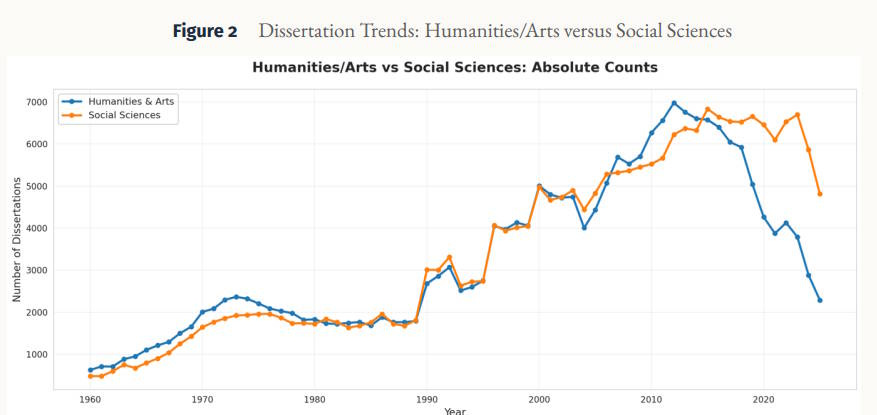

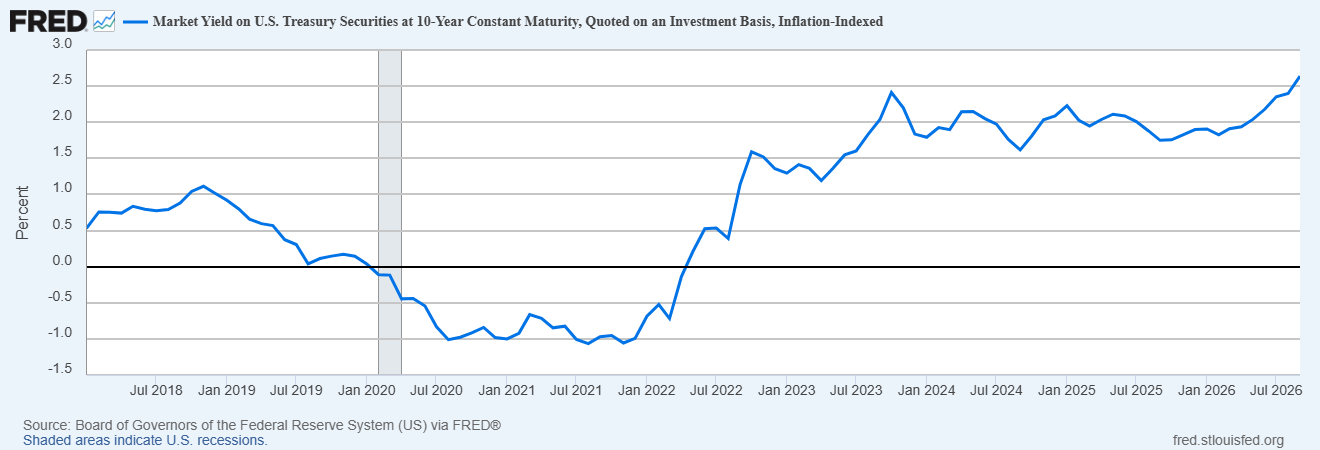

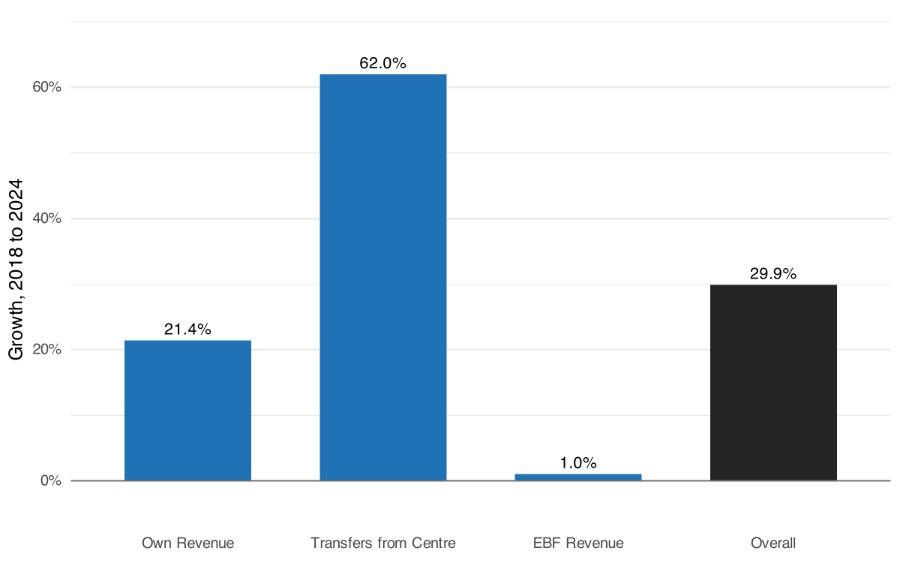
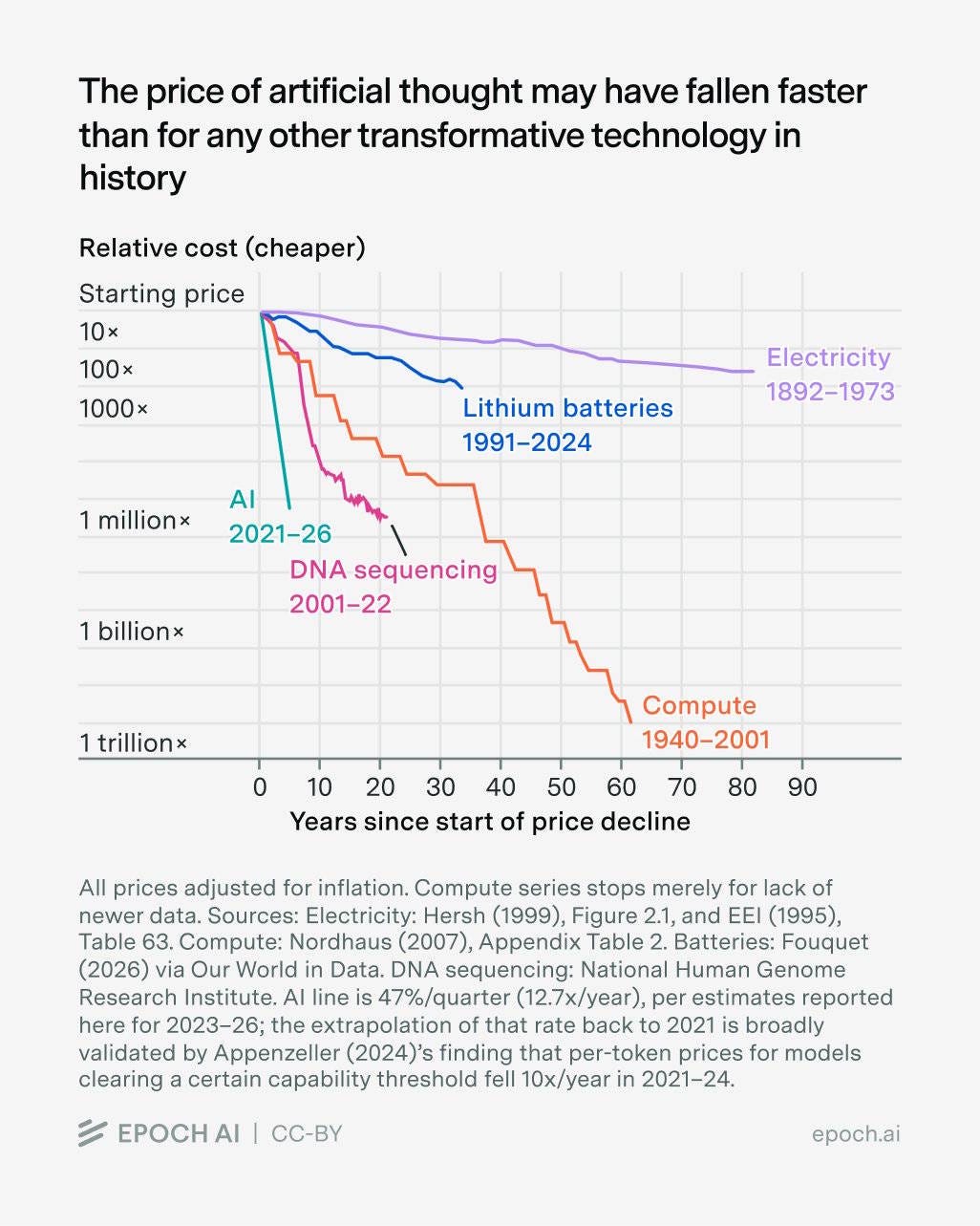
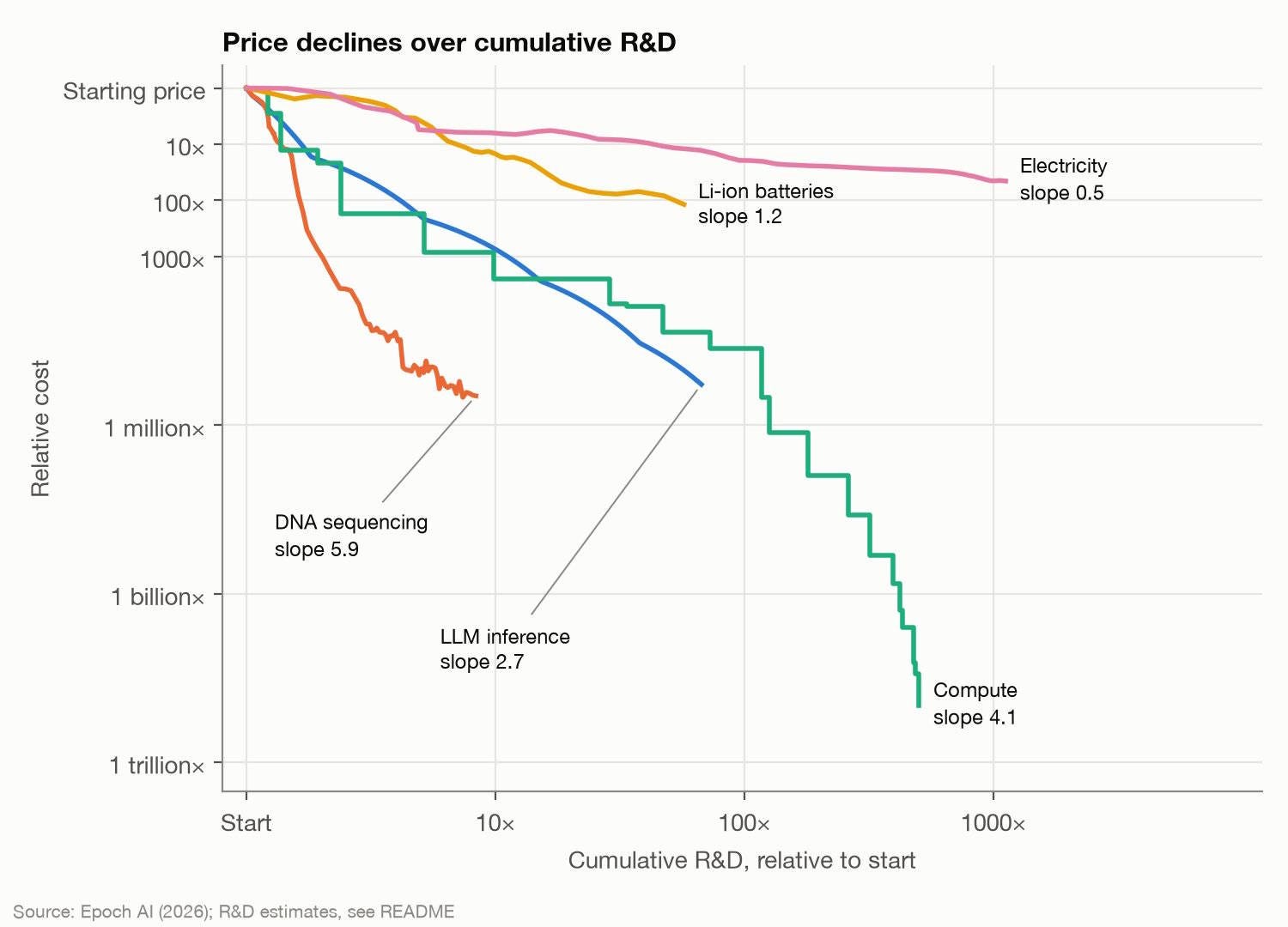

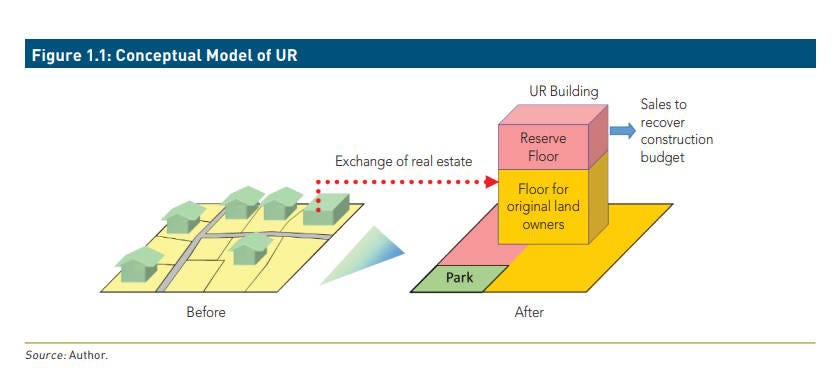
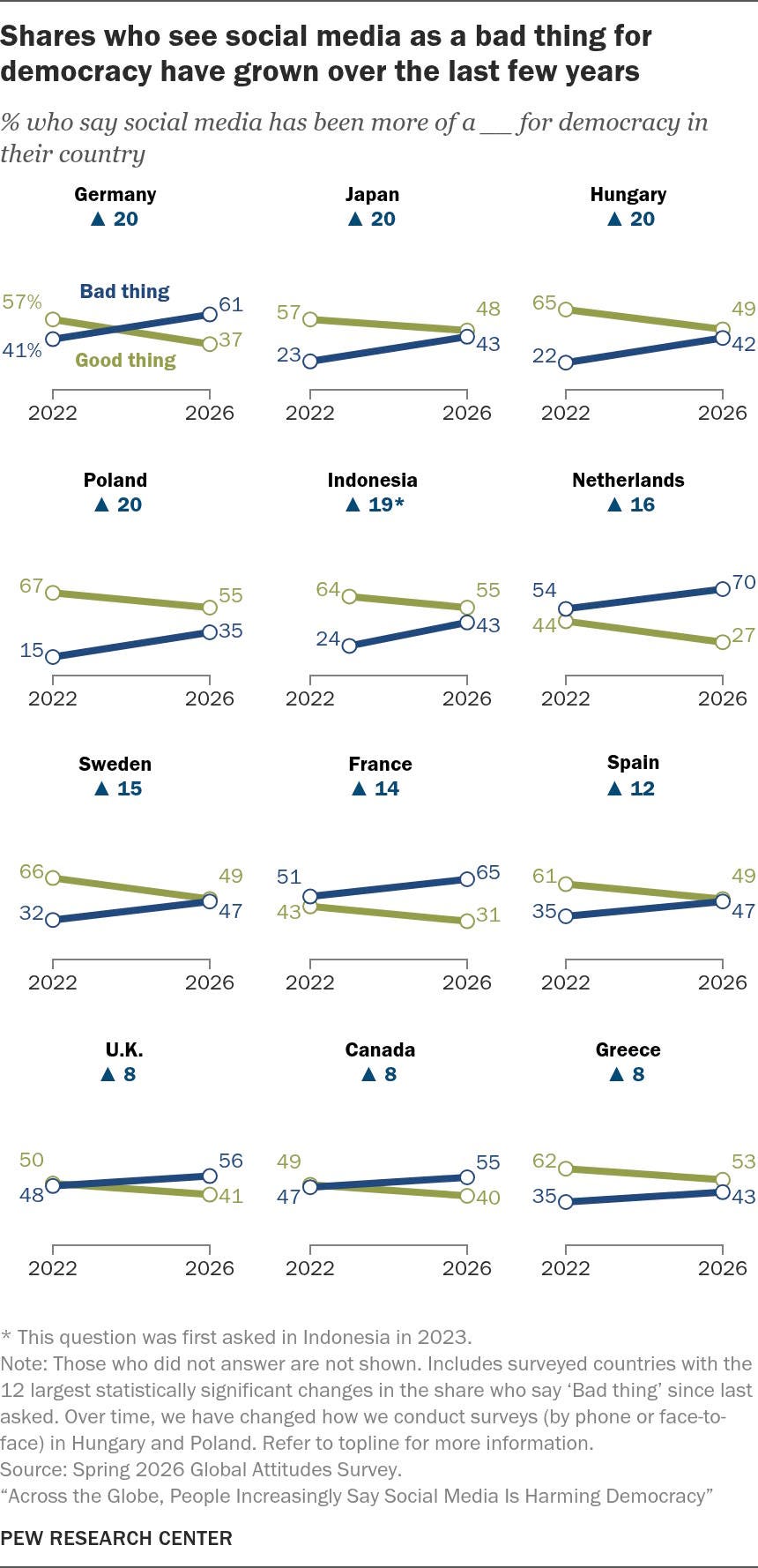
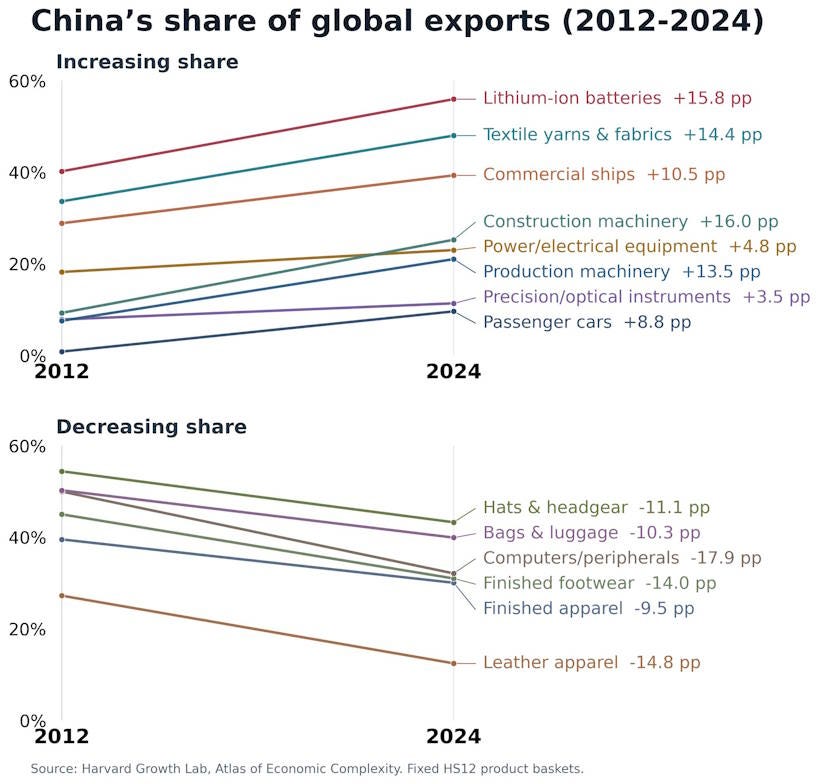
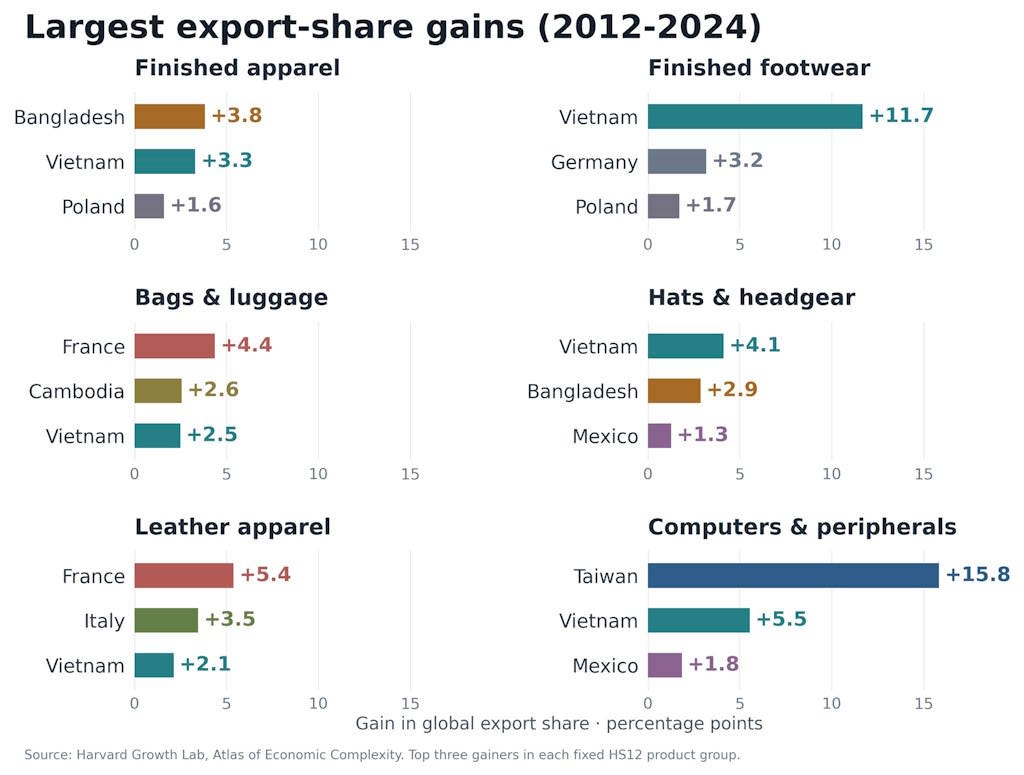
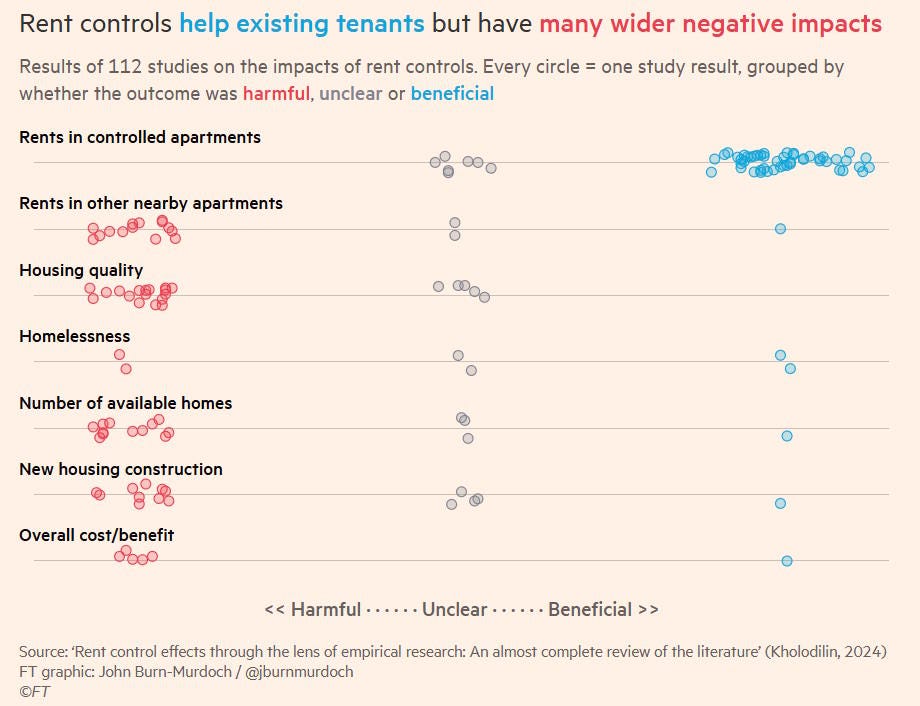

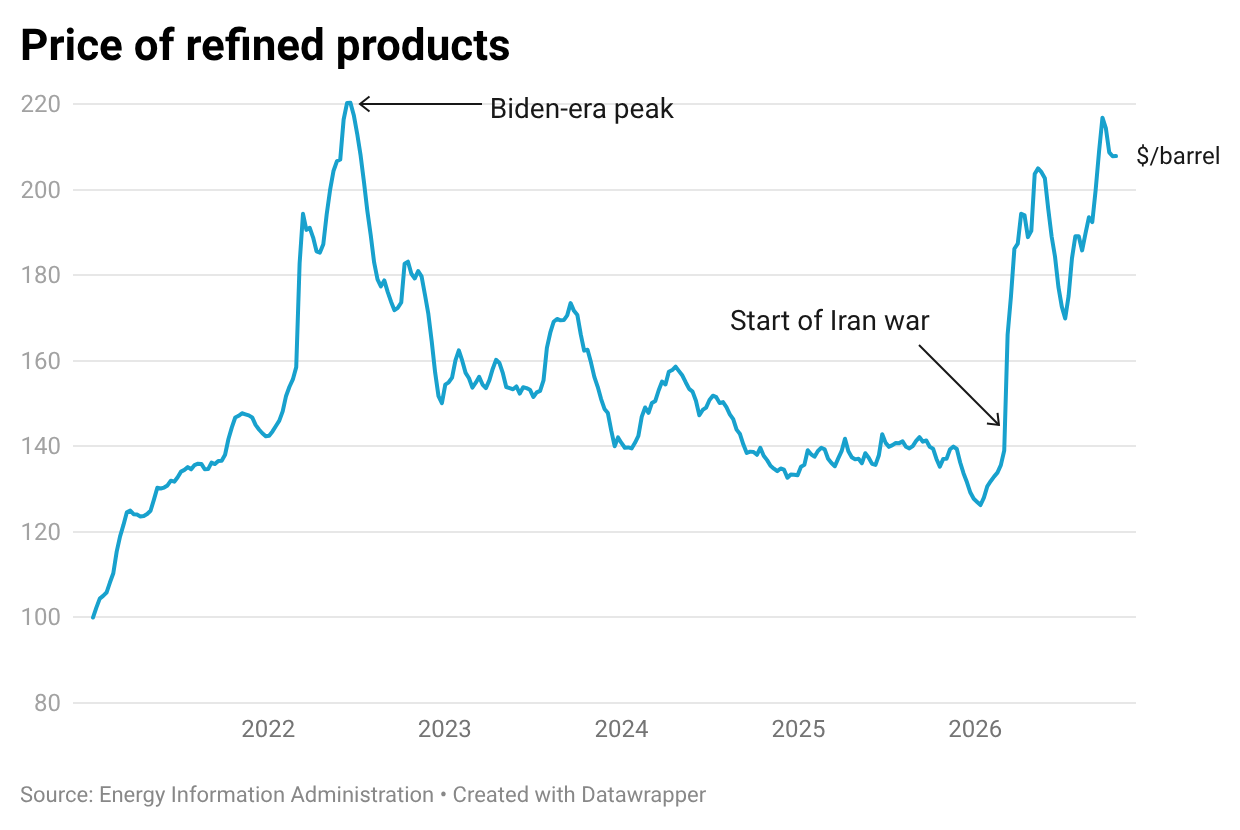


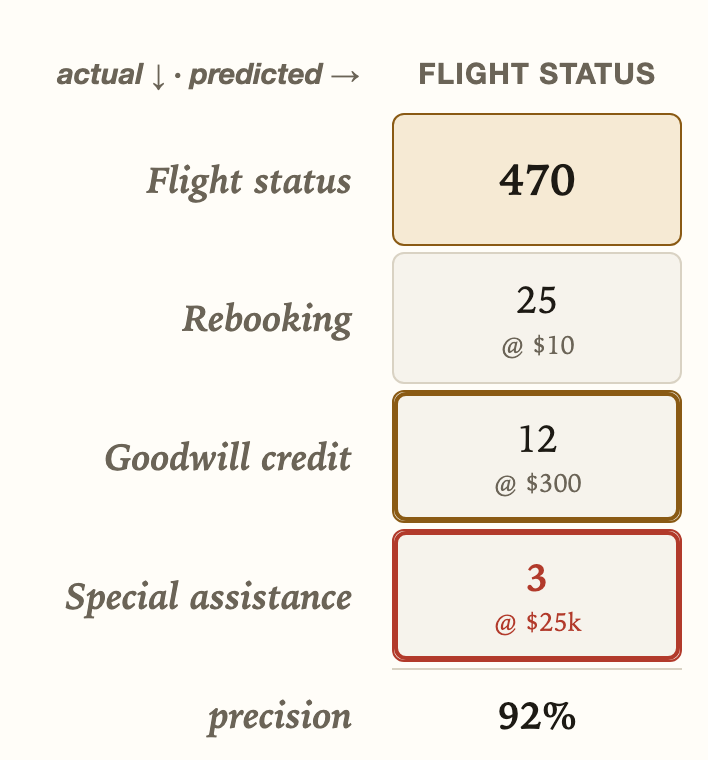








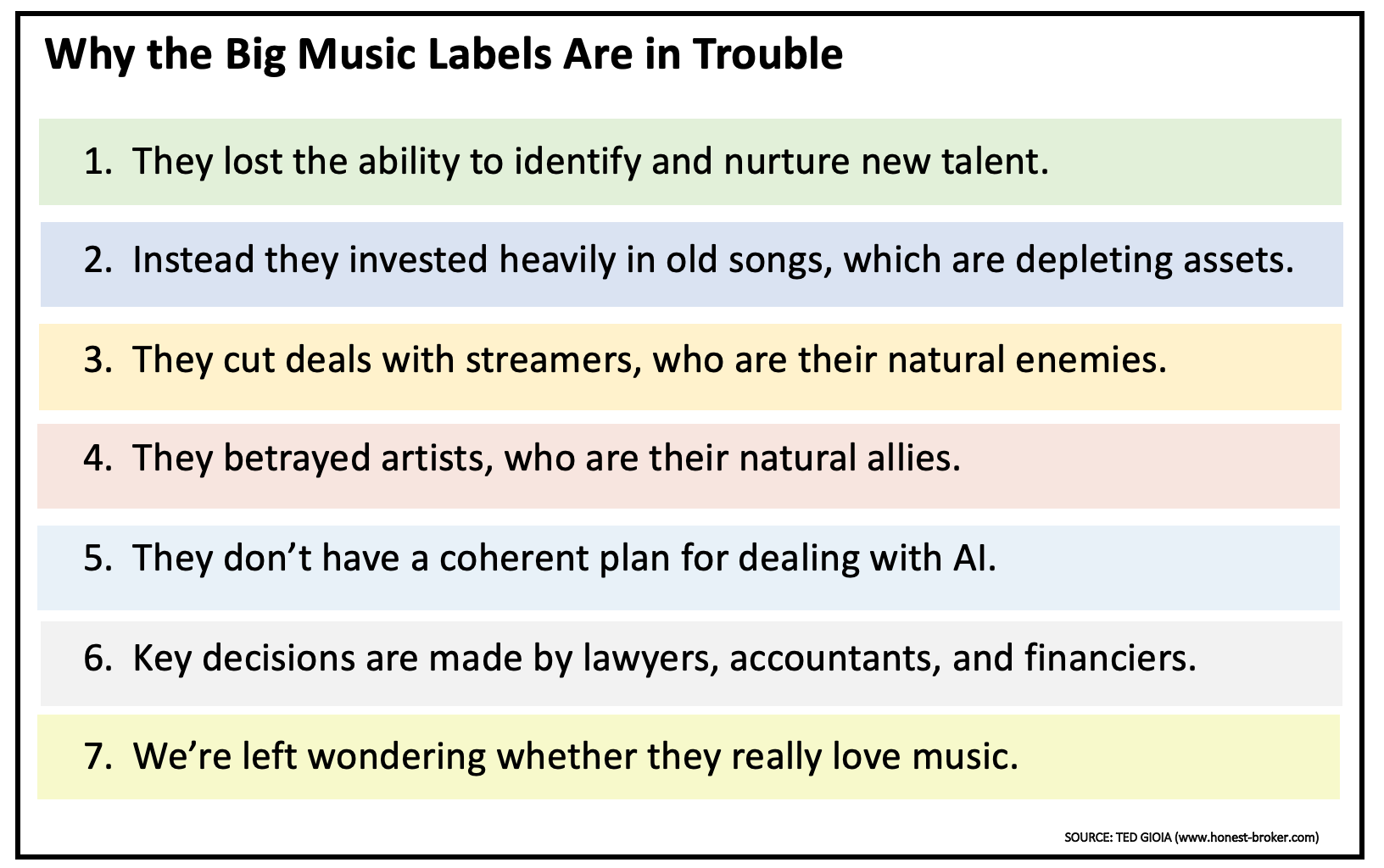

 the joy of sox

























 Market Design


